Stop Letting Images Eat Your Quota: The Two Vision Knobs Worth Knowing
You ask Hermes for a UI pass: it looks at a dozen screenshots, flags three alignment problems, and you are happy with the result. Then the bill arrives and something counterintuitive turns up — those dozen images were billed over and over for the rest of the session, and part of the cost went into rewriting 120,000 tokens of conversation history simply to drop one image. Images are one of the most natural things to hand an agent and one of the least intuitive parts of its context and cost. Two PRs merged on 17 September fixed the most expensive piece of it and left you two knobs to turn.
An image is not a one-off glance — it rides the whole session
Hermes handles images two ways, with completely different cost curves:
- Native embedding. When your main model is vision-capable and its provider supports images inside tool results (currently the Anthropic, OpenAI, Azure-OpenAI and Gemini 3.x stacks),
vision_analyzeputs the raw pixels into a tool result. The main model sees the image on its next turn — no describer, no information loss, no extra latency. The catch: that tool result is re-sent on every later API call. - Auxiliary describer. For a text-only main model (or a provider whose tool-result channel cannot carry images), the request goes to the vision model configured under
auxiliary.vision, and a text description is injected into the conversation. No pixels in context, but detail is lost.
So what “let it take a look at this image” actually costs depends on which path you are on — and most people have no idea which until the bill or the context window tells them.
The incident: 120,000 tokens rewritten to retire one image
Since native embeds ride the session, they need a retirement mechanism or a few dozen screenshots would fill the window. Hermes had two sends-path evictions (evict_stale_outbound_tool_images in agent/context_compressor.py and _evict_old_screenshots in agent/anthropic_message_convert.py) with a simple rule: always keep the newest 3 images.
The rule itself was reasonable. The problem was where it met the prompt cache. Anthropic matches its cache on an exact byte prefix. Every new image retired an old one, and retiring meant rewriting the message that carried it — a message already inside the cached prefix. Rewrite the prefix and the provider must reprocess the conversation from that message onward instead of reading cache.
A user reported it with a replay script (#113517), and the numbers are hard to argue with:
| Metric | Measured |
|---|---|
| Share of the session’s cache-write tokens spent on these prefix collapses | 62% |
| Tokens rewritten that could have been cache reads | 707,180 |
| Worst single request (retiring one image) | 127,720 tokens of history rewritten |
| What that image was actually worth | 255 – 721 tokens |
In plain terms: to save a few hundred tokens of image, the session recomputed a hundred thousand tokens of history. Cache writes are billed — and rate-limited — well above cache reads, so this accounted for roughly a quarter to a third of the whole session’s quota. And the share scales linearly with the number of images: the more you look at, the more you lose.
The lesson worth keeping is not the specific figure but the general rule: any operation that rewrites an already-cached part of history costs far more than whatever it was trying to save.
The fix: retire in batches, only at the provider limit, decided in one place
PR #113953, merged on 17 September, replaced the retirement policy:
- Trigger on the provider limit (20 image blocks / 24 MB) instead of once per new image.
- Retire a whole batch of the oldest tool images — 8 at a time — and count blocks, not messages (one tool result can carry several images, which the old accounting got wrong).
- “Keep the newest 3” becomes a satisfiability floor, no longer a window that moves every turn; it is the backstop that keeps the request within the provider’s ceiling.
- User uploads are reserved against both ceilings but never rewritten — your own attached images are not touched by the agent’s cleanup.
- One policy module now owns it:
agent/image_eviction_policy.pyholds the constants and the retire-count calculation for both passes. Previously the limit/batch/floor constants and the retire loop were duplicated under different names in two modules, so retuning one alone would make the wire pass re-evict on a second frontier.
The before/after is stark: on the old path a single collapse could rewrite six figures of tokens; afterwards retirement happens only at the limit, the frontier holds still within a batch, and the cached prefix survives.
The two knobs worth knowing
The same work introduced a new top-level config section — note that it is a different thing from auxiliary.vision, which picks the describer model:
vision:
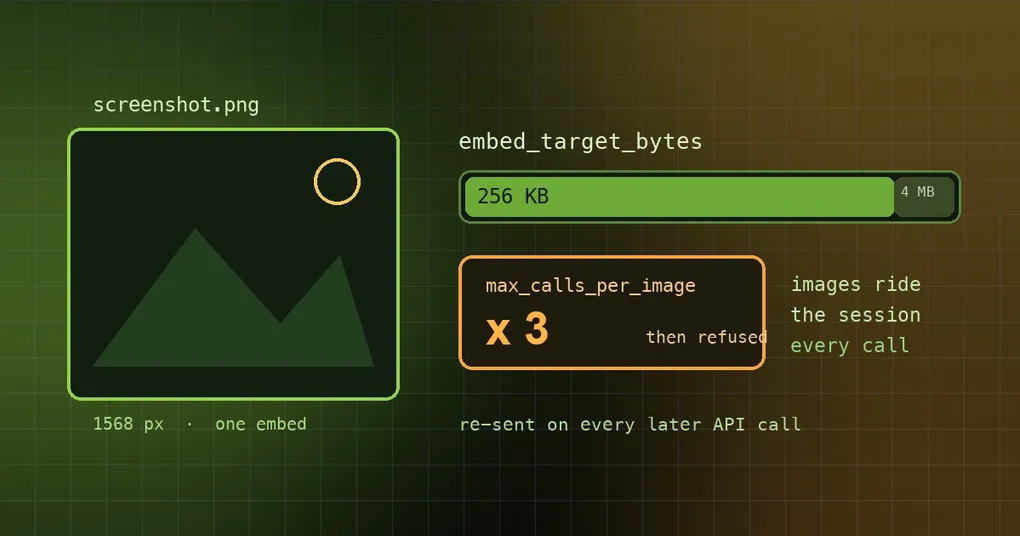
  embed_target_bytes: 262144   # per-embed byte budget; clamped 64 KiB .. 4 MiB (default 256 KB)
  max_calls_per_image: 3       # unset: only delegate_task subagents are capped at 3, main agent unlimited
vision.embed_target_bytes bounds how many bytes one embedded image may occupy. Anything above the budget — or wider than 1568 px — is downscaled to a JPEG that fits. 256 KB is fine for ordinary screenshots; dense phone screenshots of tables often come back “unreadable” at that size, so raise it, for example to 1048576. Browser screenshots delivered natively use the same budget.
vision.max_calls_per_image bounds how often the same image may be embedded in one session — region crops included, matched by resolved path. Once the cap is hit, the tool refuses with a clear message instead of embedding again:
vision_analyze refused: this image has already been loaded into context N time(s) — answer from what you can already see, or ask the userBy default only delegated subagents are capped, at 3. The reason is that they run unattended and cannot be steered mid-loop — one subagent once burned 158 vision calls across five files. Set an explicit number and it applies everywhere; 0 means unlimited.
Configuring it, on a build that has it:
hermes config get vision            # current values
hermes config set vision.embed_target_bytes 1048576
One honest caveat: the vision: section is new. On this machine’s released CLI (v0.21.0), hermes config get vision answers Config key not set: vision, because the section landed in the default config on main on 17 September. Until you upgrade past that, writing those two lines into config.yaml will not error — the older build simply ignores them.
Working out whether you are paying for nothing
- First, know your path. Vision-capable main model plus a provider that carries images in tool results means native embedding (images re-sent repeatedly). Otherwise you are on the describer path, where only text is re-sent — much cheaper.
- Think before you look. A full screenshot and its crops share one counter key, so “whole image once, then three crops” counts as four embeds. If you need detail, crop the region straight away instead of viewing everything first.
- When subagents do vision-heavy work, that default cap of 3 is your guardrail; do not rush to set
0. - When context is tight, adding fewer images beats compressing afterwards — compression itself calls a model.
Further reading: iPhone HEIC photos covers a different real-world failure on the same vision chain; context token optimization and the browser snapshot budget apply the same budgeting idea to two other objects; and if you want every background call to be cheaper too, configuring reasoning effort is the other half of the answer.
Summary
- Natively embedded images are re-sent repeatedly for the rest of the session; the old “keep newest 3” policy rewrote an already-cached message on every new image, collapsing the prefix — measured at 62% of that session’s cache-write tokens.
- PR #113953 retires in batches of 8, only at the provider limit (20 blocks / 24 MB), with the policy centralised in
agent/image_eviction_policy.py. - PR #113817 adds two knobs:
vision.embed_target_bytes(default 256 KB, clamped 64 KiB–4 MiB) andvision.max_calls_per_image(default: only subagents capped, at 3;0= unlimited). - Both merged into
mainon 17 September 2026 and are not in a tagged release yet (latest is v0.21.3).