Your iPhone Photos Finally Work: HEIC Decoding in vision_analyze, and Vision Tools That Stop Vanishing
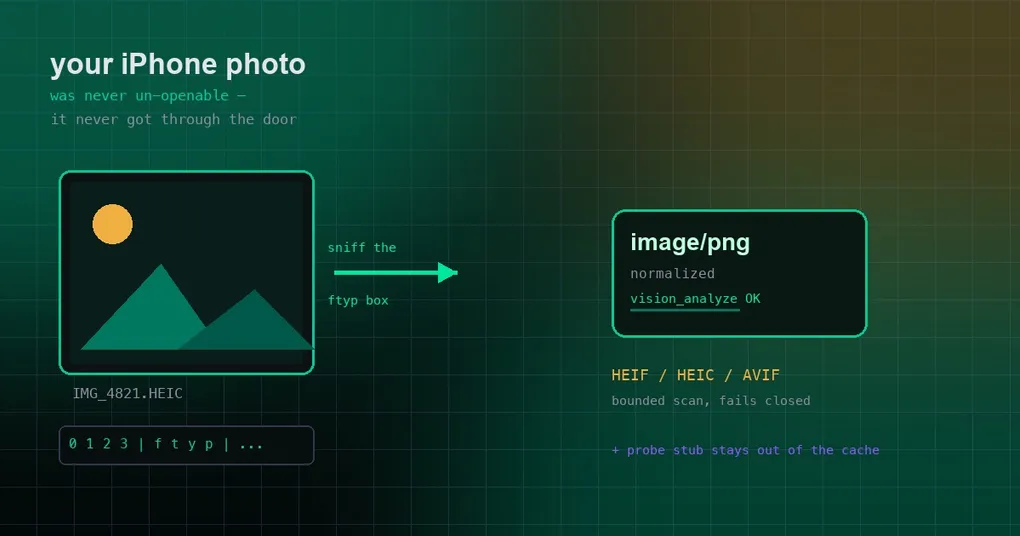
You screenshot an error on your phone, AirDrop it to the box running Hermes, and ask the agent to take a look. It answers: source is not a recognized image. The file is right there, you can open it locally, but to the agent it is not an image at all. Meanwhile something stranger happens in a long-running process: vision_analyze worked this morning and this afternoon it tells you vision is unavailable — and you changed nothing.
Those two symptoms come from two independent bugs, both fixed recently. One is an image-format sniffer that never learned about iPhone HEIC; the other is a startup probe that poisoned a client cache and made the vision tools disappear on their own. Here is what happened and how to check your own install.
Symptom one: an iPhone photo is “not an image”
First, the short version of the tool involved: vision_analyze is how the agent looks at a picture. You hand it a file path or an attachment, it sends the image to a vision model, and you get back a description or an answer.
iPhone photos default to HEIC (also called HEIF), and it is not the same family as JPEG. JPEG is pixels with a header; HEIC is wrapped in a container format called ISO-BMFF. Think of the container as a shipping box, and the brand written on the box decides whether the payload is an HEVC still image, an AVIF image, or a chunk of video. Hermes decides whether a file is an image — and which kind — by reading the first bytes (magic-byte sniffing) rather than trusting the extension, because upload pipelines routinely relabel HEIC as .jpg. Extensions lie; headers do not.
The old sniffer only recognized the PNG / JPEG / GIF / WebP calling cards. It had no branch for ISO-BMFF containers at all. So a HEIC file fell out of the sniffer as “unknown” and never reached the re-encode path that already handled SVG, BMP, and TIFF. The image was not un-convertible. It never got through the door.
Fix one: read the brand out of the ftyp box (PR #106408)
The fix adds an ISO-BMFF ftyp branch to the sniffer. Bytes 4 through 8 of the container are always ftyp, followed by a major brand and a list of compatible brands — the box’s label plus its “also known as” list.
Three details in tools/vision_tools_image_prep.py matter:
- Both the major brand and the compatible-brand list are consulted. AVIF routinely declares the generic
mif1as its major brand and only identifies AV1 in the compatible list. A major-brand-only check would call AVIF unknown. - The scan is bounded by the declared box size, and it fails closed on a malformed size. That length field is attacker-controlled input; letting it widen the scan into following boxes means the sniff result can be constructed rather than read. An invalid size is a failure, not a best guess.
- Other
ftypbrands stay unrecognized.mp42(an MP4 video) is not an image, and it does not get handed to a vision model.
Once recognized, the file takes the existing _normalize_to_supported_image path and is converted to PNG before reaching the model. Decoding HEIC comes from pillow-heif, registered as a soft dependency — the prebuilt wheels bundle libheif, so there are no system libraries to install. Missing decoder yields an actionable message instead of a broken vision stack.
AVIF is treated slightly differently on purpose: Pillow 11.3 and later decodes AVIF natively, while many pillow-heif wheels ship no AV1 codec at all — so AVIF is not gated on pillow-heif.
pillow-heif is now a core dependency (pillow-heif>=1.4.0,<2), so a fresh install works out of the box:
# Fallback if you run in a trimmed environment without the decoder
pip install pillow-heif

# Pull the version that carries both fixes
hermes update
Worth knowing: this landed as a salvage of a community contribution (@samfoy), and the identical class of bug was fixed upstream in MoonshotAI/kimi-code — their ReadMediaFile also refused iPhone .heic against a hard-coded PNG/JPEG/GIF/WebP allowlist with no HEIF branch. Same conclusion on both sides: a format allowlist needs container sniffing, or “photos taken on a phone” fail permanently.
Symptom two: vision tools that quietly disappear
The second symptom is sneakier. In a long-lived process — a gateway, a desktop backend, a session left open for hours — vision_analyze can start reporting that vision is unavailable, and a restart fixes it. The natural suspects are the provider or your quota. The actual culprit was a startup probe writing a stub client into the runtime cache.
Here is the mechanism. At startup Hermes runs a vision-capability probe over the auxiliary model client. To keep that probe’s network round trip off the startup path, the probe uses a stub client and swaps in the real one afterwards. The bug: the stub was stored under the real runtime cache key.
PR #110136 spells out the consequence. The next probe hits the cached stub, reaches _compat_model(), and does getattr(stub, "_client", None) — which raises RuntimeError, because a getattr default only absorbs AttributeError. check_vision_requirements() swallowed that into False for the rest of the process lifetime. Only slash-bearing model ids reach that branch, which is why the reports clustered around vendor/model configs — NVIDIA, LM Studio, koboldcpp, litellm.
The fix keeps probe-mode clients out of the cache entirely, and keys the guard on being in probe mode rather than on the object’s type — because adapter wrappers (CodexAuxiliaryClient and friends) sit around the stub and defeat an isinstance check.
One honest caveat: this does not heal an already-running process. The stub is in that process’s cache; the fix takes effect after a restart, which an upgrade gives you anyway.
Run the check yourself
Do not guess which state your install is in. Three commands:
# 1) What the file really is
file ~/Downloads/IMG_1234.HEIC

# 2) Can the Python side decode it? (after pillow-heif is installed)
python3 -c "import pillow_heif, PIL; pillow_heif.register_heif_opener(); im=PIL.Image.open('/path/to/IMG_1234.HEIC'); print(im.format, im.size)"

# 3) Ask the agent directly, in a session
#    > use vision_analyze on /path/to/IMG_1234.HEIC and tell me what it shows
If step 2 raises “no module named pillow_heif”, you are missing the decoder. If step 2 succeeds but step 3 still says the source is not a recognizable image, you are almost certainly running pre-fix code — upgrade.
If you work with phone media a lot, two related pieces on this site are worth your time: sandboxed image and video delivery in the sandbox media delivery guide, and document extraction for PDFs, Word, Excel, and EPUB in read_file document extraction. For images that are simply too small, see the media upscale guide.
Caveats and release status
- Normalization means transcoding, not native support. HEIC becomes PNG before it reaches the model, so a batch of large photos costs CPU and temporary disk. Do not throw a thousand files at it at once.
- “My desktop can open it” proves nothing. Your viewer ships its own decoder; Hermes decodes server-side through a different path.
- The two fixes are independent. Format sniffing answers “do I recognize this file”; the probe cache answers “does this process still want to look at images”. One upgrade carries both.
- Release status: both changes (#106408, #110136) merged after the v0.21.2 tag, so at the time of writing they live on
mainand are not in a tagged release yet.hermes updatepicks upmain, or wait for the next release.
The takeaway
Two rules cover both bugs: sniff the container, not the extension — and never cache a probe stub as if it were a real client.
In daily use that means three things:
- iPhone and Android photos can go straight into
vision_analyzenow. - If vision still refuses after upgrading, check that pillow-heif is present.
- If a long-running process suddenly claims vision is unavailable, restart it first — then check whether you were on the old probe-cache bug.
Next time an agent insists your image is not an image, you will know exactly where to look.