Hermes Can Now Read PDF, Word, Excel, EPUB, and RTF Documents: A Practical Guide
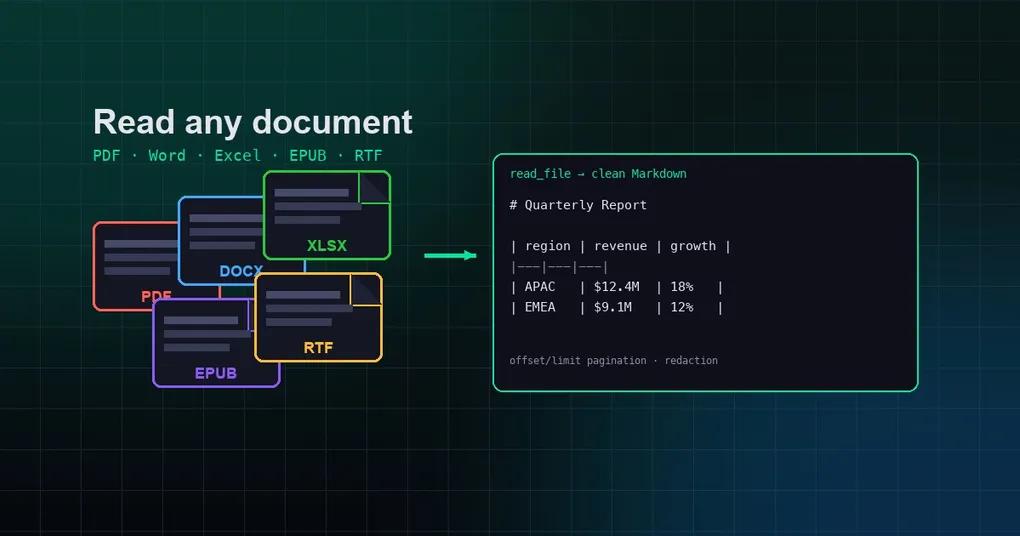
Getting an AI to read a document sounds trivial, but in practice it is surprisingly painful: PDFs need text extraction, Word files need parsing libraries, and legacy RTF or EPUB formats barely have any ready-made tooling. Your first instinct is usually “just copy and paste the content into the chat” — which stops working the moment you face a 40-page report, a formatted contract, or a spreadsheet with hundreds of rows.
Hermes Agent just turned this into a one-command affair. read_file, the most commonly used tool in the agent’s toolbox, can now read PDF, Word, Excel, EPUB, RTF, and a dozen other document formats directly, converting them into clean Markdown for the model to consume. This post is based on hands-on verification against the latest upstream code: which formats are supported, how it works under the hood, what to do with scanned documents, and realistic use cases for each file type.
The one-paragraph summary
read_file ships with built-in auto-extraction for three formats — Jupyter notebooks (.ipynb), Word (.docx), and Excel (.xlsx) — with no extra dependencies.
On top of that, Hermes introduced an optional dependency, firecrawl-anydoc (Rust core, imported as anydoc), which widens coverage to PDF, legacy Office (.doc/.ppt/.xls), OpenDocument (.odt/.ods/.odp), RTF, and EPUB, all converted to Markdown through one shared document model. Once installed, reading these formats is indistinguishable from reading a plain text file.
Full format matrix
| Category | Formats | Extraction path |
|---|---|---|
| Notebooks | .ipynb |
Built-in (stdlib, no deps) |
| Word | .docx |
Built-in (stdlib, no deps) |
| Excel | .xlsx |
Built-in (stdlib, no deps) |
.pdf |
anydoc (optional) | |
| Legacy Office | .doc .docm .ppt .pps .pot .pptx .pptm .ppsx .ppsm .xls .xlsm .xlsb |
anydoc (optional) |
| OpenDocument | .odt .ods .odp |
anydoc (optional) |
| RTF | .rtf |
anydoc (optional) |
| EPUB | .epub |
anydoc (optional) |
One design detail worth noting: the built-in extractors remain authoritative for .docx/.xlsx. Even with anydoc installed, those two formats still go through the stdlib path, so behavior is identical whether or not anydoc is present.
How to use it: just call read_file
There are no new commands and no new parameters for the user. Just hand read_file a document path:
read_file(path="/tmp/quarterly-report.pdf")What comes back is line-numbered Markdown text, supporting the same offset/limit pagination, character-budget truncation, and sensitive-information redaction as any other file. Oversized documents are truncated to the single-read budget with a hint to continue via offset — exactly like reading a large plain file.
Lazy install: auto-installed on first read, never blocks
anydoc is not a hard dependency. It is registered in lazy_deps as tool.doc_extract (firecrawl-anydoc==0.1.6) and installed automatically the first time you read such a file, with prompt=False so read_file can never block waiting for confirmation.
If the install fails or the file is malformed, anydoc’s ConvertError is mapped to ExtractionError, and read_file falls back to normal path/binary handling instead of crashing. Encrypted documents, corrupted PDFs, and empty EPUBs all take this safe fallback path.
Verified sample output
Take a real DOCX contract as an example. The built-in extractor parses the paragraphs and text nodes of word/document.xml:
  1|Quarterly report: revenue up 23%
  2|Second paragraph with contract terms.
Tables, line breaks, and tabs are preserved; XLSX is emitted per sheet, with hidden sheets skipped:
  1|# ── Sheet: Q1 ──
  2|region	revenue	growth
  3|APAC	$12.4M	18%
  4|EMEA	$9.1M	12%
Scanned documents: the OCR path
Text-based PDFs extract cleanly, but scanned (image-based) PDFs need OCR. In that case the built-in/anydoc paths cannot resolve any text, and the right tool is the ocr-and-documents skill (bundled with Hermes by default, v2.3.0).
The skill provides two local extractors:
| Capability | pymupdf (lightweight) | marker-pdf (high quality) |
|---|---|---|
| Text-based PDF | ✅ | ✅ |
| Scanned PDF (OCR) | ❌ | ✅ (90+ languages) |
| Tables | ✅ (basic) | ✅ (high accuracy) |
| Equations / LaTeX | ❌ | ✅ |
| Code blocks / forms | ❌ | ✅ |
| Reading-order detection | ❌ | ✅ |
| EPUB | ✅ | ✅ |
| Install size | ~25MB | ~3-5GB |
| Speed | Instant | ~1-14s/page (CPU) |
pip install pymupdf pymupdf4llm
python scripts/extract_pymupdf.py scanned.pdf --markdown
URL documents: web_extract first
If the document lives on the web (arXiv papers, company reports, public PDFs), try web_extract first — it converts PDF to Markdown via Firecrawl with no local dependencies:
web_extract(urls=["https://arxiv.org/pdf/2402.03300"])Only when the file is local, web_extract fails, or you need batch processing should you go local. The decision is clean: URLs → web_extract, local text documents → read_file, scans/complex layouts → ocr-and-documents.
Real-world scenarios
Scenario 1: Reviewing contracts (Word / RTF)
Feed contract.docx or a legacy contract.rtf straight into read_file and have the model extract key clauses, flag risky terms, and diff two versions. RTF is the most common legacy format inside large enterprises — and now there is no need to manually convert it to DOCX first.
Scenario 2: Reading reports (Excel)
read_file emits .xlsx as per-sheet table text, so the model can compute totals, spot anomalies, and produce an analysis summary directly. Hidden sheets are skipped automatically, keeping internal working areas away from the model.
Scenario 3: Batch PDF analysis
Hand Hermes a list of PDF report paths and let it read_file each one, then summarize. Combined with an execute_code script that walks a directory, a stack of dozens of documents can be summarized in a single session.
Scenario 4: Reading ebooks (EPUB)
EPUB is the standard ebook format. Hand a .epub to Hermes to summarize chapters, extract key ideas, and build reading notes — both anydoc and marker-pdf support EPUB.
Scenario 5: Research papers
Text-based papers go straight to read_file; scanned ones go through ocr-and-documents with marker-pdf; anything with a URL goes through web_extract. Three paths cover the whole pipeline from PDF download to deep reading.
Upgrade & availability
The feature ships in two layers:
- Built-in trio (.ipynb/.docx/.xlsx): available with Hermes since June 2026 —
hermes updateto any recent version and you’re set. - anydoc extension (PDF/legacy Office/ODF/RTF/EPUB): introduced by commit
b2598b41e(merged to upstream main on 2026-08-05), this is the newest capability after v0.20.0 and is not yet part of a tagged release. Runhermes updateto pull the latest main; reading such a file then triggers the lazy install of anydoc automatically.
Summary
| Where the file is | What to use | Dependencies |
|---|---|---|
| Local, .ipynb/.docx/.xlsx | read_file |
None |
| Local, PDF/legacy Office/ODF/RTF/EPUB | read_file + anydoc |
Auto lazy-installed |
| Local, scans/complex layouts | ocr-and-documents skill |
pymupdf or marker-pdf |
| Web URL | web_extract |
None |
Document reading is one of the most fundamental — and most underestimated — capabilities of an AI agent. Hermes has collapsed this pipeline into a single command, and lazy installation brings the barrier for optional capabilities down to zero. Next time you hit a PDF contract, an Excel report, or an EPUB ebook, just read it — no copy-paste required.
Want to keep exploring Hermes’ file and data capabilities? Check out our productivity tips roundup, the storage optimization guide, or get the latest Hermes running via the installation guide.