The Hermes Context Diet: Slash Per-Turn Token Overhead the Official Way
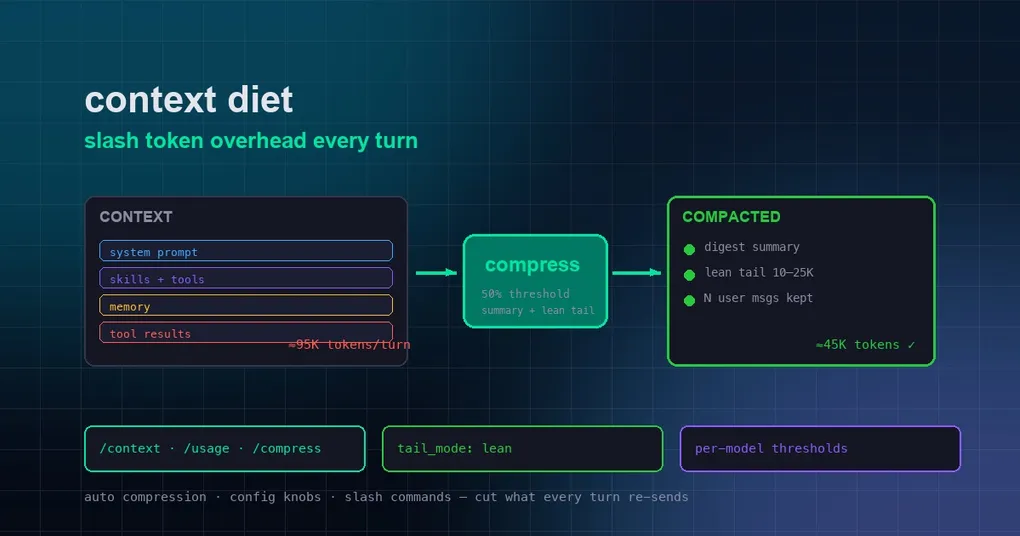
You’re three hours into a long task — a migration, a bug that spans twenty files, a data cleanup that keeps growing. Then you notice it: every new message takes longer to answer, and the provider dashboard shows this one session eating more tokens than everything else this month combined. This is not a fluke. Every single turn, the model has to re-read the whole conversation — including the tool outputs and intermediate steps that stopped being relevant two hours ago. The bigger that pile gets, the more every sentence costs. Hermes calls the fix for this “context reduction,” and since v0.20 shipped in early August, the official tools for it have quietly gotten very good. This guide walks through every verifiable layer: what you get for free by upgrading, which configuration knobs actually matter, and the slash commands that keep a long session in shape.
Why Every Turn Re-Sends Everything
A quick mental model: an LLM has no memory of its own. Each time you send a message, it receives the entire context — system prompt, loaded skills, tool definitions, your memory files, the conversation history, and every tool result — and reads it again. “Tokens” are just how that text is measured, and you pay for every token you send, on every turn.
So the total cost of a session is roughly context size × number of turns. Shrink either one and the bill drops immediately. That’s the whole game of context reduction: keep the information that improves the answer, drop what is duplicated, stale, or irrelevant — without making the agent dumber.
Layer 1: Automatic Compression — Already Working for You
Hermes ships a dual compression system that runs on its own, no setup needed:
- Agent ContextCompressor — the primary system, running inside the agent’s tool loop with accurate, API-reported token counts. It fires when the session crosses 50% of the model’s context window (configurable).
- Gateway Session Hygiene — a safety net at 85% of context, running before each turn. It catches sessions that grew too large between turns (for example, an overnight pile-up in Telegram or Discord) so the API never fails on an oversized request.
When compression fires, it works in four phases:
- Prune old tool results — old tool outputs are dropped first. This step costs nothing: no LLM call.
- Align boundaries — the compressor walks backward so it never splits a “tool call → tool result” pair.
- Generate a structured summary — the middle of the conversation is sent to an auxiliary model, which writes a structured digest covering goals, decisions, progress, and next steps. The summary budget scales with content (about 20%), floored at 2,000 tokens and capped at 5% of the context window.
- Assemble — the compressed session becomes: head (system prompt + early context) + summary + recent verbatim tail.
The official docs show a worked example: a 45-message session at ~95K tokens compresses to 25 messages at ~45K tokens — roughly a 53% reduction, with the summary plus the recent tail keeping continuity.
Layer 2: Upgrade, and the v0.20 Overhaul Kicks In
The v0.20.0 release (August 3) reworked compression deeply — “Compression that respects your conversation.” The headline changes, all merged upstream and verified in the release notes:
- Per-turn micro-compaction — instead of one giant, stalling pause when the threshold is hit, the cost is amortized across turns in small increments.
- N-user-message tail guarantee —
compression.min_tail_user_messages(default 1) ensures recent real user messages always survive compaction. You never lose the thread of what you actually asked. - Proactive tool-result pruning — large-window models prune stale tool results even before the threshold, keeping the pile from growing in the first place.
- Ghost-skill defense — a skill removed mid-session can no longer silently haunt the context (
[SKILL_PRUNED]markers make pruning deterministic). - Per-model thresholds and absolute token thresholds — you can trigger compression at different percentages per model, or at a fixed token count (
compression.threshold_tokens), which matters when your models have very different window sizes.
The newest piece landed on August 26: lean tail mode (PR #87326). The old compaction formula kept a verbatim tail proportional to the window size — on a 1M-context model that meant hoarding 170K tokens of raw history after every compression, making /compress nearly pointless and re-shipping those tokens on every turn. Lean mode clamps the tail to 2.5% of the window (10K–25K tokens) and moves continuity into an upgraded summary with recovery pointers. One setting change, tens of thousands of tokens saved per turn. If your hermes config get compression.tail_mode still says legacy, run hermes update — the new default is lean.
Layer 3: Knobs You Can Turn
Compression defaults are sane, but a little tuning pays off fast. Start by looking at what you have:
hermes config get compression.enabled             # true
hermes config get compression.threshold           # 0.50 (fires at 50% of context)
hermes config get compression.target_ratio        # 0.20
hermes config get compression.tail_mode           # lean on latest builds
hermes config get compression.protect_last_n      # 20 (minimum protected tail messages)
hermes config get compression.min_tail_user_messages  # 1
Three adjustments that matter most:
1. Trigger earlier on big-window models. If you run a 200K+ model, waiting until 50% means each turn already ships ~100K tokens. Set compression.threshold to 0.4, or better, use a fixed absolute threshold:
compression:
  enabled: true
  threshold_tokens: 80000    # compress once the session passes 80K tokens
2. Set per-model thresholds. Different models, different windows, different prices:
compression:
  model_thresholds:
    "claude-sonnet": 0.35
    "glm-5.2": 0.40
3. Make the summary cheaper. The summarizer is an LLM call too — by default it uses a sensible auto-detected model, but you can point it at a cheap, fast model and keep the expensive flagship for actual work:
auxiliary:
  compression:
    model: <a cheap, fast model>
Compression summaries are not the place for your most expensive model.
Layer 4: Everyday Hygiene
The four slash commands that tell you what’s happening and let you act:
| Command | What it does |
|---|---|
/context |
Breaks down exactly what is filling your context window — skills, tools, memory, history, files |
/usage |
Shows token usage and cost for the session (and hermes insights covers the last 30 days) |
/compress |
Manually triggers compression mid-session when things feel slow |
/focus |
Reduced-output view that hides noisy tool lines while keeping them recoverable |
Beyond commands, a few habits cut the fixed overhead that rides along every single turn:
- Disable skills you don’t use. Every enabled skill injects its header into context each turn.
hermes skills listthenhermes skills disable <name>for the ones you never touch. - Set
tool_searchtoauto. Tools load only when needed instead of all schemas being sent every turn. - Keep memory and AGENTS.md lean. Every character of injected memory and project instructions is re-sent on every message. Store durable facts, not task progress.
- Don’t switch models mid-session. Most providers cache the prompt prefix — a stable system prompt makes subsequent turns hit the cache and cost a fraction. Switching models invalidates it.
- Delegate or batch. Long research or file operations done via
delegate_taskor a singleexecute_codescript keep bulky intermediate output out of the main conversation.
Putting It Together
None of this requires sacrificing capability. The official worked example alone shows ~95K → ~45K on a typical long session, and on big-window models the lean tail change removes well over a hundred thousand tokens per turn that were pure overhead. Automatic compression handles the history; the v0.20 overhaul makes it gentler and cheaper; a few config lines tune it to your models; daily hygiene stops the pile from growing in the first place.
Two warnings, though. First, don’t set the threshold so aggressive that the agent compresses constantly — each summary is a small LLM call, and repeated compression of a short session wastes money on summaries instead of answers. Second, context reduction is about removing duplicated, stale, or irrelevant context — if your real problem is that the session is genuinely huge and still needs everything, prefer unlimited max_turns with session export over squeezing compression.
For the story behind the new lean tail default and real numbers on big-window models, see Hermes Compaction Gets a Lean Default. If your bill jumped because a context window was set larger than your provider advertises, read Why Your Subscription Drained in Hours. And for the full field-by-field context budget rundown, the long-task configuration guide is the deep dive to bookmark.