/save: export any session as JSON, Markdown, or HTML — even from chat
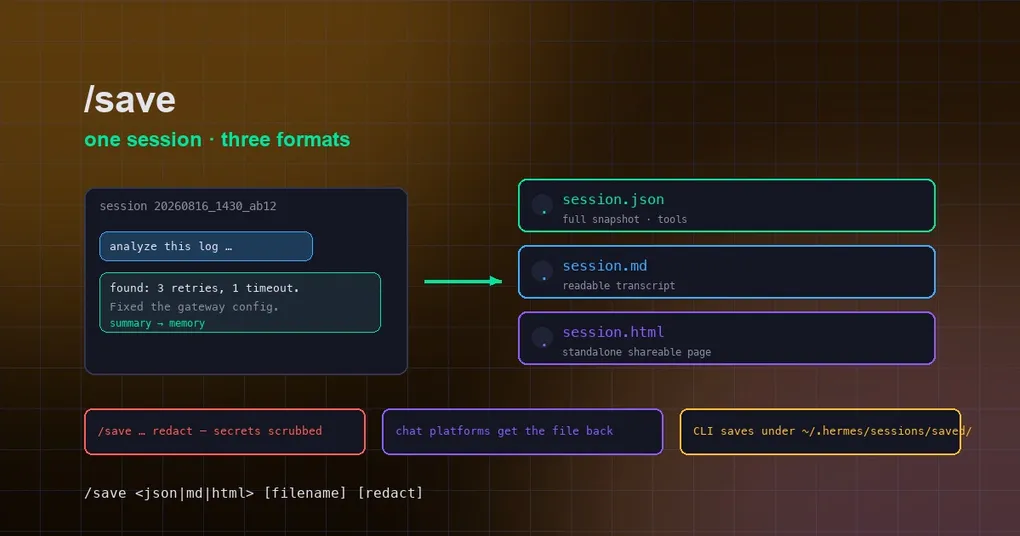
It’s Friday afternoon. You just spent three hours with Hermes tracking down a production issue — digging through logs, tweaking config, running a dozen debugging rounds — and finally it’s solved. The next thing you want to do is turn that whole investigation into a document for your colleague, or file it away in your knowledge base. But if your only option is screenshotting the terminal screen by screen, that hard-won knowledge stays trapped in the scrollback forever. It doesn’t have to be that way: Hermes’ /save command exports the entire session to a file in one line — JSON, Markdown, or HTML, with the option to redact secrets before anything touches disk.
What /save is
/save is Hermes’ in-session export command: type it in a conversation and the whole exchange is written to a file. The plain JSON snapshot has been around for a while, but a recent upgrade (merged to main in mid-August 2026, PR #86806) turned it into a cross-platform export tool:
/save json— a complete session snapshot including messages, tool calls, and metadata. It’s the machine-readable “source of truth,” ideal for backups and migration;/save md— a readable Markdown transcript you can paste straight into docs, notes, or a message to a teammate;/save html— a standalone single-file HTML page that opens in any browser with zero dependencies — the easiest thing to share.
Those three formats cover the three most common needs: archive, read, and share. And it’s not limited to the terminal: on messaging platforms like Telegram, Discord, or Slack you can just send /save md to the agent and it sends the exported file back into the chat — your full record, right on your phone.
How to use it
In the terminal, the syntax is:
/save <json|md|html> [filename] [redact]A few practical examples:
/save                  # no arguments: prints the full usage help
/save json             # full snapshot, auto-named, saved under ~/.hermes/sessions/saved/
/save md               # Markdown transcript
/save html my-report.html   # custom filename, single-file HTML
/save json backup redact    # force-redact API keys and secrets before writing
Two details worth knowing: filenames are sanitized to their last path component, so there’s no way to sneak a path traversal in; and when you don’t give a name, one is generated for you. On the CLI, exported files land in ~/.hermes/sessions/saved/.
redact: clean up before you export
Sessions accumulate secrets fast — you pasted an API key while debugging, showed a token in a config snippet, and all of it lives in the transcript. Exporting that as-is is handing over the keys.
The redact flag exists exactly for this: before writing, the export runs through a force-mode secret redaction pass that scrubs anything that looks like an API key, token, or password. Hermes already redacts secrets from tool output by default (security.redact_secrets), and /save redact adds a second layer of protection at the export boundary. When you’re sharing a session with someone else, making redact a habit saves a lot of trouble.
Going further: batch export and the other export commands
If you need more than the current session, the CLI has hermes sessions export, which handles multiple sessions at once:
# Export to JSONL (the default format)
hermes sessions export backup.jsonl

# Export as Markdown into a directory
hermes sessions export out/ --format md

# Export as a Claude Code trace and upload to the Hugging Face Trace Viewer
hermes sessions export --format trace --upload
--format accepts jsonl, md, qmd, html, and trace. The trace format emits Claude Code JSONL and, combined with --upload, pushes it to Hugging Face’s Agent Trace Viewer for visual analysis (this needs an HF_TOKEN); --no-redact skips the forced redaction — only after you’ve manually reviewed the content.
Also, don’t confuse /save with /export: /save exports the current session, while /export archives an entire profile (config, skills, and theme packed into a tar.gz for migration and sharing). Different jobs, different commands.
A few things worth knowing
- Exporting doesn’t touch the session: every message is already persisted incrementally to the local SQLite session database, so
/savejust produces a snapshot — the session stays resumable withhermes --resume <id>whenever you want it back. - The cross-platform json/md/html export is new: the full three-format export landed on
mainon August 15, 2026; in v0.20.1 and earlier releases,/savewas still a CLI-only JSON snapshot. Runhermes updateto get the latest (or wait for the next release) and the full capability is yours. - Which format? Keep an archive, migrate, or feed tools →
json. Read and paste into documents →md. Share with someone who opens it in a browser →html.
Wrap-up
/save is one of those commands you don’t think about until you use it once and can’t go back: archive a session after a long debugging run, turn a conversation into Markdown for the meeting doc, hand a colleague a shareable HTML record. Combined with redact for secret hygiene and chat platforms delivering the file right back to you, it frees the knowledge sitting in your sessions from the terminal — archiving and organizing, recovering and migrating become as easy as sending a message. For more command details, check out the session command reference or our v0.20.0 release notes.