Hermes Compaction Gets a Lean Default: Big-Window Models Stop Hoarding 170K-Token Tails
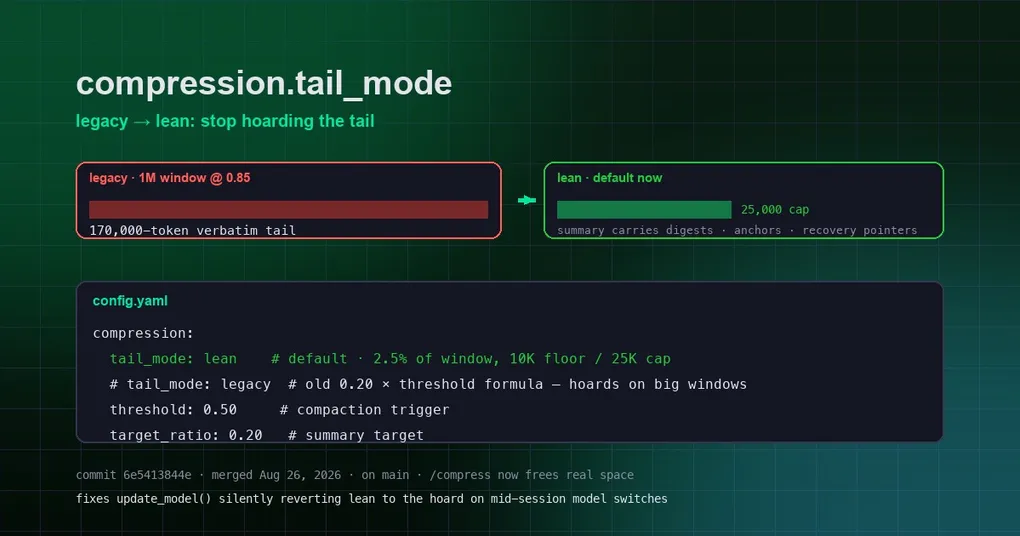
Picture this: you’re running a marathon session on a 1M-context model, you hit half a million tokens, things are getting slow, so you type /compress to slim the context down — and the session barely shrinks. Every subsequent turn still ships a hundred-thousand-plus-token “tail” to the model, and your bill quietly balloons. That’s not your imagination: the legacy compaction formula scales the verbatim tail with the window size and threshold, so on big-window models it silently hoards 100K–240K tokens of verbatim history out of every compaction. A commit merged on August 26 (6e5413844e) flipped the default: the new lean mode keeps only a small, clamped tail, and the reclaimed space is dramatic.
Why the Old Formula Started Hoarding on Modern Models
When compaction runs, Hermes splits the session into a “summary” (long-term memory) and a “tail” (recent verbatim content that keeps continuity). The legacy default budget was threshold × target_ratio — a formula designed around 128K windows at a 50% trigger, which yielded a sensible ~13K-token tail.
But as model windows grew, the formula kept scaling proportionally: a 1M-window session at threshold 0.85 gets a 170K-token verbatim tail (soft ceiling 255K) in legacy mode. A manual /compress on a 540K session lands at ~290K — the hoard makes compaction pointless, and every turn re-ships those tokens to the model, burning money twice.
The New Default: Lean Mode (#87326 compaction-v2)
Lean mode treats the tail as a small recency window rather than a context hoard. Concretely:
- Tail budget = 2.5% of the window size, floored at 10K and capped at 25K tokens;
- Continuity no longer depends on a big tail — it rides the upgraded summary: content digests, an anchor index, verbatim user messages, and
session_searchrecovery pointers; - Recall was validated in a before/after eval (
evals/compaction/results/), not eyeballed.
Side-by-side (real imports, 1M window @ 0.85 threshold):
| Scenario | Verbatim tail budget |
|---|---|
| Old default (legacy) | 170,000 (ceiling 255,000) |
| New default (lean) | 25,000 (ceiling 37,500) |
| Explicitly back to legacy | 170,000 (opt-out intact) |
| Mid-session switch to a 400K model (lean preserved) | 10,000 |
It also fixes a latent bug: update_model() used to re-assign the legacy formula directly when recomputing budgets, silently reverting a lean compressor to hoarding on every mid-session model switch. The recompute now routes through the mode-aware tail_token_budget property (regression test included).
Checking and Adjusting the Setting
Inspect your current configuration:
hermes config get compression.tail_mode    # now defaults to lean
hermes config get compression.threshold    # default 0.50 (50% trigger)
hermes config get compression.target_ratio # default 0.20
To restore the old behavior, set it explicitly in config.yaml:
compression:
  tail_mode: legacy   # old formula: 0.20 × threshold, hoards on big windows
Note: compression.tail_mode is now a gateway cache-busting key too — changing it evicts cached gateway agents just like target_ratio changes do, no full gateway restart needed.
When to Use Which
For most people, keep the lean default: it saves money, frees real space on /compress, and the summary carries recovery pointers as a safety net. Only if you genuinely hit “important information was lost” after compaction (say, a critical tool output in a long session that the digest didn’t cover) is it worth switching back to legacy for comparison — at the price of tens of thousands of extra input tokens per turn.
Wrapping Up
This change rebalances “how much original text to keep” from a formula-derived accident into bounded engineering: continuity comes from a smarter summary, and the tail is just a recent window. If /compress felt useless on big-window models, update to the latest dev build and try again — the difference is night and day. Compaction is only one piece of long-session endurance: pair it with unlimited max_turns and session export and long tasks can run worry-free. For the full field-by-field rundown of context budgets, see the long-task configuration guide.