Running Hermes Agent on Kubernetes: no official Helm chart, one replica, and a container that starts as root
You got Hermes working nicely on your laptop — memory, skills, cron jobs, the lot. Now you are moving it into a cluster, so you write a completely reasonable Deployment: replicas: 3, rolling updates, runAsNonRoot: true, data on NFS. The pods come up, and then the odd behaviour starts. Session history does not line up. Containers exit on boot. You change a ConfigMap and nothing happens.
Hermes runs fine on Kubernetes — once you accept that a few things in its container collide head-on with standard cluster defaults. The official Docker documentation already describes them; what it does not do is tell you which sentence matters in a Kubernetes context. Here they are in the order they will actually bite you.
Rule one: one HERMES_HOME, one writer
Start with the fact everything else hangs off: all mutable Hermes state lives under HERMES_HOME — config, memory files, skills, and session history in a local SQLite database. In the official image that is /opt/data, which the Docker docs call the single source of truth for all Hermes state.
The docs then say something blunt: never run two Hermes gateway containers against the same data directory simultaneously — session files and memory stores are not built for concurrent writes. The same page explains why: the gateway’s PID file and systemd service name are both scoped by HERMES_HOME, which is upstream’s own signal that it is the unit of isolation.
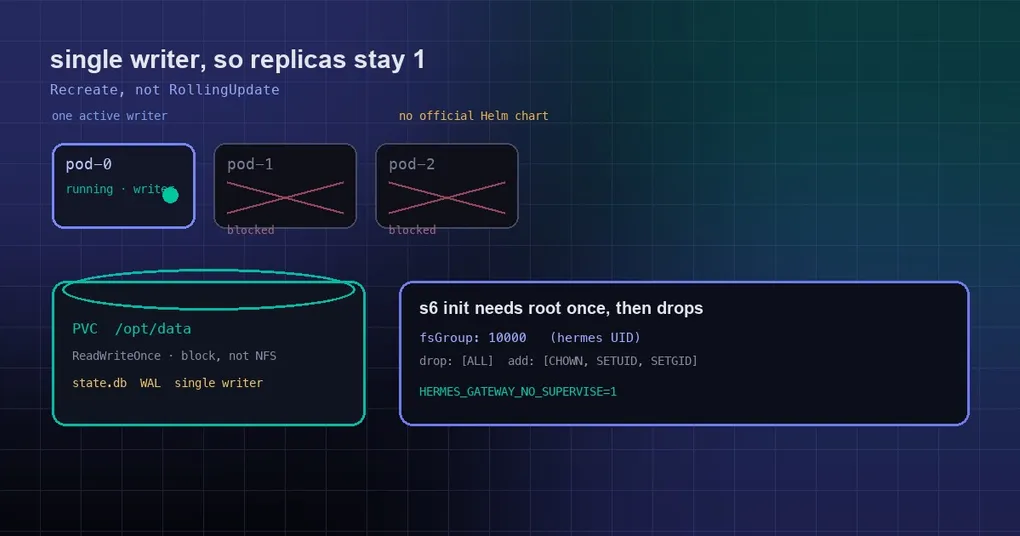
Translated into Kubernetes terms:
replicaCountstays at 1 whenever persistence is on;- the update strategy must be
Recreate, neverRollingUpdate— a rolling update deliberately runs the old and new pod at the same time, which is exactly the two-writer window you are trying to avoid; - prefer
ReadWriteOnceon the PVC.RWXis not automatically unsafe — the real invariant is one active writer, not one mount — butRWOenforces it at the storage layer instead of trusting your manifest.
Need more than one team? That is one release per tenant, each with its own volume, not more replicas per release.
Rule two: keep SQLite off a cross-VM network filesystem
This one gets missed more often than replica counts, because it fails silently. Hermes opens state.db in SQLite WAL mode by default, and WAL depends on a shared-memory file (state.db-shm) staying coherent between every process holding the database open. Mounts that cross a VM boundary — virtiofs on macOS, 9p / drvfs on Windows — let concurrent writers silently corrupt a WAL database while the main file still passes an integrity check.
In a cluster, the equivalent is an NFS or CIFS storage class. Use block storage local to the node (the cloud SSD block classes) for the data volume; if you cannot, follow the recipe in this guide to convert the journal mode to DELETE and pin it. Do not treat “the mount works” as “the database is safe”.
Rule three: the container does start as root — the agent does not
Saying “the official image must run as root” is wrong, but it is imprecise in a way that matters when you are arguing with a platform team about a Pod Security Standard exemption.
The image uses s6-overlay as its init system. Its /init runs as root so it can chown the volume on first boot, then drops to the hermes user via s6-setuidgid for the main program and every supervised service. The image even ships a shim that detects root callers on docker exec and re-execs through s6-setuidgid hermes.
So only the bootstrap is root; the agent is not. That is still enough to break a restricted security context: a pod with runAsNonRoot: true or a non-zero runAsUser fails before the agent ever starts, with something like:
/package/admin/s6-overlay/libexec/preinit: fatal: /run belongs to uid 0 instead of 1000,
has insecure and/or unworkable permissions, and we're lacking the privileges to fix it.
s6-overlay-suexec: fatal: child failed with exit code 100
One detail that published examples routinely get wrong: the hermes user is UID 10000, not 1000. The image creates it with useradd -u 10000 -m -d /opt/data hermes and sets no USER instruction — the container starts as root by design and drops privileges itself. Set fsGroup: 1000 and your volume ends up owned by the wrong group.
A workable starting point (treat the capability list as a checklist, since s6’s needs shift between image versions):
podSecurityContext:
  runAsUser: 0
  runAsNonRoot: false
  fsGroup: 10000
  fsGroupChangePolicy: OnRootMismatch
  seccompProfile:
    type: RuntimeDefault
containers:
  - name: hermes
    securityContext:
      allowPrivilegeEscalation: true
      readOnlyRootFilesystem: false
      runAsNonRoot: false
      capabilities:
        drop: ["ALL"]
        add: ["CHOWN", "SETUID", "SETGID"]
That is meaningfully narrower than a privileged pod: drop everything, add back only what the bootstrap needs. If your cluster enforces the restricted Pod Security Standard, this workload needs a namespace exemption — you have not missed a setting, the image simply was not built to start non-root.
Rule four: when the platform wraps PID 1, s6 supervision goes quiet
The image’s entrypoint is a dispatcher, and s6-overlay’s suexec requires being PID 1. When a platform wraps the entrypoint under its own init, upstream’s documented path is that the dispatcher runs the stage-two bootstrap directly and execs the main wrapper without s6. The docs name docker run --init and “some Nomad/Kubernetes setups” as the cases that hit it.
Two consequences matter:
- If something in your stack injects an init process — a
shareProcessNamespace: truepod, certain sidecar injectors, a runtime configured to add one — you silently lose s6 supervision. The agent keeps running; it is just no longer being restarted by s6. - That is not necessarily bad. In a cluster you generally want Kubernetes’ restart policy to be the supervisor rather than a process manager inside the container. But the failure model changes, so know which path you are on. If you want the no-s6 behaviour deliberately, ask for it with
--no-superviseorHERMES_GATEWAY_NO_SUPERVISE=1instead of relying on an accident of PID 1 handling. Both are no-ops outside the s6 image.
Rule five: config changes have no HTTP reload endpoint
This is the awkward one for GitOps. Hermes gives you /reload-mcp (reload MCP servers from config.yaml) and /reload-skills (re-scan the skills directory) inside a conversation, but the API server exposes no equivalent HTTP endpoint. The community feature request for exactly that, issue #52417, is still open at low priority.
So when your pipeline updates a ConfigMap, there is no native reconciliation hook. Your realistic options are to drive the runtime reload path (run the slash command in a session) or restart the workload — and restarting brings you right back to the Recreate, not RollingUpdate, constraint.
And yes: there is no official Helm chart
Upstream documentation covers install.sh, Docker, Docker Compose and Nix packages. Kubernetes is simply not a promised deployment target, and the feature request for an official packaging story — Dockerfile, Helm chart, RBAC and smoke tests in one go — is issue #85474, opened in August 2026 and still open.
There are community attempts, such as ultraworkers/hermes-agent-helm-chart (about 140 stars, last pushed in April), plus a few personal operators. None of them is maintained by Nous Research, and chart versions move independently of Hermes. If you use one, read the templates end to end, override the security context yourself, and check it against the five rules above — any one of them silently missing is a data-corruption risk waiting for a bad rollout.
A minimal deployment checklist
- One release, one PVC,
ReadWriteOnce, mounted at/opt/data; replicas: 1andstrategy.type: Recreate;- the data volume on node-local block storage, never NFS;
- accept root at bootstrap, use
fsGroup: 10000, drop all capabilities and add back onlyCHOWN,SETUID,SETGID; - decide deliberately whether you want s6 supervision, and say so with
--no-superviseorHERMES_GATEWAY_NO_SUPERVISE=1; - treat config changes as restart-or-slash-command, never as a hot reload over HTTP;
- size resources from the official Docker guidance and leave headroom for browser automation (Playwright/Chromium), which is the hungriest thing Hermes does.
The short version
Hermes runs stably on Kubernetes as long as you treat it as a single-writer stateful service, not a stateless twelve-factor app. Write those constraints into your manifests and your team’s docs — single writer, node-local storage, root at bootstrap, no HTTP reload — and the rest is like any other stateful workload.
If you are still on a single Docker host, sharing one container across profiles is less work. And if you have not installed it yet, start with the install guide.