Why state.db Gets Corrupted Inside Docker Desktop, OrbStack and WSL2 Mounts
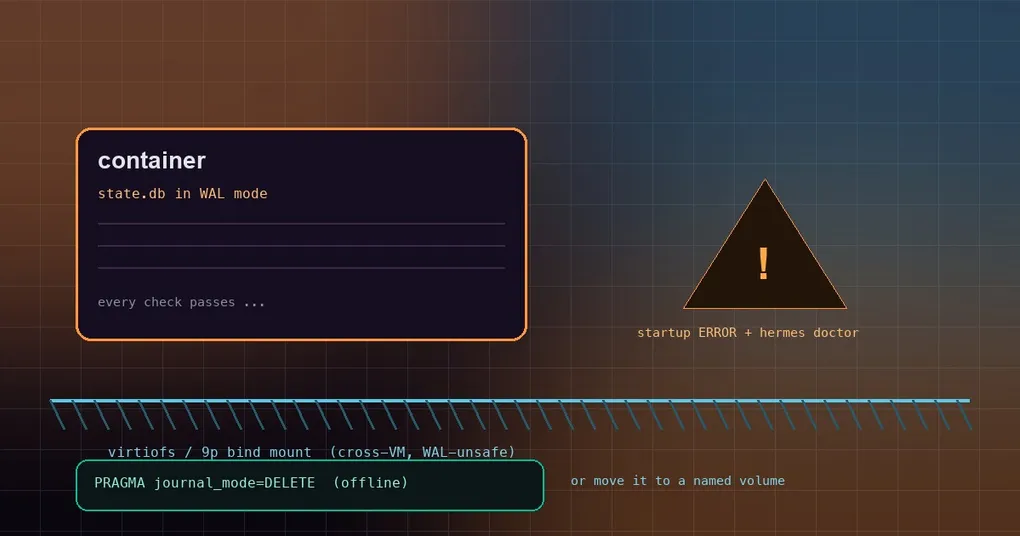
You containerised Hermes Agent and did the sensible thing with the data directory: bind-mounted it to the host so a rebuilt image would not take your sessions and config with it. For a few weeks it worked. Sessions saved, hermes doctor printed nothing but cyan arrows, container restarts were boring. Then one morning Hermes refuses to start with database disk image is malformed, or half the session list is simply gone. You open the file on the host, run PRAGMA integrity_check against it, and it reports the database is perfectly fine. That contradiction is the whole problem, and since PR #111433 Hermes no longer lets you fight it alone.
Three terms first: WAL, bind mount, virtiofs
WAL (write-ahead log) is a SQLite journal mode where writes are appended to a .db-wal file first and merged back into the main database later. It is much faster than the default rollback journal, and the price is a shared in-memory index (state.db-shm) that every process with the database open has to agree on in order to queue writers.
A bind mount hands a host directory straight into the container: files written inside are the same files the host sees, not a copy.
virtiofs is the filesystem Docker Desktop and OrbStack on macOS use to expose host directories to their Linux VM; Docker Desktop on Windows goes through 9p / drvfs. Both make the files look like they are simply there, but every access crosses a VM boundary.
Why “every check passed” is the dangerous part
The VM boundary is exactly where this breaks. WAL needs a real shared lock: two processes writing the same database must see the same lock state, so they can take turns instead of overrunning each other. A cross-VM mount such as virtiofs or 9p does not provide that. The host side and the VM side keep their own caches and their own view of the locks, and both sides believe they hold write access.
The result: two writers can enter the write path at the same time, interleave writes into the same WAL file, and step on each other’s pages. Nothing errors, nothing blocks, and the structure of the main database file stays legal for a long while — until one moment when it does not, and SQLite throws malformed on the next open.
That is why this failure gets misdiagnosed so consistently. PRAGMA integrity_check reads the structure of the main file as it exists right now, and it passes. File permissions, disk space and the host-side view all look healthy too. You only see an error after the damage has already happened. In the words of the official docs, concurrent writers can silently corrupt a WAL database while the main file still passes its integrity check.
One more thing worth knowing: this classification is Linux-only. Hermes reads /proc/self/mountinfo inside the container to determine the mount type, so a macOS or Windows host is never inspected directly — the check runs inside the Linux container where Hermes actually executes, which is precisely where the corruption happens.
What Hermes does now: a startup log plus hermes doctor
Since v2026.9.14, Hermes classifies the mount when it opens the database and treats two cases differently:
- A fresh database (no file yet, or a 0-page empty one): if its directory sits on virtiofs or 9p, Hermes creates it in
DELETEmode and logs a one-time WARNING. Nothing for you to do. - A database that is already in WAL mode: Hermes does not downgrade it live. The gateway, cron and worker processes may hold it open, and switching it to
DELETEout from under them would destroy their uncommitted writes. So Hermes keeps WAL — and says so. That is what PR #111433 adds: a once-per-process ERROR at startup, plus a matching warning inhermes doctorwith the fix spelled out.
On a healthy database, doctor prints an info line like → state.db: WAL journal mode (264.0 KB). Once the database sits on a cross-VM mount, that line becomes a warning that carries both remedies verbatim:
$ hermes doctor
  ⚠ state.db is in WAL mode on a cross-VM filesystem (virtiofs/9p, 264.0 KB) (WAL can silently
    corrupt across the VM boundary; stop every Hermes process and run a one-time offline
    'PRAGMA journal_mode=DELETE' on the file, then set `database.journal_mode: delete` — or move
    the database onto a native/named volume)
This warning outranks the WAL-reset exposure notice, on the grounds that active corruption beats a latent bug class. Deduplication is keyed on the database path, so a gateway serving several profiles reports every affected database rather than just the first one.
Fix one: convert offline to DELETE and pin it
Start by stopping every Hermes process that uses this database — gateway, cron and interactive sessions all count. A live conversion would discard other openers’ uncommitted writes, which is why Hermes deliberately refuses to do it for you.
Then run the one-time offline conversion. The published image ships libsqlite3 but no sqlite3 shell, so use the Python that is already in the image:
docker exec hermes python3 -c "import sqlite3; print(sqlite3.connect('/opt/data/state.db').execute('PRAGMA journal_mode=DELETE').fetchone()[0])"A delete in the output means the switch worked. Now pin it in config.yaml, or the next open will flip it back to WAL according to the default:
database:
  # Default is wal. Use delete on cross-VM bind mounts, NFS or SMB.
  journal_mode: delete
The trade-off is concurrency: rollback-journal mode allows a single writer at a time and makes readers and writers wait for each other. A single-user agent will not notice. A deployment running a gateway alongside several workers will hit database is locked more often.
Fix two: move the database to a native or named volume
If you would rather keep WAL’s concurrency, replace the host bind mount with a Docker named volume — docker run -v hermes-data:/opt/data. A named volume lives on the VM’s own ext4 filesystem, where WAL is perfectly safe. The problem was never “WAL inside a container”; it was a directory that straddles a VM boundary.
Mount type cheat sheet
| Mount type | WAL safe? | What Hermes does |
|---|---|---|
Host bind mount from Docker Desktop / OrbStack (virtiofs) |
No | Fresh DBs get DELETE; an existing WAL DB logs one ERROR at startup and doctor flags it |
Docker Desktop on Windows (9p / drvfs) |
No | Same |
Docker named volume, native directory (ext4, btrfs, xfs, zfs, tmpfs, overlay) |
Yes | Keeps WAL and says nothing |
| NFS / SMB / generic FUSE | Not auto-classified | Not detected at all; set database.journal_mode: delete yourself |
Why Hermes does not just fix it for you
A few deliberate trade-offs are worth knowing, because they explain the behaviour you will actually observe.
No live downgrade. Switching a WAL database that other processes hold open to DELETE on the spot means throwing away their uncommitted writes. Hermes would rather log an error and let you pick a maintenance window.
No locking_mode=EXCLUSIVE. It looks like the obvious escape hatch and it is a bad one: an exclusive lock would dodge the cross-VM lock-coherence problem, but the gateway, cron and worker processes open state.db concurrently by design, so it would trade occasional corruption for database is locked on every surface.
No automatic NFS or SMB detection. Auto-classification covers the virtiofs and 9p families only; NFS, SMB and generic FUSE are not in it. If your data directory lives on NFS or SMB, set database.journal_mode: delete yourself.
These fixes arrived as one run of work: #98965 stopped state.db from silently corrupting on Docker Desktop / OrbStack bind mounts, #110544 made WAL survive sibling closes and stray lock cancellation, #109541 routed every small store through a single open_db transaction with plugin databases on the same WAL fallback — and #111433 added the operator-facing signal, the startup error and the doctor check.
If your state.db has already been damaged once, start with how state.db heals itself. If the symptom is “database is locked” rather than “database is corrupt”, that is a different failure with different fixes — see the state.db lock fixes. For the pitfalls of running more than one container against the same data directory, the shared-container guide goes deeper. And the first stop on any health check is always the hermes doctor reference.