You fixed the file, the kernel kept running the old code: execute_code now says so
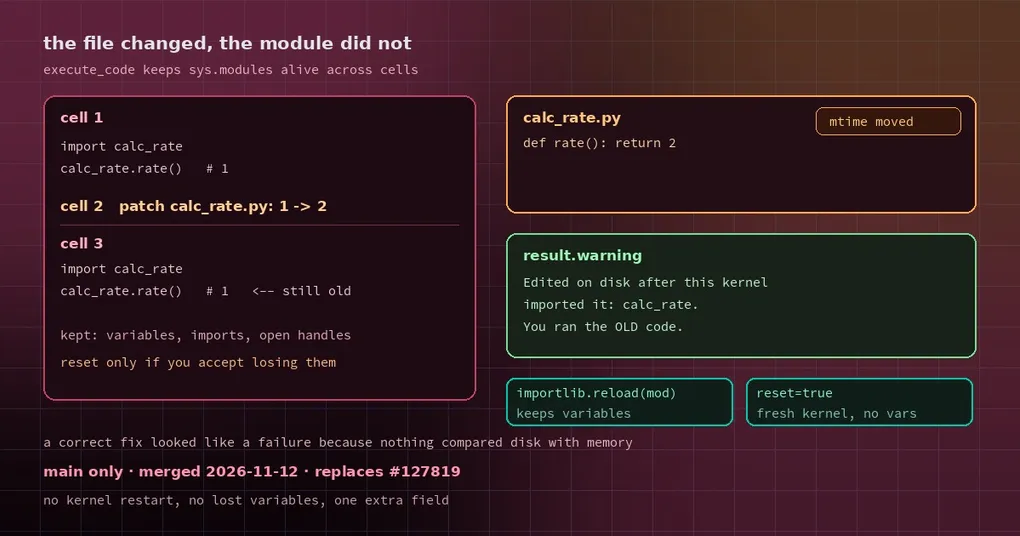
You ask Hermes to fix a small bug: calc_rate() should return 2 and returns 1. It reads the file, edits the code, runs it through execute_code to check — and the output is still 1. It reads the file again, confirms the change is really there, and then apologises. Or worse: it “fixes” the now-correct code a second time, or gives up and blames the environment.
What actually happened is simple. The code was right; the 1 came from a stale module in memory. The session kernel keeps sys.modules alive across calls, the file changed on disk, and nothing told it. The result looked completely normal, which is exactly why the miss was invisible.
PR #153665, merged on November 12, makes it visible: execute_code now names the modules that were edited after the kernel loaded them.
Why this happens: Python imports once
In a plain script there is no problem. Every python script.py is a fresh process, so imports start over.
execute_code is not that. To let a variable defined in one cell survive into the next, it keeps a kernel process alive and runs cells inside it. The cost is that module objects in sys.modules stay alive too — if your import calc_rate happened before the edit, that object is the old version forever.
That produces a uniquely irritating kind of mismatch: the file is correct, read_file shows the correct content, the model’s reasoning is correct, and only the execution result is stale. Nothing in the output distinguishes it, so the model has to guess.
What changed: a modification-time record per cell
The kernel now does two things:
- After each cell runs, it records the source modification time (mtime) of every project module the session imported.
- Before the next cell runs, it compares: any file whose mtime moved gets its name into the result’s
warning.
Standard library and site-packages / dist-packages modules are skipped — you do not need to know what a pip package did. The scan reads each module’s own dict and skips anything it cannot read, so an odd entry in sys.modules (a lazy module, a non-module object) can never fail a cell. Names come from the cell process, so the host keeps only plain dotted identifiers and redacts them the way it redacts stdout.
The result looks like this (verbatim; local kernels put it in warning, remote kernels in kernel.warning):
Edited on disk after this kernel imported it: calc_rate. If this cell used it
without reloading, it ran the OLD code. Run importlib.reload(<module>) (and
re-import any names taken from it), or call again with reset=true to start
from fresh imports.
Same prompt on both trees, with nvidia/nemotron-3.5-super-vl on Nous Portal:
| Before | After | |
|---|---|---|
| Third cell’s output | rate 1 | rate 1 |
| Third cell’s result | no warning | warning naming calc_rate and both fixes |
| Model’s own account | “printed rate 1 and there was no warning text” | “printed rate 1 and warned: edited on disk after this kernel imported it” |
| Kernel state | kept | kept |
That last row is the important one: nothing is discarded. Variables, imports and open handles all survive. The result simply gains a field. Each edit is named once, and a module that was reloaded or re-imported after the edit is not named again.
Two fixes, different costs
Option one: importlib.reload(). Keep your variables, reload the module:
import importlib
import calc_rate

importlib.reload(calc_rate)
calc_rate.rate()   # now runs the new code from disk
One detail the warning also mentions: from mod import f binds the name to the old object, and a reload does not change that. Either re-import, or always call through the module (mod.f()).
Option two: reset=true. Start a fresh kernel with clean imports. The cost is that every variable in the session is gone — if you just spent ten minutes loading a large DataFrame, do not do this.
Why not just restart the kernel whenever a file changes
An earlier PR (#127819) did exactly that: any .py file edited under the working folder restarted the whole kernel. Blunt but simple — except it threw away every variable and loaded dataset, even when the edited file had never been imported.
The shipped approach is narrower: the kernel stays alive, only modules the kernel actually imported are reported, and the message states the cost. The trade-offs show up in what it deliberately does not cover, and knowing those limits is more useful than knowing the feature:
- Compiled extension modules (
.so,.pyd) and modules without a.py__file__are not watched. - A module imported and then edited inside the same cell is not reported — the kernel cannot tell that order from the usual write-then-import.
- An edit followed by a reload that fails (a
SyntaxError, say) leaves the old code loaded, and no later cell re-warns; the traceback lives in that cell’s result. - The scan cannot tell whether the cell actually used the module, so the wording is conditional (“if this cell used it without reloading”) rather than an assertion.
What it changes day to day
If your loop is “agent writes code → runs it → sees a failure → edits → runs again”, this warning removes several rounds of guessing. When you see it, the right move is a reload or a reset, not another look at the edit.
Two neighbouring cases that also look like bugs but are not: the loop detector firing on legitimate work and replays after an edit-and-resend. The full argument list for the tool, reset included, is in the command reference.
Release status
PR #153665 merged into main on November 12, 2026, and its title says outright that it replaces #127819. v0.23.1 shipped on November 10 and does not include it — wait for the next release or install from main. The new “Edited modules” paragraph in code-execution.md landed in the same commit.
Update (2026-11-17): these changes shipped in v0.23.2 (November 16) —
hermes updatebrings them in. The “not in v0.23.1” wording above is a snapshot from publication time.