The Esc Esc habit: rewinding a Hermes conversation without losing it
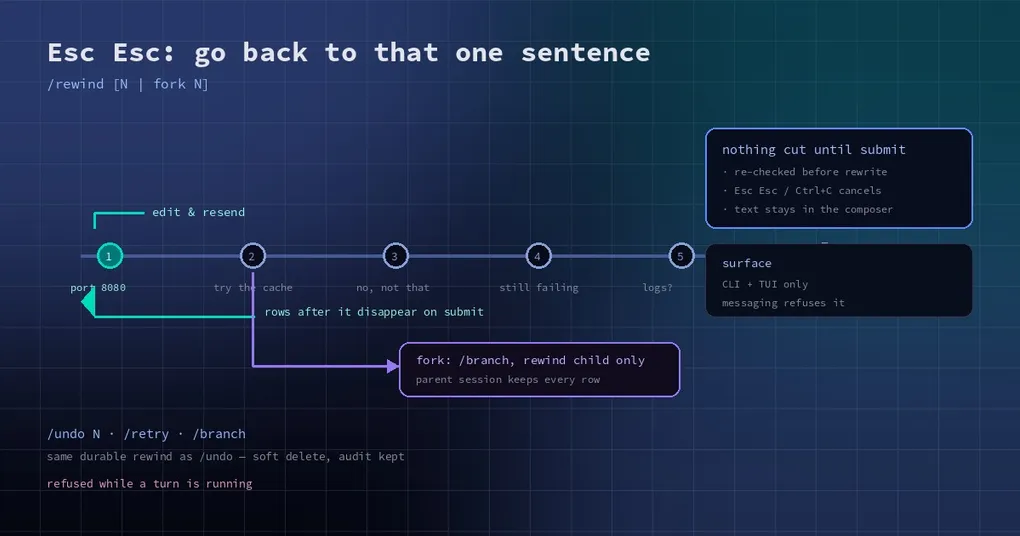
You are twenty turns into a debugging session and the agent is confidently wrong — because of one sentence you typed an hour ago: you said the service runs on port 8080 when it runs on 9090. Every turn since has been built on that. You do not want to start over, and you do not want to argue with it either. You want to go back to that one sentence and change it.
That is what /rewind does in v0.23.0, and it is the first time going backwards has been comfortable rather than destructive.
What Esc Esc actually does
In the classic CLI and the TUI, press Esc twice on an idle composer with nothing typed. You get a list of your earlier prompts, newest first. Each row is numbered by its position in the conversation, so row 1 is your very first prompt, not the most recent one.
Arrow keys move, Enter picks the prompt for edit and resend, and f forks a new session from just before it. The row you are on shows a preview of the first few lines, which matters when three of your prompts start with “also fix”.
The same picker is available as a command:
/rewind          # open the picker
/rewind 4        # edit and resend prompt number 4
/rewind fork 4   # fork from just before prompt number 4
When you pick a prompt for editing, its text lands in your composer. Change it, submit, and Hermes rewinds to that turn and reruns from your new wording. There is no separate “confirm” step and no window where the transcript is already gone.
The four ways back, and when to use which
Hermes now has four overlapping tools for undoing things, and picking the wrong one is how people lose work.
| Command | What it does | Use it when |
|---|---|---|
/rewind |
Pick any earlier prompt, edit and resend it, or fork from it | The mistake was several turns ago and you can point at it |
/undo |
Back up N user turns, then re-prompt them | You know exactly how many turns to drop and do not need to edit text |
/retry |
Resend your last message unchanged | The model failed, not your wording |
/branch |
Fork the session, leaving the original intact | You want a parallel attempt, not a correction |
The practical rule: if the mistake is in the text you wrote, use /rewind. If the text was fine and the model just stumbled, use /retry. If you want to keep both outcomes alive, /branch.
Why cancelling is safe
The design detail worth knowing is that nothing is cut until you submit. Picking a prompt only prefills your composer; the transcript itself is untouched. If you press Esc Esc again, hit Ctrl+C, or submit an empty line, the edit is cancelled and the session is exactly as it was.
When you do submit, the request carries the original prompt’s identity, and Hermes re-checks it before touching anything. If the session changed underneath you — you switched sessions, or the prompt text no longer matches because the session was compacted differently — it refuses to rewind, tells you the target changed, and leaves your edited text in the composer so nothing is lost.
The fork path is even more conservative. It runs /branch first and rewinds only the child, so your original session keeps every row and stays usable. The forked session starts just before the prompt you picked, with that prompt prefilled for editing. That is the difference between experimenting and gambling.
Both paths share the same durable rewind that /undo uses — a soft delete that keeps the audit trail rather than truncating rows — which is why a rewind does not corrupt session history the way a naive “delete the last ten messages” would. If you have ever restored a session from an exported transcript, the same durable rows are what you were restoring.
When it will not work
Three situations, all deliberate:
- A turn is still running.
/rewindrefuses with an “agent busy” message. Interrupt first; rewinding under a live turn is how you get two answers to the same prompt. - The composer is not empty. Esc Esc with a draft in the box is treated as a normal interrupt, not as a rewind request. Clear the line first.
- You are on a messaging platform.
/rewindis CLI and TUI only. The gateway refuses it, because truncating a transcript from a chat message is exactly the action that should require the terminal in front of you.
A workflow that uses it well
The pattern that pays off is a long task with a wrong assumption near the start:
- Run
/rewind, pick the prompt where you stated the assumption. - Correct it in the composer; the rows after it disappear on submit.
- If you are not sure the correction is right, use
finstead — you keep the original session and get a clean fork to argue with.
Because the fork keeps the parent, you can compare “what if I had said 9090” against the original answer without rebuilding either. On a long session that is often more useful than the rewind itself.
If you have not upgraded yet, /rewind arrives with v0.23.0, alongside the single-gateway session model that makes these rewinds consistent across every surface you have open.