Hermes Stops Putting Your sudo Password at the Front of the Command
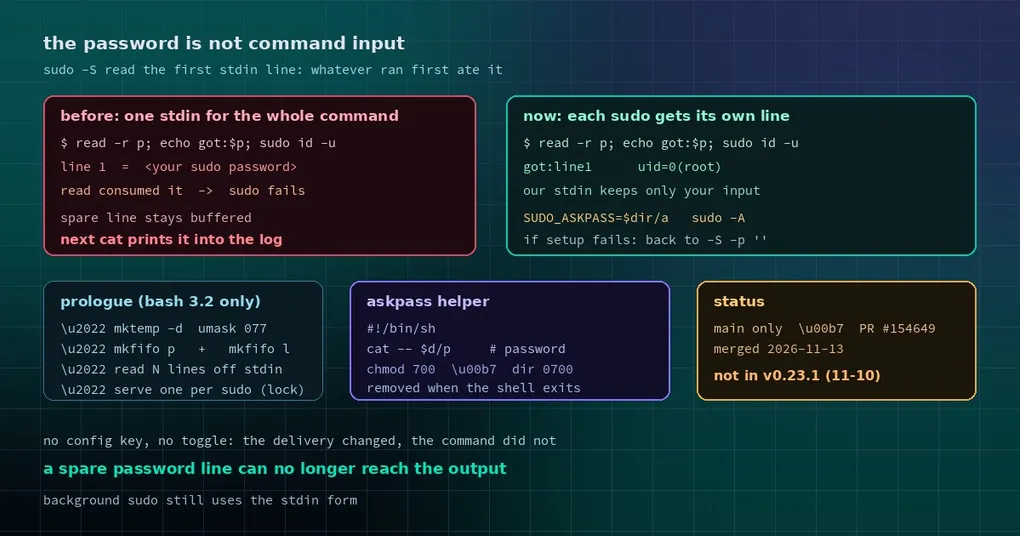
You ask Hermes to install something on a fresh box. It runs a command with sudo, prompts you for the password, you type it — and the command dies with sudo: no password was provided. Try a different command and the sudo works, but the output contains a line you recognise: the password you just typed, sitting in the log.
Those two symptoms look unrelated. They are the same design flaw seen from two sides: Hermes used to put the password at the front of the stdin shared by the entire command, so whoever read stdin first got it.
The old design: the password went into the command’s mouth
When you run a command containing sudo, the terminal tool rewrote it first. Every real sudo invocation was switched to read its password from stdin (sudo -S -p ''), and one password line per sudo was placed at the front of the stdin stream shared by the whole command string.
That works — as long as nothing else in the command reads stdin.
In practice, plenty of things do:
- A
read -r answerearly in the command (a confirmation prompt, say) consumes the first line, which is the password. sudo then gets nothing and fails. - A command with two sudos where only one fires leaves the unused password line in the stdin buffer. A later
catorwhile read linepicks it up and prints it. The password lands in the tool output, in the session transcript, and in whatever log you paste to a colleague.
This is not hypothetical. The PR that fixes it lists before/after behaviour for a set of commands, and in the old form read -r p; echo "got:$p"; sudo id -u prints the password while sudo fails.
The new design: a small helper hands each sudo its own line
The fix keeps the “one password line per sudo” input format but changes the delivery. Before your command runs, a short prologue executes:
- It creates a private temp directory with
mktemp -dunderumask 077to hold the helper and its pipes. - It writes an askpass helper — the script sudo runs when it needs a password, pointed at by
SUDO_ASKPASS. - It lifts the password lines off stdin into a detached writer that serves them one at a time through a named pipe, once per counted sudo.
- It rewrites the sudos to the askpass form (
sudo -A). Your command’s stdin now contains only the input you passed in.
There is also a concurrency detail worth knowing: if two sudos in one command ask at nearly the same moment, two helpers would race for the same line. Each helper therefore takes a lock file for the duration of its exchange. The lock is an O_EXCL file create rather than mkdir, because uutils’ mkdir (Ubuntu 25.10 and later) can let two racing callers both succeed — two helpers then read one serving and a sudo gets an empty password.
The prologue deliberately uses bash 3.2 syntax only, and writes \command, \builtin and \exec so aliases or shell functions from your session cannot shadow the commands it relies on. macOS ships bash 3.2, so this is compatibility, not style.
Before and after
| Command | Old behaviour | Now |
|---|---|---|
read -r p; echo "got:$p"; sudo id -u |
prints the password; sudo fails | prints your own line; sudo succeeds |
Two sudos, one fires, then cat |
prints the spare password line | prints only your input |
echo hi | sudo cat |
sudo reads hi as the password and fails |
prints hi |
sudo tee file with multi-line input |
file contents correct | identical bytes |
A command that sets sudo -S or -A itself |
left alone | still left alone |
That last row matters: if your command already manages sudo’s input (a script that pipes a password into sudo -S, for example), Hermes does not touch it. The new path only applies when no counted sudo carries its own stdin or askpass option.
The fallback: if the helper cannot be built, behave as before
Any scheme that manipulates a shell has to answer “what if the environment says no?”
A filesystem that refuses FIFOs, a temp path with an awkward character, a sudo build that ignores askpass — all of these can break the prologue. So the implementation has an explicit escape hatch: if the helper is not set up when the command runs, the sudos fall back to -S -p '' and read their lines from stdin exactly as they did before.
The practical consequence is that this change cannot make a machine that used to work stop working. The worst case is the old behaviour.
One case deliberately stays on the old path: background sudo (sudo ... &). The askpass helper has to outlive the command’s own shell and be torn down with the process group; that is a bigger change and was not part of this one.
What you should know
- No configuration. There is no new
config.yamlkey and no toggle. The behaviour applies after you update. - The password still only lives in memory and a private temp dir. The directory is mode 0700, the helper 0700, and cleanup runs when the command’s shell and its children exit, or when the command is killed.
- Where the password comes from. Hermes prompts you when it needs it — a dialog in the TUI or desktop app, or a hidden prompt on the terminal — and auto-skips after 45 seconds, failing the command gracefully. The password is cached per session and never written to disk.
- Do not paste a sudo password into a prompt. Unrelated to this change, but worth repeating: prompts end up in the session transcript. Use the password dialog.
When you get it
This landed on main as PR #154649 on 2026-11-13. v0.23.1 shipped on 2026-11-10, so it is not in that release — track main, or wait for the next version.
Update (2026-11-17): these changes shipped in v0.23.2 (November 16) —
hermes updatebrings them in. The “not in v0.23.1” wording above is a snapshot from publication time.
If you only occasionally let the agent run sudo apt install, you may never notice the difference. That is the nature of this class of fix: it removes failures that are rare, and painful to diagnose when they happen. If your agent regularly runs long scripts that mix read with sudo, it removes a whole category of “the password was right, why did it fail?” afternoons.
Related: why SSH config edits go through an approval gate, approval policy for unattended runs, and the install guide.