Want Hermes to Edit Your SSH Config? Now It Asks First
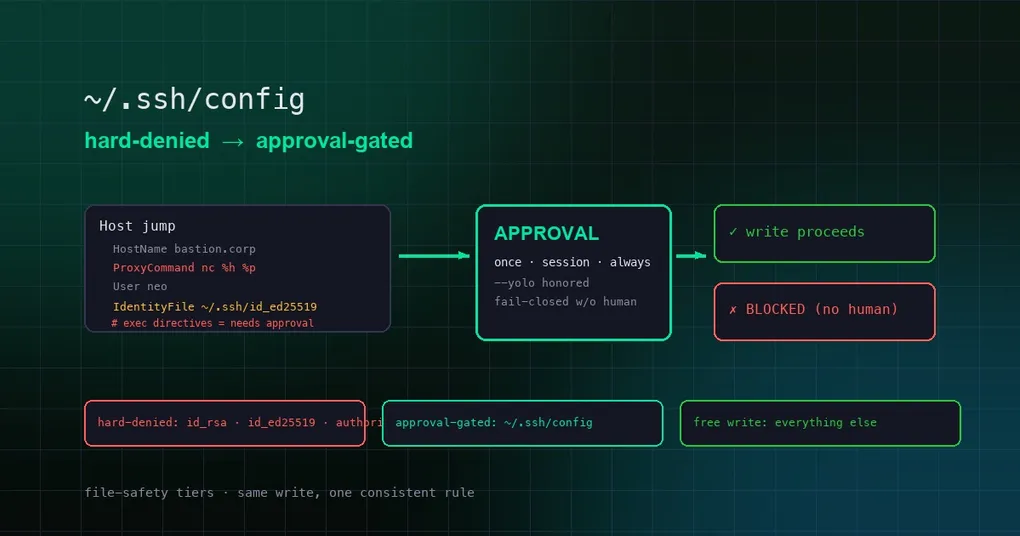
You ask Hermes to add a new server to your SSH config — a host alias, a ProxyJump bastion, so that ssh work connects in one line from now on. write_file slams the door: “Write denied: ~/.ssh/config is a protected system/credential file.” So you switch to the terminal tool and printf the same lines into the same file — and it just pops a confirmation dialog, you click approve, done. Same file, two tools, two contradictory rulebooks. Which one is right? PR #84663, merged August 12, settles it: the SSH client config is no longer a “don’t even think about it” zone — it moved to an approval gate that asks you first.
The root cause: one file, two conflicting rules
The contradiction came from two independent safety layers:
write_file/patchcheck the hard-denied list inagent/file_safety.py.~/.ssh/configused to hit both the exact-path deny and the~/.ssh/prefix deny, so it was rejected outright with no room for negotiation.terminalruns through the dangerous-command approval logic intools/approval.py. Writing into~/.sshonly got flagged as “needs approval” — approve it and the write goes through.
So the same ~/.ssh/config was a dead end through file tools and a one-click confirm through the terminal. That flip-flopping confused users — and the agent itself would report “write failed” first, then “succeeded” via the other path, leaving a trail of contradictory logs.
The fix: ~/.ssh/config demoted from hard-denied to approval-gated
PR #84663’s reasoning: the SSH client config is not credential material. It holds no private-key bytes, and editing it (host aliases, ProxyJump, VS Code Remote-SSH targets) is a routine, user-initiated task — a flat refusal is wrong. But it can carry ProxyCommand / Match exec directives that execute commands, so a silent free-write is equally wrong. Approval is the correct policy — matching what the terminal tool already did for ~/.ssh writes.
Concretely, PR #84663 changes:
agent/file_safety.py:~/.ssh/configremoved from the flat credential deny; newbuild_write_approval_paths()+is_write_approval_required()short-circuit approval-gated paths out of the~/.ssh/prefix deny in_classify_write_denial.- Private keys and auth files stay hard-denied:
id_rsa,id_ed25519,authorized_keys, and everything else under~/.ssh/— no exceptions. tools/file_tools.py:write_fileandpatchnow route SSH-config writes through the shared_run_approval_gateright after the protected-instruction gate.- Non-interactive callers fail closed: the ACP file bridge (
agent/copilot_acp_client.py) rejects approval-required paths outright; the TTS output-path picker (tools/tts_tool.py) refuses them too.
Hermes’ file-safety tier model
This change also surfaces the full write-safety model, which has three tiers worth remembering:
Tier 1: hard-denied — don’t even think about it. Credentials and critical system files are unwritable by any tool in any mode, yolo included: ~/.ssh/authorized_keys, id_rsa, id_ed25519, .env, .anthropic_oauth.json, .netrc, .pgpass, .npmrc, .pypirc, .git-credentials, /etc/sudoers, /etc/passwd, /etc/shadow, plus directory prefixes like ~/.ssh/, ~/.aws/, ~/.gnupg/, ~/.kube/, ~/.docker/, ~/.config/gh/. This is the floor that never moves.
Tier 2: approval-gated — ask me first. Currently one member: ~/.ssh/config. Writable, but only through a human approval prompt, because it can smuggle command-executing directives. The gate offers three persistence scopes: once (this one time), session (remember for this session), always (remember forever).
Tier 3: free write — everything else. Normal work files and project code, the agent can write freely.
How the approval gate actually behaves
Reading the shared gate (_run_approval_gate in tools/approval.py), the decision order is:
--yolobypasses first: yolo mode (process-levelHERMES_YOLO_MODEor session-level) passes straight through — but tier-1 hard denials are checked before the gate, so yolo still can’t touch them;- Session cache short-circuit: a previously approved write (session/always scope) passes silently;
- Interactive / gateway / cron branch: interactive sessions get a prompt; cron sessions follow
approvals.cron_mode(default: deny); - Fail-closed with no human channel: neither an interactive terminal nor a gateway session (e.g. background scripts, ACP calls) → BLOCKED, flat out. The denial even tells the agent not to retry via terminal or execute_code unless the user explicitly consents.
Wrap-up
Moving ~/.ssh/config from hard-denied to approval-gated is really about moving the decision from “the tool decides” back to “you decide”: routine edits are no longer blocked outright, while command-carrying writes always pass through a human gate. For more on Hermes’ approval machinery, see our three-gate Smart Approvals guide and how approval fatigue gets solved; the --yolo modes and red lines are covered in this post; config commands live on the hermes-config reference page.