Hermes Smart Approvals: Stop Nodding at Every Step
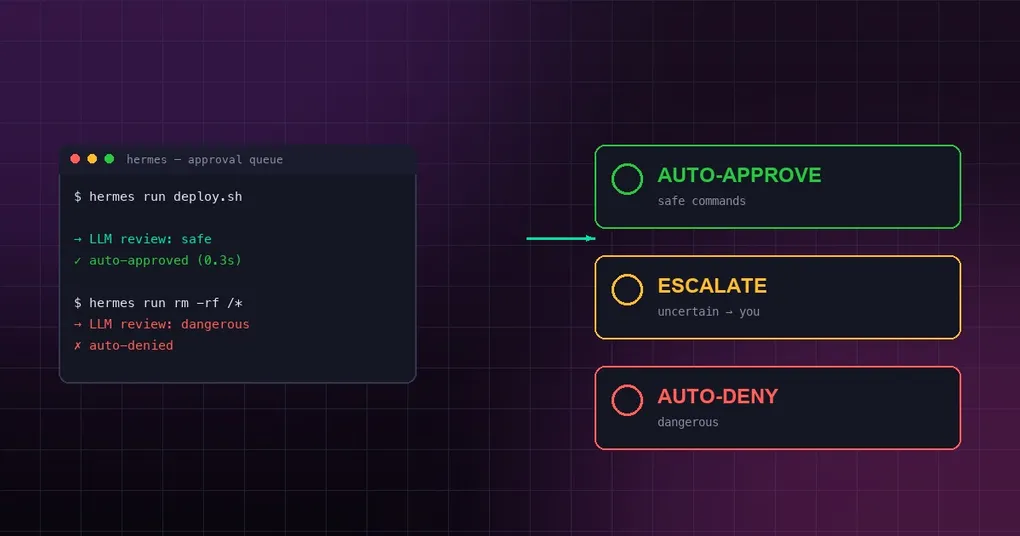
There’s a moment every heavy Hermes Agent user knows: you’re watching the agent work, things are going great, and then — bump — an approval prompt. Did you even read it? Be honest. After the fiftieth rm pattern check of the day, most of us just hammer approve. That’s approval fatigue, and it’s a security hole wearing a convenience costume: the more prompts you rubber-stamp, the less each one means.
Hermes v0.19.0 (the Quicksilver Release) attacked this problem at the root. Smart approvals are now the default: instead of asking you to approve every flagged command, Hermes has an independent LLM reviewer assess each one, auto-approves the low-risk cases, auto-denies the genuinely dangerous ones, and only escalates the uncertain to you. Fewer interruptions, same human override — if anything, a stronger one, because your attention is now spent only where it matters.
This post is a practical walkthrough: how the new approval flow actually works, the real config.yaml keys (verified against the v0.19 source, not folklore), and how to set hard red lines that even yolo mode cannot cross.
The problem: approval fatigue is a security bug
Manual approval worked when agents ran a handful of commands per session. Modern agents run dozens or hundreds. Every prompt is a context switch; every context switch taxes your attention; taxed attention approves things it shouldn’t. Security researchers have a name for this — habituation — and it’s exactly how the one command you should have read carefully slips through.
The old flow also had a second problem: you were the risk classifier. Hermes flagged a command, you judged it, done. The judgment quality depended on how alert you were at that exact moment, which is the worst possible design for a safety mechanism.
Smart approvals fix both issues by moving the routine classification to a model that never gets tired, while keeping the final call with you.
How smart approvals work: three verdicts, one command each
When Hermes wants to run a command that matches its dangerous-pattern list, the flow is no longer “ask the human.” It’s:
- An auxiliary LLM independently assesses the command — not the main agent, but a separate reviewer model.
- The reviewer returns one of three verdicts:
- Safe → auto-approved, no interruption.
- Dangerous → auto-denied, with the reason logged.
- Uncertain → escalated to you for a manual approve/deny.
The important detail is in the release notes: each verdict covers only that exact command. A later command matching the same pattern gets its own fresh review. There’s no “we approved this class before, so approve it again” shortcut. The reviewer can’t be pattern-burned into complacency, and neither can you — because you only ever see the genuinely ambiguous cases.
You: "deploy the staging server and run the migration"
Hermes: [runs kubectl apply --dry-run ...]      → smart review: safe, auto-approved
        [runs kubectl rollout restart ...]      → smart review: safe, auto-approved
        [runs kubectl delete namespace prod]    → smart review: DANGEROUS, auto-denied
        [runs psql -c "DROP TABLE users;"]      → uncertain → escalates to you
That’s the flow that ends the nodding.
The real config: approvals.mode, not folklore
If you’ve read older blog posts about v0.19 approvals, you may have seen made-up keys like smart_approvals: true or deny_rules: with pattern:/reason: fields. Those don’t exist. The actual schema in config.yaml is:
# ~/.hermes/config.yaml
approvals:
  mode: smart        # smart | manual | off  (smart is the default)
  timeout: 300       # seconds to wait for your approve/deny before failing closed
  cron_mode: deny    # deny | approve — what cron jobs do on a flagged command
deny: [] # your own red lines: glob patterns blocked unconditionally| Key | Default | What it does |
|---|---|---|
mode |
smart |
Approval policy for flagged shell commands |
timeout |
300 |
Seconds Hermes waits for your reply before treating it as a denial |
cron_mode |
deny |
Headless behavior: deny blocks flagged commands in cron jobs, approve auto-runs them |
deny |
[] |
Glob patterns that block commands unconditionally — even under yolo |
Verify your current setting any time:
hermes config | grep -A 4 approvalsThe three modes in plain English:
smart(default) — LLM review filters routine commands; dangerous ones are denied; uncertain ones reach you.manual— every flagged command prompts you, exactly like pre-v0.19.off— no approval prompts at all; equivalent to--yolo/HERMES_YOLO_MODE=1. Only for trusted sandboxes.
Hard red lines: approvals.deny beats yolo
Here’s the part that makes smart mode safe to relax into. The deny list is a set of glob patterns that block matching commands unconditionally — before any yolo bypass, before /yolo, before mode: off. It is the user-editable counterpart to Hermes’ built-in hardline blocklist, and it is the single most important line of defense you can configure:
approvals:
  mode: smart
  deny:
    - "git push --force*"
    - "rm -rf /"
    - "*curl*|*sh*"
    - "kubectl delete namespace*"
Patterns are case-insensitive fnmatch globs. Quote them in YAML — a bare leading * is a parse error. A matching command is blocked with a logged reason, full stop. Even in yolo mode. This is your “I don’t care how confident the agent is, this never happens” list, and it should contain the handful of commands whose failure modes are unacceptable: force-pushes to shared branches, recursive deletes, production namespace drops, secrets written via CLI.
The escape hatch for genuinely deliberate one-off runs? None in config — and that’s the point. If you really need to force-push, you remove the pattern, run the command, and add it back. The friction is intentional and tiny.
/deny <reason>: make the refusal teach
Smart approvals don’t just reduce prompts — they make the ones you do answer more valuable. When the reviewer escalates a command to you and you reject it, you can now tell the agent why:
Hermes wants to run: docker system prune -a -f

> /deny too aggressive — other containers share that image cache
The reason is written back into context, and the agent course-corrects — it looks for a narrower command instead of retrying the same one and hoping you blink. A reasoned refusal is feedback; a bare refusal is a brick wall. Get into the habit of giving one sentence of why, and the agent’s next attempt will be measurably better.
Related: if the agent is heading the wrong way entirely, /stop still kills the run instantly. The approval flow and the stop button are complementary — one filters commands, the other cuts the whole sequence.
Cron jobs: nobody is there to nod
Smart approvals shine in interactive sessions, but what about headless ones? When a scheduled cron job hits a flagged command, there’s no user to escalate to. The default cron_mode: deny handles this conservatively: the command is blocked, and the agent has to find another way. If you’re confident in a specific job (say, a nightly backup that legitimately cleans old files), you can flip that job’s policy:
approvals:
  cron_mode: approve   # auto-approve flagged commands in cron context
Think hard before enabling this. deny costs nothing when the agent finds an alternative path; approve turns every cron prompt into a silent auto-run. For most jobs, deny plus a narrow approvals.deny exception list is the right shape.
Which mode should you use?
| Situation | Recommendation |
|---|---|
| Daily interactive work | smart (default) — you keep override, lose the noise |
| Repo surgery / destructive ops | smart + deny rules — red lines for the irreversible stuff |
| Full-trust sandbox / CI container | off or --yolo, but keep deny rules as a belt-and-braces backstop |
| Legacy muscle memory | manual — if you genuinely want every prompt back |
For most people the answer is: leave mode: smart, spend ten minutes writing deny rules, and use /deny <reason> every time you refuse. That’s the whole upgrade.
Beyond approvals: layered defense
Smart approvals are one layer in Hermes’ defense-in-depth model, not the whole story. The other layers worth knowing about: checkpoints take automatic filesystem snapshots before destructive file operations (so a mistake is a rollback, not a disaster), secret redaction scrubs API-key-shaped strings from tool output before they reach context or logs, and container isolation (Docker/Singularity/Modal backends) can fence the terminal tool entirely. Approvals decide whether a command runs; checkpoints decide what happens after it does. They compose.
Summary
Hermes v0.19 smart approvals are not “the agent can do anything now.” They’re the opposite: a tired human rubber-stamping every prompt is replaced by a tireless reviewer that filters the routine, blocks the dangerous, and surfaces only the ambiguous. The real configuration is three keys and one habit:
approvals.mode: smart— the default that ends approval fatigue.approvals.deny: [...]— your red lines, enforced even in yolo mode.approvals.cron_mode: deny— headless jobs stay conservative by default.- The habit:
/deny <reason>— every refusal teaches.
Your agent gets more autonomy; you keep every ounce of control. No more nodding.
Want more Hermes safety and workflow guides? Check out the v0.19.0 release deep dive, the three-gate smart approvals setup, our yolo mode explainer, and the error handling & recovery guide. New to Hermes? Start with the install guide.