Hermes Told a 16 GB Machine to Run a 27B Model: Now It Says No
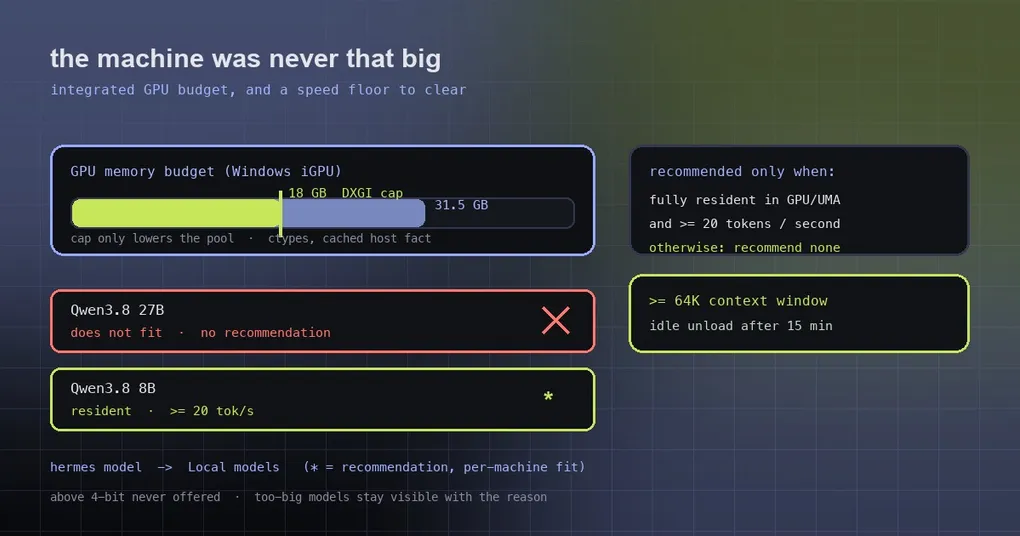
You open the local models panel on a machine with a GTX 1080 and 16 GB of RAM. The setup card tells you: Qwen3.8 27B fits this machine. You spend half an hour pulling twenty-odd gigabytes of weights, run it, and get two or three tokens per second — half a minute for one answer. Two messages in, you quit. You start to doubt your hardware. The thing you should have doubted was the recommendation.
PR #135438 fixed that on October 9, and it isn’t a matter of nudging one threshold: three separate bugs stacked up to produce a 27B recommendation on a 16 GB box. Here’s all three, and the standard Hermes now uses to recommend a local model.
How the three bugs stacked
1. The setup card offered models the resolver itself refuses
The first bug lived in the desktop setup card. Its selection rule was: take the recommended catalog row; failing that, take the first row marked as fitting. And “fits” was generous — any build that runs at all, even spilled into system RAM, counted.
So the card could recommend a model that works but crawls, while the resolver that actually makes the decision would never have suggested it. The rule is now the same in both places: the card names the resolver’s recommended model, and a machine with no recommendation gets no card at all. Recommending nothing beats recommending wrong.
2. An integrated GPU was budgeted the entire system RAM
The second bug is the sneakiest, and it lives in the memory-budget probe.
With no nvidia-smi answer and no discrete compute device, probe_budget treated all system RAM as unified memory. On a real unified-memory machine like an Apple Silicon laptop that’s correct. On a Windows laptop with an integrated GPU it is badly wrong — the PR’s example is an Intel Arc B390 laptop being reported as having 31.5 GB of “GPU memory”, which makes a 27B model look obvious.
The fix introduces a real ceiling: on Windows, the adapter’s dedicated plus shared video memory is read through DXGI (the same figure Task Manager shows as “GPU memory”) — 18 GB of that 31.5 on the B390. It’s fetched with ctypes in about 0.3 ms and cached as a host fact in hermes_platform, for the adapter the engine named, or otherwise the only non-NVIDIA adapter when a Vulkan or HIP engine will run the model.
Two details show how carefully this was scoped:
- The cap only lowers the pool, never raises it. It can’t make a machine look more capable than it is.
- The CPU engine keeps the RAM budget (a Snapdragon, say), whether the user chose it or it’s the only build available.
- And why not trust the Vulkan engine’s own number? Because ggml-vulkan sums every heap of an integrated GPU, so it overshoots.
3. The resolver recommended models below its own speed floor
The third bug is the most interesting: the resolver broke its own rule.
Hermes recommends the highest-quality model that runs entirely in GPU or unified memory at a predicted 20 tokens per second or more. But when no resident model cleared that floor, the old code fell back to recommending the fastest of them (fastest-resident). Picture a “32 GB” machine with no discrete GPU whose budget was miscalculated, so nothing runs resident — it gets a “fastest” recommendation, which is really just the least slow option.
Now, when nothing clears the floor, the resolver returns no recommendation. Slow and spilled models stay visible and selectable — they just don’t carry the recommendation badge, so opting into a degraded experience is a choice you can see. The reason keys became explainable too: product-default (the maker’s pick, and it runs resident), best-quality-resident (quality won among resident models above the floor), and speed-gated-quality (the pick clears the floor, but the floor eliminated a higher-quality candidate).
What the recommendation means now
Putting the three fixes together, today’s behavior is:
- only a model that runs entirely in GPU or unified memory at a predicted ≥ 20 tokens per second gets recommended;
- among those, the highest quality grade wins;
- if nothing qualifies, nothing is recommended — but every model that fits stays visible;
- a machine has at most one default pick, and the maker can set a different one; Hermes honors it whenever it fits.
A few rules that still stand, and explain why you never see ultra-small builds offered: Hermes never goes below 4-bit, because the quality loss is too severe; a model whose 4-bit build has to spill into system RAM simply can’t run on that machine; and models that don’t fit stay visible with the reason, so you know what a hardware upgrade would unlock.
Checking it yourself
hermes model # then choose "Local models"From a terminal, the catalog is priced against your machine: a ★ marks the recommendation, and each row shows memory fit (green = runs entirely in GPU memory, amber = works but slower via system RAM, red = too big), the context window it starts with and its maximum, and the download size of the build selected for your hardware. Find more models searches all of Hugging Face and gives every file a per-file fit check sized to your machine, so you know before downloading whether it runs fully in VRAM.
For the full local-models walkthrough — engine install, catalog, quantization choices — see our local models guide; provider and model switching is covered in the hermes model reference. If your real constraint is context rather than VRAM, this context optimization write-up is the better fit.
Two mechanisms are worth knowing because they affect what “it runs” means in practice: every recommended model gets at least a 64K context window, and the window grows as the conversation needs it (seeing “Context window grown” in the status feed is normal). When a model is larger than your GPU memory, the overflow is placed in system RAM in the order that hurts least — expert weights first, never the attention cache. Idle models unload after 15 minutes to free VRAM and reload on the next message.
Release status
PR #135438 merged on 2026-10-09, after v0.21.6 shipped on October 8, so it is on origin/main only right now — run hermes update to get it today.
The takeaway
“Recommended a model that can’t run” looks like a small bug. The real cost is the user’s time, bandwidth, and a ruined first impression. What makes this PR worth remembering is that it didn’t touch the recommendation threshold at all — it fixed three wrong inputs: a card using a too-generous fit test, a memory budget that treated an integrated GPU as a whole machine, and a resolver that retreated to “the fastest one” when nothing qualified. With the inputs corrected, recommending nothing turned out to be the honest behavior. For local models, a truthful silence beats an enthusiastic lie.