Hermes Cron Jobs Now Degrade Instead of Failing on systemd Gateways With No User D-Bus Session
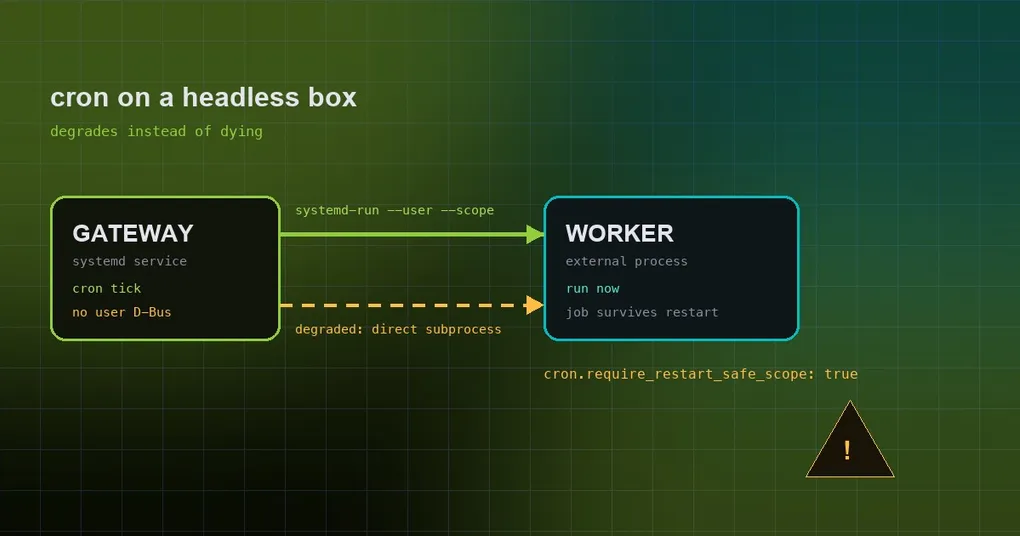
You installed Hermes as a systemd service on a VPS or inside a Docker container. Chat works, tools work, the bot stays online. The one thing that never shows up is the scheduled job — the daily digest that is supposed to land every morning. In the log, at the minute it should have fired, there is the same line: the worker failed to start. Search that error and the advice is always to use systemd --user, except your container has no login session and nothing a user manager could attach to. PR #109311 closes exactly that gap: on those hosts cron jobs used to hard-fail at dispatch, and now they degrade and run.
What a “restart-safe” job actually means
Put simply: when a job is due, it does not run inside the gateway process. It is handed to a separate external worker process, started in a transient user scope (systemd-run --user --scope) — a throwaway cgroup that outlives the gateway. Restart the gateway mid-job (an upgrade, a config change, systemctl restart) and the job keeps going instead of dying with its parent. The docs cover this in a section called “Restart-safe workers under systemd”. For how the whole scheduler fits together, see the complete cron automation guide.
Why headless hosts used to hard-fail
Creating that scope requires a user systemd session, and a user session requires a user D-Bus session. Containers usually have no login session; slim LXC images have none; a service account running without linger enabled has none either. Those hosts simply cannot provide one — the docs name exactly these three cases: containers, slim LXC, and service users without linger. Before the fix the outcome was blunt: every due cron job failed at dispatch time, with no fallback path. If you run Hermes in a container, the shared-container deployment notes cover what else behaves differently there.
The fix: degrade, and be explicit about what degrades
PR #109311 (“Cron jobs run on systemd gateways without a user D-Bus session”) landed on main on 2026-09-12. It is a salvage of @kiwipaulrob’s #102431, and the fix commit keeps the original author. Labels: type/bug, comp/cron, P1. Diff: +204 / −65 across 7 files.
The root cause was a sentinel value. In tools/process_registry.py, restart_safe_gateway_child_argv used to express only two outcomes: “fits in a scope” or “cannot be managed, keep it in-process”. A degraded dispatch had nowhere to go but that second bucket, so it collapsed into the unmanaged sentinel. It now returns GatewayChildDispatch(mode, argv), where mode is one of in_process, scoped or degraded — degraded dispatch has its own name and no longer falls through.
On the behavior side, _launch_external_cron_worker in cron/scheduler.py starts an external worker for both scoped and degraded, reusing the existing ownership-handoff mechanism. The difference is only the isolation level:
| Mode | Where the job runs | Process isolation | cgroup isolation | Gateway restart mid-job |
|---|---|---|---|---|
scoped |
External worker (transient user scope) | Kept | Kept | Job keeps running |
degraded |
External worker (runs the command directly) | Kept | Lost | Job gets killed |
A degraded run also warns — once per gateway process, not once per job, so the log does not drown. The docs are explicit that restarting the gateway while such a job runs kills it, and that the execution ledger records it.
Want fail-closed instead? One switch
cron.require_restart_safe_scope is the new config key, and it defaults to false. The comment on that default in the source says it plainly: without it, Hermes degrades to a direct external subprocess (one warning, no cgroup isolation). Set it to true and the old behavior comes back — fail-closed, raising an error that carries enable-linger remediation.
cron:
  require_restart_safe_scope: true
One component ignores this key on purpose. hermes_cli/kanban_db_dispatch.py passes require_restart_safe_scope=True, so long-lived Kanban workers stay fail-closed no matter what you configure. That is deliberate: a worker built to run for hours is better off failing loudly than running in a mode where a routine gateway restart kills it halfway through.
The real fix: give the gateway user a session
The switch only chooses how you want to fail. To get cgroup isolation back, the gateway user needs a user session:
sudo loginctl enable-linger <gateway-user>On system-level installs — where the unit is managed by the system systemd rather than by a user manager — set XDG_RUNTIME_DIR and DBUS_SESSION_BUS_ADDRESS in the unit as well, so the gateway process can find the session bus, then restart the gateway. Once a session exists, newly dispatched jobs again have what they need to run inside a scoped transient scope.
A related background detail: .tick.lock
One thing worth knowing when you start asking “did this job actually run?”: cron guards against overlapping tickers with a file lock at ~/.hermes/cron/.tick.lock, which keeps two ticks from running the same batch of jobs twice. It is unrelated to this change, but it explains why you will not see duplicate launches even when the scheduler is busy.
Summary and status
Condensed: on a systemd gateway with no user D-Bus session, cron used to hard-fail; it now degrades — process isolation kept, cgroup isolation lost, one warning per gateway process. cron.require_restart_safe_scope: true restores the strict behavior, and only enable-linger (plus the unit environment variables on system-level installs) brings cgroup isolation back for real.
Timing matters here: the fix landed on main on 2026-09-12, after v0.21.2 (released 2026-09-11), so it is not in a tagged release yet — the v0.21.2 release notes are the current stable baseline. And it is not a caching or retry fix. Nothing is being retried here. It is a failure-mode choice: hard failure before, graceful degradation now, with a switch to opt back into hard failure.
If a job looks like it never ran at all, start with hermes cron doctor for a read-only checkup across the whole fleet before you dig through scheduler logs.