Hermes v0.20.6: The Agent Learns to Browse as You, a 50+ Server MCP Catalog, and Secrets Without the Keychain Nag
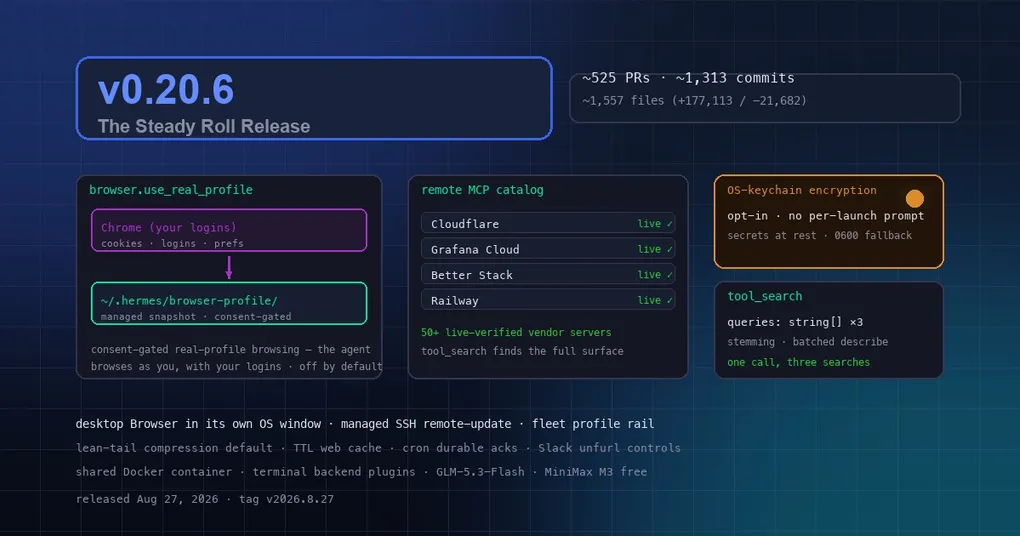
You ask your agent to check something inside your company dashboard — “pull up the deployment page and tell me what version is live” — and it comes back with a login wall, because the browser it controls starts every session logged out. So you copy the URL into your own browser, log in, and do the whole thing by hand. That tiny friction is exactly what v0.20.6 (tag v2026.8.27, released August 27, 2026) targets: the agent can now browse as you, with your real logins, under explicit consent and off by default.
The window merged roughly 525 PRs and ~1,313 commits across ~1,557 files since v0.20.5. The headline is consent-gated real-profile browsing, but the release rolls on from there: a desktop Browser that finally gets its own OS window, a managed SSH remote-update engine for fleets, a remote MCP catalog past 50 live-verified vendor servers, TTL caching for web search, lean-tail compression as the default, multi-query tool_search, and opt-in OS-keychain encryption for stored secrets. Let’s go through them.
The agent browses as you — consent-gated, off by default
Real-profile browsing is the headline for a reason. When enabled (browser.use_real_profile: true, or Settings → Browser → Use My Real Browser Profile in the desktop app), Hermes copies your default browser’s active profile — the one you actually browse, with its cookies, saved logins, and preferences — into a managed snapshot under ~/.hermes/browser-profile/, and drives that snapshot with its packaged Chromium (#1f4d095fd8, #830e4a29be).
Three details matter:
- Your live profile is never opened directly. The snapshot is a separate directory, so it doesn’t fight your running browser for the profile lock, and it sidesteps Chrome 136+’s block on remote-debugging the default profile directory.
- Auth re-syncs. Cookies and logins are copied again whenever a fresh session launches, so a login you do in your own browser shows up in the agent’s next session.
- Revoking consent deletes everything. Turn the toggle off and the snapshot store is removed on next browser use — copied credentials don’t linger after you withdraw consent.
Windows has a quirk: Chrome/Edge/Brave lock their cookie databases with a deny-all lock while running, so the browser must be fully quit before the profile can be copied (Hermes fails fast with a clear message rather than hanging). Setting browser.real_profile_autoclose: true lets the agent offer to close it for you — it never closes it on its own, and if the profile is still locked after that, it stays blocked and tells you to quit the browser. Non-Chromium defaults (Firefox) fail closed with a clear message. In the browser_exec tool, a local argument appears when the toggle is on, forcing a real-profile session even under a cloud browser backend.
Is this safe? It’s consent-gated convenience, not an isolation boundary: a page the agent visits runs with your real logins. That’s exactly why it’s off by default — enable it when you want the agent acting as you. For the mechanics of how the browser tools work, see our Browser Use CLI guide and the browser snapshot budget post.
The desktop Browser grows up: own OS window + managed SSH updates
The desktop Browser was an embedded pane; now it can open in its own OS window — resize it, move it between monitors, keep it pinned beside your editor. If you’ve ever wished the preview pane had more room, this is it.
The other desktop story is a managed SSH remote-update engine: updates can now be driven per-connection over SSH for remote gateways, so a fleet of machines stays current from one desktop app. The fleet profile rail follows — switch profiles and the update targets switch with you. Combined with the update improvements below, “update everything” is becoming a one-click, verifiable operation. For the broader update story, see our graceful upgrade guide.
A remote MCP catalog past 50 live-verified servers
The built-in remote MCP catalog keeps growing: 50+ live-verified vendor-hosted servers — Cloudflare, Grafana Cloud, Better Stack, Railway, Canva, Dropbox, GitLab, Strava and more. Each entry is verified against the vendor’s live endpoint, and ?codemode=false is pinned so tool_search sees the full endpoint surface. If you haven’t looked at what’s in the catalog lately, it’s worth a browse:
hermes mcp catalog list --remoteFor a deeper look at the catalog itself, see our official remote MCP catalog guide.
Caching, compression, and a smarter tool search
Three quieter upgrades that save tokens and money every day:
- TTL result caching for
web_search/web_extract: repeat lookups within the TTL window return the cached result instead of re-billing the vendor. A retry, a re-run, a cron job checking the same URL — all cheaper. (Configurable viaweb.cache_ttl; see our web search cache post for the full story.) - Lean-tail compression is now the default: after compression, the agent keeps a compact summary plus a short high-value tail instead of a long low-value one — less to re-send every turn, lower cost. Our compression guide covers the knobs.
- Multi-query
tool_searchwith stemming:tool_searchnow takesqueries: string[], searching each independently (limit per query, default 5 / max 25), andtool_describetakesnames: string[]returning a map keyed by name — one bad name no longer fails the whole call. Snowball stemming means “browsing” matches “browser”.
{ "queries": ["browser snapshot", "web search cache", "read pdf"] }The result: fewer round-trips when the agent is hunting for the right tool, and cheaper discovery. We wrote up the details in our tool_search multi-query guide.
Secrets without the keychain nag
If you use the Hermes desktop on macOS, you may have met the “Keychain Not Found” dialog — Electron’s safeStorage parks a per-app key in the login keychain, and on machines with a locked, missing, or corrupted keychain, that turned every launch into a blocking password prompt. v0.20.6 makes keychain-backed encryption an explicit opt-in (Settings → Gateway): the default path never touches safeStorage at all, and a one-shot migration converts existing encrypted blobs to plain 0600 files at first launch. Flip the toggle and every stored secret store re-encodes in place. No more prompt, and full encryption if you want it. Full setup in our keychain secret encryption guide.
Updates that don’t kill your gateway
Updaters now pause gateways over the control socket instead of tree-killing them: services quiesce, the update lands, gateways resume — in-flight turns and messaging connections survive the upgrade. Image/package-managed installs also refuse unsafe in-place updates through one shared gate (#91277 Phase 3), and gitignored user files block the destructive ZIP overlay (#96440). The updater keeps proving its outcome, continuing the arc we covered in the v0.20.5 housekeeping release notes.
Other notables
- Cron: durable-incident acks — acknowledge a job’s incident once and the ack persists; clearer code-skew failures when scheduler and gateway disagree.
- Slack: link-unfurl controls so teams can stop the agent’s links from expanding into cards.
- Docker: trusted profiles can opt into one shared persistent container; third-party sandboxes plug in as terminal backends without touching core.
- Models: GLM-5.3-Flash reaches the z.ai + OpenCode pickers, MiniMax M3 free joins OpenRouter, MiniMax H3 Max joins the FAL video picker.
- Gateway reliability: two-witness loop liveness — the watchdog’s own heartbeat can no longer freeze or kill a healthy gateway (#92315); launchd
--replacedouble-kill fixed via SIGUSR1 graceful restart (#96427).
For the complete highlight-by-highlight breakdown, including the full Improvements and Fixes lists, see our v0.20.6 release notes. Upgrading is straightforward:
hermes updateAfter upgrading, run hermes doctor and restart the gateway (hermes gateway) so platform changes take effect. v0.20.6 doesn’t need a single dramatic headline — it’s a steady roll where the agent finally meets you on your own logged-in web, and the daily chores (caching, compression, keychain, updates) quietly get out of your way.