No More Keychain Nag: Opt-In OS-Keychain Encryption for Stored Secrets
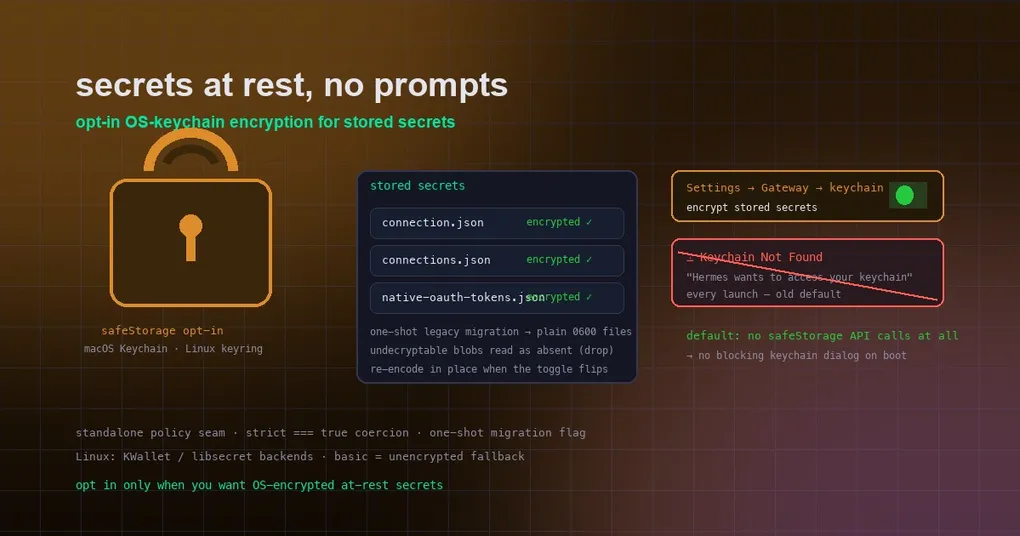
Monday morning, you open the Hermes desktop app, and instead of your chat list you get a macOS dialog: “Hermes wants to access your keychain. Enter your password to allow this.” You type it, the app loads. Tuesday: same dialog. Every launch, forever — because the app’s secrets were encrypted with a key parked in the login keychain, and your keychain was locked, missing, or corrupted. It’s the kind of nag that makes you want to throw the machine out the window. Hermes v0.20.6 (commit 6a6e16fa5d) fixes it at the root: keychain-backed encryption for stored secrets is now an explicit opt-in, and the default path never calls the keychain at all.
The change targets desktop-stored secrets: remote gateway tokens, Cloudflare Access headers, and native OAuth token sets. Before, Electron’s safeStorage parked a per-app key (“Hermes Key”) in the macOS login keychain, and any safeStorage touch — even the “is encryption available?” check — could throw a blocking keychain dialog on machines with a locked or corrupted default keychain. That was an unacceptable default for a chat app, so the behavior flipped: encryption is now opt-in, plain storage is the default, and a one-shot migration cleans up after the old behavior.
What changed
The policy is defined in a standalone module (electron/secret-storage-policy.ts) — deliberately free of import 'electron' so it unit-tests cleanly — with three properties:
- Setting OFF (default): secrets are written with encoding
'plain'and no safeStorage API is ever called — includingisEncryptionAvailable(), which itself touches the keychain. No keychain, no dialog, no prompt. - Setting ON: the previous behavior — strict safeStorage encryption, loud failure when the keychain is unavailable, and a per-save plain-text confirm dialog as the escape hatch.
- One-shot migration: legacy blobs written before the flag existed are safeStorage-encoded on disk. With the setting off, Hermes attempts one migration pass (decrypt → rewrite as plain). The pass is recorded in the same settings file whether or not it succeeds, so a broken keychain costs at most one prompt on the first post-update launch — never one per launch.
The on flag uses strict === true coercion: a truthy-but-not-true value must not silently enable keychain prompts (mirroring the allowPlainText coercion rule in hardening.ts). The policy file lives at secure-token-storage.json.
How to use it
Desktop (recommended): open Settings → Gateway, find the keychain/secure-storage toggle, and flip it. Flipping the toggle re-encodes every stored secret store in place — v1 connection.json, v2 connections.json, and native-oauth-tokens.json — and the at-rest spec covers both postures: opted-in unchanged contract, default saves without secure storage, owner-only bits, and restart round-trip.
The migration detail worth knowing: if you’re coming from an older version, the first post-update launch with the default (off) setting attempts the one-shot migration — decrypting existing safeStorage blobs to plain 0600 files. Undecryptable blobs (a dead keychain, say) are kept on disk but read as absent afterward, classified as ‘drop’, so a dead keychain prompts at most once. On Linux, the underlying keychain backend is configurable: desktop.password_store accepts auto (detect the session keychain — KWallet via KDE session env vars, GNOME Keyring / any org.freedesktop.secrets provider like KeePassXC via D-Bus) or a forced backend (gnome-libsecret, kwallet, kwallet5, kwallet6); basic means an unencrypted store. An explicit HERMES_DESKTOP_PASSWORD_STORE env var still wins over the config.
What stays the same
- Opted-in machines keep the full contract: strict safeStorage encryption, loud failure when the keychain is unavailable.
- Owner-only file permissions on the plain fallback files (0600) keep the “unencrypted at rest” posture reasonable: readable only by your user.
- Secrets are still secrets. The change is about where the encryption key lives (OS keychain vs. plain owner-only files), not about exposing tokens in logs or model-visible content — the existing redaction machinery (
security.redact_secrets) is untouched.
When to opt in
- Opt in if you want OS-level at-rest encryption and your keychain is healthy — the standard posture for laptops, shared machines, or compliance-minded setups.
- Leave it off if your keychain is locked/missing/corrupted (the dialog population), if you’d rather not have a per-app key sitting in the login keychain, or if the per-launch prompt was driving you crazy. The default path is now prompt-free by design.
The bigger picture
This is part of v0.20.6’s reliability theme: the same window that made web search caching and lean-tail compression defaults also stopped the updater from tree-killing gateways (see our graceful upgrade guide). Secret storage was the last desktop thing that could block your morning with a password dialog — now it’s opt-in, quiet, and reversible. For the full release rundown, see the v0.20.6 release notes.
One toggle. No more daily “Hermes wants to access your keychain” — unless you want the encryption, in which case it’s still there, one switch away.