Let a Browser Extension Safely Take Over Hermes' browser Tools: The Authenticated Controller Guide
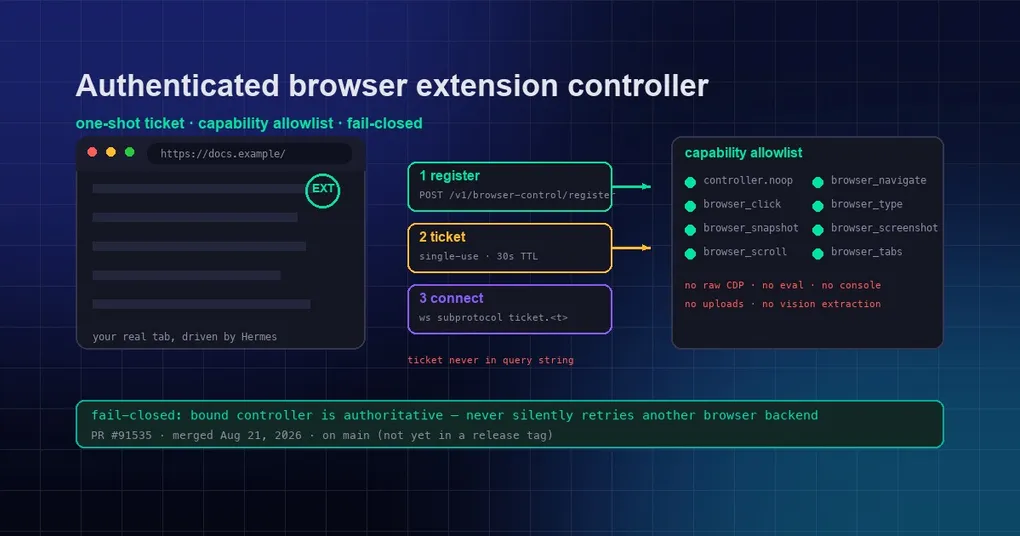
You have a page open in your browser and you want Hermes to work it for you — fill the form, flip through pages, screenshot evidence. The old answer was to point it at a “browser backend”: a cloud browser, or local CDP. But the tab you’re actually using and the “browser backend” Hermes launches are two different things. The ideal shape is: the browser extension you installed becomes the control channel, so the agent drives the very page in front of you. That raises a sharp security question though — why should an extension be trusted, and where exactly is the boundary of what it can do?
Hermes’ answer is an authenticated lane called the browser extension controller: an extension registers as the exact controller for a session’s browser_* tools through a one-shot WebSocket ticket, and capabilities are filtered through a strict allowlist — no raw CDP, no arbitrary script evaluation, no console access. Once bound, it fails closed: a missing, ambiguous, disconnected, or incapable controller fails the call instead of silently switching to another browser backend. The feature lands in PR #91535 (a salvage of #85351 with the original author’s commits cherry-picked and preserved), merged to upstream main — it is not in any release tag yet.
Why a “controller” lane at all
Hermes’ browser tools (browser_navigate, browser_click, browser_snapshot, …) sit on several backends: Browserbase cloud, Browser Use, local Chromium CDP, Camofox… — all of them are “a browser Hermes starts itself.” But the browser you’re using is a different species: not launched by Hermes, it’s the instance you drive every day.
The extension controller fills exactly that gap: the extension holds your real browser tab, Hermes sends browser_* commands over an authenticated WebSocket channel, and the extension executes them in the real page and reports back. Commands, capabilities, and ownership are all constrained by a server-side allowlist and one-shot tickets.
Enabling the config
The feature is off by default and must be opted in — and the local API path additionally requires the API server bearer key:
browser:
  extension_control:
    enabled: true
A controller may register only for an existing server session; the controller principal is derived from authenticated server state, and a client-supplied principal_id is ignored — identity is not something the client gets to declare.
The capability allowlist: 11 items, no bare CDP
GET /v1/capabilities exposes whether the feature is enabled, the protocol version, transport names, and the exact capability allowlist:
controller.noop
browser_back
browser_click
browser_navigate
browser_press
browser_screenshot
browser_scroll
browser_snapshot
browser_tab_activate
browser_tabs
browser_type
Requested capabilities outside that list are filtered out. Note the deliberate trade-off: raw CDP, arbitrary script evaluation, console access, uploads, image extraction, and vision are not part of the controller protocol — the extension can help the agent click, type, scroll, and screenshot, but it cannot run arbitrary JavaScript in the page. That is a deliberately narrow security boundary: capable, but not scary.
Registration and connect: one-shot ticket, 30-second TTL
The flow is three steps (Local API registration):
- Send an authenticated
POST /v1/browser-control/registerwithprotocol_version,session_id,controller_id,browser_profile_id, and the requestedcapabilities; - Hermes returns a single-use ticket (30-second TTL) with the filtered, server-bound controller scope;
- Open
GET /v1/browser-control/wswith both WebSocket subprotocols:hermes-browser-control-v1andhermes-browser-control-ticket.<ticket>.
The ticket is never accepted in the query string; unknown, expired, reused, or malformed tickets fail before the WebSocket upgrade. Once connected, Hermes sends browser.controller.command frames (with command_id, action, immutable arguments, and the originating tool_call_id), and the controller replies with browser.controller.result (same command_id, exact boolean ok, and either result or error). Cancellation and timeouts emit browser.controller.cancel; late results are ignored.
Fail-closed: no silent browser switching once bound
This is the part worth emphasizing most:
- With no bound controller identity, or when the feature is disabled → Hermes preserves the existing browser backend;
- Once the gateway binds a controller principal and transport family to the request, that extension lane is authoritative: missing, ambiguous, disconnected, or incapable controllers fail closed instead of silently switching to a different local/cloud browser;
- After an exact controller is selected, its result or error is authoritative, and Hermes never retries the same action through another backend.
In other words: a “control this tab” session will never quietly jump to a cloud browser behind your back. An unexpected socket loss is treated as a recoverable disconnect (in-flight work survives until each command’s deadline); an explicit browser.controller.detach on the authenticated transport is the hard separation, cancelling pending work immediately. A different controller id or browser profile in the same authenticated session lane is a hard replacement: old pending work is cancelled before the successor becomes routable.
Current status and how to try it
- Code:
feat(browser): authenticated extension controller (salvage #85351), PR #91535, merged tomainon 2026-08-21. - Release status: not in any release tag yet — v0.20.5’s tag v2026.8.19 was cut before this merge. It currently lives on
mainonly; once it rides out with a future release,hermes updategets it. - Companion flow: the loopback browser-extension pairing flow (PR #88203, the “one approval click gets a scoped token” gateway half) is still open — so the install-and-click-to-approve experience isn’t merged yet; for now you go through API server auth + the register flow yourself.
To try it: get a build of main that includes the PR, enable browser.extension_control.enabled, configure the API server bearer key, and use your WebSocket client of choice to register a test controller per the three steps above, starting with controller.noop to validate the channel. For more on browser backend selection and modes, see our Browser Use CLI 3.0 mode guide and the desktop read-preview-browser guide.
The real value of this feature isn’t “one more way to connect” — it’s that the browser you’re actually using becomes a safely controllable execution environment for the agent, for the first time: the allowlist shrinks the attack surface, the one-shot ticket blocks replay, and fail-closed makes silent backend drift impossible. When the pairing flow lands, install the extension, click approve, and Hermes works in the page in front of you.