Hermes Browser Automation Gets a Big Rework: One browser_exec Replaces 12 Tools and Halves Token Spend
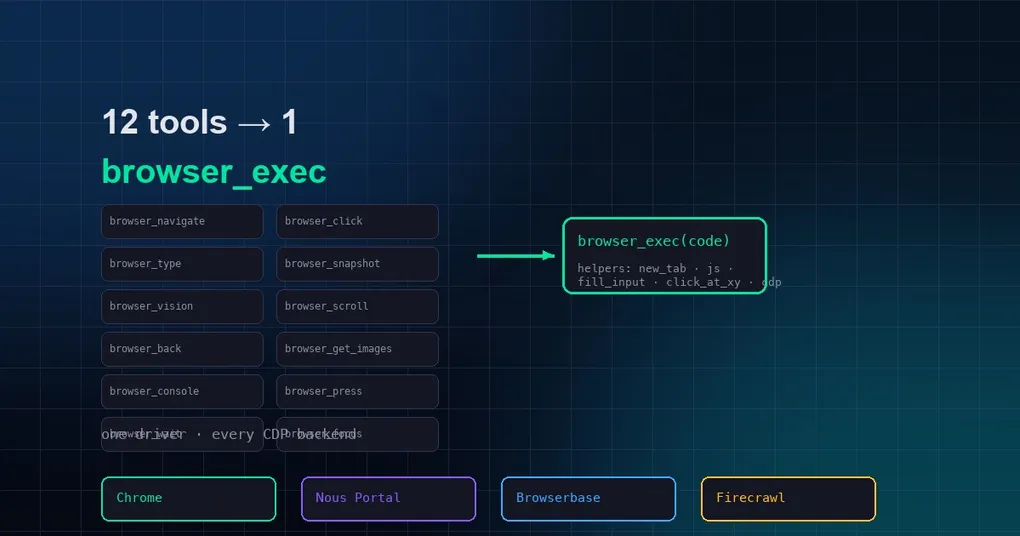
You ask Hermes to do something slightly involved on a website — log into a dashboard, open a report, copy back the key numbers — and then you watch it grind through the familiar loop: screenshot, look, click, screenshot, look again. Every step burns tokens, and by the time the task is done, a large chunk of your budget went to “looking.” In August 2026 that pain got a serious answer: Hermes merged Browser Use CLI 3.0 mode (PR #81958), replacing the screenshot-and-click cycle with a single tool that runs Python code directly in the browser. In official benchmarks, total token consumption on multi-step web tasks dropped by roughly half.
What Browser Use CLI 3.0 mode is
Browser Use is an open-source browser automation framework, and its CLI 3.0 lets you run a snippet of Python code that performs arbitrary actions in a real browser (connected over CDP). With this update, when you set browser.backend to browser-use, the model no longer sees a dozen small tools like browser_navigate, browser_click, and browser_type. Instead it gets a single browser_exec tool: you express what you want as code, and one call completes many steps.
The official framing is simple: 12 tools become 1 tool by turning “generate an action sequence token by token” into “generate executable code as a whole.” The more steps a task has, the bigger the gap — benchmarks across 4 batteries and 204 runs show total token consumption dropping 48% to 66% on multi-step web tasks, with accuracy unchanged.
How to turn it on
Add one line to the browser: section of your config.yaml:
browser:
  backend: browser-use   # "" = built-in tools; browser-use = Browser Use CLI 3.0 mode
Restart your Hermes session after changing it. Before first use, make sure the Browser Use CLI is installed:
# pick one
uv tool install browser-use
pipx install browser-use

# verify the install
browser-use --doctor
If the CLI is missing, Hermes will try uvx as a zero-install fallback; if that fails too, the error message tells you exactly what to install.
How to use it in a session
Once the mode is on, browser_exec takes one required argument, code — a snippet of Python that can call a set of pre-imported helpers (no imports needed):
| Helper | What it does |
|---|---|
new_tab(url) |
Opens a new tab (use for the first navigation) |
goto_url(url) |
Navigates the current tab |
wait_for_load() |
Waits for the page to finish loading |
page_info() |
Returns a summary of the current page state |
js(expr) |
Evaluates a JS expression and returns its value, e.g. js('document.title') |
fill_input(selector, text) |
Types text into an input |
click_at_xy(x, y) |
Clicks viewport coordinates |
capture_screenshot() |
Saves a screenshot and prints its path |
cdp('Domain.method', **kwargs) |
Raw CDP protocol calls |
ensure_real_tab() |
Recovers from a stale/internal tab |
A typical snippet looks like this:
new_tab("https://example.com/login")
wait_for_load()
fill_input("#username", "demo")
fill_input("#password", "secret")
js("document.querySelector('button[type=submit]').click()")
wait_for_load()
print(page_info())
The model generates the whole snippet in one shot and hands it to browser_exec, instead of screenshotting its way through every step. Need a stable name for the task? Pass session (1-64 letters, digits, dashes, or underscores), e.g. browser_exec(code=..., session="r7k2").
How it composes with your existing browser backends
This is the most interesting part of the update: browser_exec is not an isolated new browser — it just swaps the driver while keeping your car. The CDP endpoint resolves through the exact same chain the built-in tools use: BU_* environment overrides → /browser connect manual override → your configured cloud provider. So local Chrome, Nous Portal cloud browsers, Browserbase, and Firecrawl all keep working — you’re just steering differently.
Three details worth knowing:
- Legacy Browser Use cloud configs migrate automatically: old setups using
cloud_provider: browser-useplus aBROWSER_USE_API_KEYare auto-detected as Browser Use mode, no manual change needed. - Camofox users are untouched: Camofox is Firefox-based with no CDP surface, so even if you write
backend: browser-use, Camofox scenarios automatically fall back to the built-in toolset — no silent switch. - Terminal gating:
browser_execis arbitrary Python by nature, so sessions whose toolsets excludeterminalnever even see the tool at definition time — low-privilege sessions can’t pick up this capability.
Security notes
A tool that runs arbitrary Python deserves scrutiny. browser_exec keeps the built-in browser’s URL safety checks: http(s):// literals in your code are validated against browser_navigate’s block policy, and dangerous destinations error out immediately. For login walls, the official guidance is to bake the behavior into your code: if credentials are needed, stop and ask the user — never guess.
From our testing, this mode shines on web tasks with clear, repeatable steps — form filling, data scraping, batch operations — while screenshot-assisted judgment still has its place for visual calls. For more Hermes browser capabilities, check out our desktop preview-browser guide or the hidden tricks roundup. If you haven’t installed Hermes yet, the install guide gets you running in five minutes.