An update rolled three months of sessions back to July — because a locked file was called corrupt
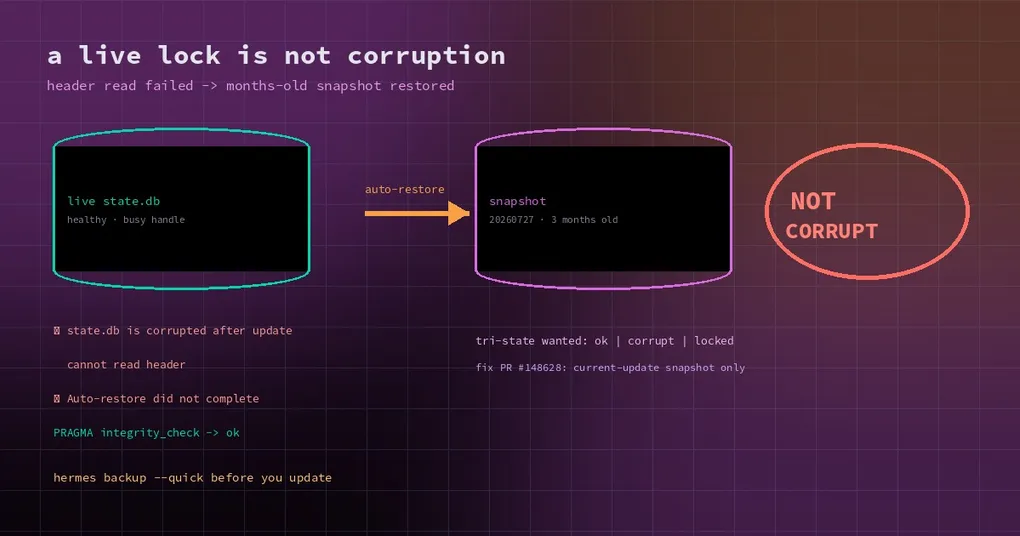
Wednesday morning you open Hermes to continue yesterday’s work. The recent sessions are gone; the list stops in July. Three months of conversations, cron history and messages are not there. The update log has three lines: state.db is corrupted after update, cannot read header, Auto-restore did not complete.
Your first thought is that the database broke. Your second is whether those three months are recoverable. The truth is stranger than either: the database was never corrupt. The update pipeline read “this file is currently in use” as “this file is damaged”, overwrote it with a snapshot from three months earlier, and then reported a failure for an overwrite that had already succeeded.
The timeline of a no-op update
The incident report quotes the log directly — a routine Windows 11 update from v0.22.5 to v0.22.6, default profile, state.db around 1.19 GB:
22094  build ends — code no-op: apply/snapshot SKIPPED (so NO fresh snapshot was taken)
22098  ⚠ state.db is corrupted after update (default home): cannot read header
22100  ✗ Auto-restore did not complete
Those three lines are the whole story. The update carried no real code change, so the snapshot stage was skipped — no fresh recovery point was created. The integrity check then read the state.db header during the pause window, failed, and declared corruption. The restore logic found exactly one snapshot on disk, state-snapshots/20260718-132211-pre-update, three and a half months old. It verified, so it was used to overwrite the live database. The overwrite worked (the post-restore runtime_epoch was (44, 'offline-restore'), the stamp that path writes), but the post-restore verification repeated the same header read, failed again, and the run ended with “auto-restore did not complete”.
A second reporter hit it 24 hours later with a bigger install: 531 sessions and roughly 81,500 messages replaced with the state from July 27.
Three defects, stacked
Any one of them alone would be survivable. Together they destroy data.
1. “In use” and “corrupt” were the same answer
In hermes_cli/sqlite_safe_read.py, read_header_bytes_preopen() returns None in two cases: a live tracked connection to that database exists in the reading process, or the raw header read raises any OSError. On Windows, a sharing violation caused by another process holding the file is exactly that OSError.
backup.py::verify_sqlite_integrity() maps None straight to a cannot read header failure, and the caller cannot tell why. The function’s own comment says verification targets offline snapshots and backup artifacts — but the update guard points it at the live profile home, inside a window where the gateway is only paused, not exited.
Read the same file through a read-only connection or PRAGMA quick_check and it is fine. After the fact, on the same machine and the same file, PRAGMA integrity_check returned ok and verify_sqlite_integrity returned valid. That is not luck; it is a misclassification.
2. No snapshot on a no-op update
The restore logic assumes a freshly taken snapshot always exists. When the update applies no code changes, the snapshot stage is skipped entirely, so the only restore target is the oldest thing on disk. “Auto-restore” then becomes the data-loss event, and nothing checks how much older that snapshot is than the data it is about to replace.
3. A successful restore reported as a failure
The restore ran, and the database really was swapped for the old snapshot. The post-restore check then used the same read that fails, so the run printed Auto-restore did not complete. Open the database the next day and you see a healthy but rolled-back file plus a log line that is wrong in both directions: it was not corrupt, and the restore did happen.
Your data is probably still in the snapshot — stop writing first
Three practical checks:
- Stop using that profile. Every new write into the rolled-back database makes it harder to tell old data from new.
- Look at the snapshot directory. Each entry under
state-snapshots/is timestamped, so the one that was restored is obvious. The three-month-old database is still sitting there, and it is not junk. - Re-verify the accused file. If the pre-update database still exists somewhere, open it read-only and run
PRAGMA integrity_check. It will very likely returnok— which tells you whether you are holding a misjudged healthy file or a genuinely damaged one.
If it was misjudged, swapping the old database back is usually more reliable than patching the current one, and exporting sessions is the safety net either way:
hermes backup --quick                  # a critical-state snapshot before updating
hermes sessions export backup.jsonl
Where the fix stands
Two tracks are in motion:
- #148628 (PR, open): automatic recovery may only use the snapshot that the current update recorded for that profile. If it is absent, missing its database, or fails validation, the guard leaves the live database untouched. That also removes the false “did not complete” label, because there is no stale snapshot to fall back to.
- #128350 (tracked separately): classifying the SQLite lock state — making the header verdict tri-state (
ok/ corrupt / temporarily unreadable) and never restoring on “unreadable”.
Neither is in the v0.22.7 tag, so the stable build you install today still behaves the old way. The risk window is open.
How to run updates from now on
This is a textbook case of verification code pointed at a target it was never designed for. Four habits cover it:
- Run
hermes backup --quickbefore updating, especially on Windows and on multi-gigabyte stores. It takes seconds and is the only step that actually saves you here. - Check the dates under
state-snapshots/. If the newest snapshot is a month older than your data, you have no recovery point. - Do not read “restore succeeded” as “data is safe”. A restore is a rollback, not a repair; the first job afterwards is finding out what was lost, not continuing to work.
- Treat
cannot read headeras a lock first. On Windows, another process holding the file is normal, not exceptional.
The short version
The database was fine. The judgement that it was broken was not. Locked, corrupt, and temporarily unreadable are three states that need three different responses; collapsing them into one costs three months of sessions. The fix is on its way, but the protection available today is the old one: back up before you update.
Further reading: self-healing a damaged state.db, exporting and backing up sessions, a careful upgrade routine, what else is in the v0.22.7 window.