v0.22.7 unpacked: four changes you will notice today inside a 174-PR patch
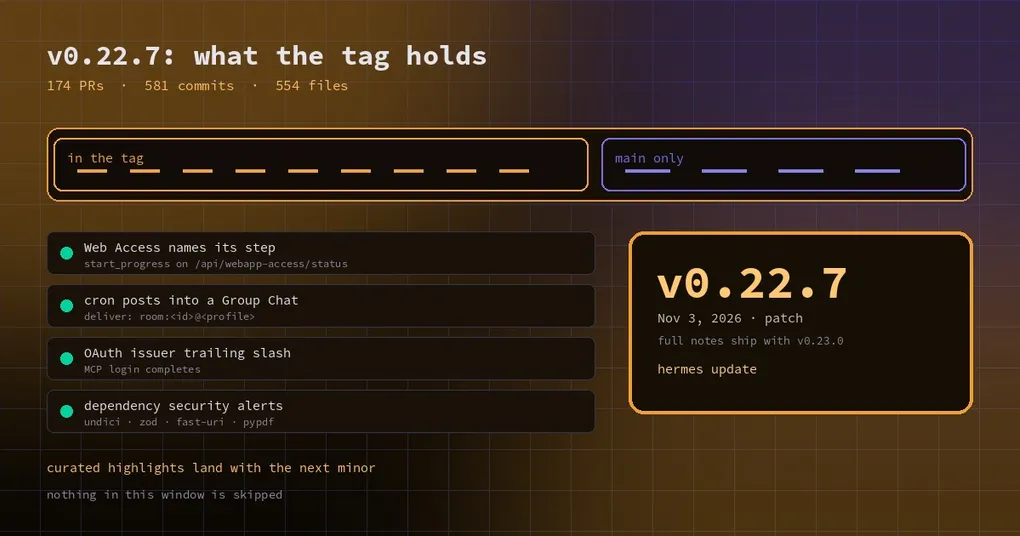
Thursday afternoon, you are about to roll the latest build across a handful of team machines. You open the release note and get one paragraph plus a line saying the full curated write-up ships with v0.23.0. What you actually need answered is narrower: will my colleagues’ daily clicks change, what is missing from this tag, and should I upgrade now or wait?
This post answers those three questions for v0.22.7. Published on November 3, 2026, it is a pure patch release whose job is to turn the merge queue since v0.22.6 into a version number you can install, roll back, and pin in a deploy manifest.
How big the window is
The published measurements are taken at commit b200f5bc60e:
- 174 merged PRs
- 581 non-merge commits across 554 changed files, +24,012 / −3,144 lines
- 29 closed issues
That is an order of magnitude smaller than the previous roll-up: v0.22.6 packaged 776 PRs and 3,448 commits. The intent is clear — not another feature release, but a stable point for two weeks of fixes. The note is explicit that full curated documentation for everything from v0.22.0 onward lands with v0.23.0, and that nothing in this window is skipped.
Past the numbers, these are the changes that actually reach you.
What is already in this tag
1. Web Access Start now names the step it is on
Clicking Start in the desktop Web Access pane does three things in one request: build the webapp (minutes the first time), register Nous sign-in, and restart the gateway. The pane used to show a single “Starting” for the whole ride, so a multi-minute build looked stuck, and reopening the pane mid-build handed you another Start button as if the first click had vanished.
Now the pane names the step — building, setting up sign-in, restarting — and counts how long Start has been running. Progress is tracked by the backend per gateway as start_progress on /api/webapp-access/status, which is why a reopened pane or a second window shows the same state; the pane re-reads that status once a second only while its Start request is pending and the window is in view. An older backend without the field is not polled at all.
If anyone on your team has described the first Start as “it looked like it hung”, this release removes the guesswork.
2. Scheduled jobs can post into a Group Chat
Bot Mode group rooms are now a real delivery target. A cron job’s deliver field accepts:
deliver: room:<room_id>@<profile>The output lands in the room as one message labelled with the job name and a Scheduled tag. The important part is the wake rule: only the bots you @mention take a turn. A scheduled post that names nobody stays a message in the room and starts no model call; @all addresses everyone. A failure notice is also posted, and never starts a round.
Rooms also gained two fields every member sees at the top of its turn, edited from Room settings:
- Purpose — what the room is for, up to 500 characters
- Shared notes — up to 4 KB
Write “this is the ops room, check the on-call sheet first” once instead of repeating it in every message.
The same batch added lead routing, opt-in per room: when a message names nobody, a lead bot decides who should take it and the room shows a quiet line such as ada gave this to linus, so you can see the pick and correct it. Defaults are untouched — rooms without a lead still run the serial round-robin where everyone answers. For teams where five or six bots in one room all pile onto every message, this switch is worth trying.
Group rooms also adopted the native chat layout: a single column, with each member’s live state visible in the roster instead of guessed.
3. The Telegram card points at setup that works on Team Gateway
If you run Telegram on a Team Gateway, the Hermes Cloud card used to route you into a single-machine setup flow that dead-ended on permissions. It now points at Portal account linking, which works under Team Gateway. Small change, but it was a hard blocker for the shared-bot deployment model.
What is still main-only
This is the part that bites during upgrades: a merged PR on GitHub does not mean the change is in the tag you just installed. Several fixes landed on main after v0.22.7 was cut and will wait for the next release:
- Dependency security advisories — undici, zod, fast-uri, qs, pypdf and pyasn1 alerts that met the release-age threshold are cleared.
- MCP OAuth issuer trailing slash — logins for issuers that differ only by a trailing slash (Otter.ai among them) now complete.
- New chats on remote desktop — public-ticket connections failed every new chat with
Session unavailable / invalid_params, because the canonical session-authority wire was only selected when the URL carried the privatenative_dialmarker, even though the gateway already advertisedsession_authority: trueingateway.ready. The fix negotiates from the advertisement. - A smaller skill library — seven optional skills are retired and the Notion, Airtable and Shopify vendor repos become trusted sources.
- Minimized desktop windows — less streaming work while minimized, throttled idle previews, and voice detection that keeps working when the window is not visible.
To check whether a PR is in the build you run, compare ancestry against the tag instead of trusting merge timestamps:
git fetch --tags origin
git merge-base --is-ancestor <merge_commit_sha> v0.22.7 && echo "in tag" || echo "main only"
How to upgrade
Pick the line that matches your install:
# CLI / installer
hermes update

# Docker / Hermes Cloud
docker pull nousresearch/hermes-agent:stable

# Microsoft Store app
# updates through the Store, not this tag
Desktop builds installed from the .exe / .dmg have no bundled change in this release and move with the next bundled version.
Take a snapshot first, especially on Windows — not because a patch release is risky, but because the updater touches state.db, and a snapshot turns a bad surprise into a boring one:
hermes backup --quickUpgrade now, or wait a week
Three quick calls:
- You use Web Access or Bot Mode rooms: upgrade. Both differences show up every day.
- You run a single-agent CLI install with no rooms or remote desktop: waiting one release is reasonable, and you collect the main-only fixes in one go.
- You run model traffic behind a TLS-inspecting proxy: hold off and read our analysis of the
SSL_CERT_FILEregression first, because that one affects every model call.
A version number is just packaging. What decides whether you act today is whether this window touched the buttons you press every morning.
Further reading: the v0.22.6 window breakdown, the Bot Mode group chat guide, all releases, install and upgrade.