Bot Mode Group Chats Grow Up: Threads, Summaries, and Rooms You Can Actually Manage
You spin up a Bot Mode group chat with three agents: one writing API docs, one hunting a bug, one adding tests. It goes great for half an hour — then you come back and every task’s discussion is mixed into a single room. To find the “API docs” thread you scroll through hundreds of interleaved messages. That’s what Bot Mode group chats used to be: one room, one flat log, every topic bleeding into every other.
That’s changing. Over the past week Hermes merged a cluster of group-chat upgrades: real threads (each topic gets its own lane), older conversations that fold into one-line summaries (rooms stop growing forever), @-mention autocomplete, and editable group names and room pictures — on top of the hide-bot, disband, and cross-machine features that shipped in v0.20.4. Group chats are finally becoming a proper collaboration tool. Let’s go through it.
Why group chats got messy in the first place
The root problem: Bot Mode group chats were “one room + one flat log”. Every agent reply landed in a single chronological stream, and the round-robin engine picked who spoke next by last-activity alone. Ask one question and three agents answer — those answers sit in the same stream as a discussion from ten minutes ago, on a different task. There was no visual partitioning and no data-level partitioning either: each member’s turn only tracked the room’s single watermark, so there was no way to tell where task A had gotten to versus task B.
That’s why group chats never scaled past small experiments. Real multi-task collaboration needs structure, not just a prettier log.
Real threads: one topic, one lane
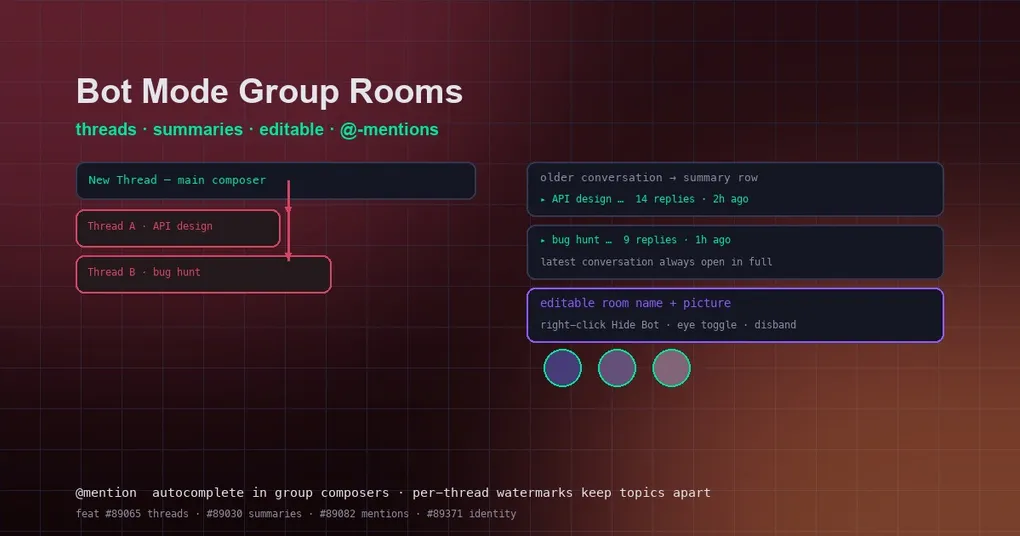
The first piece is threads (PR #89065, merged to main, shipping with the next release). Group rooms now have two clear entry points:
- The main composer starts a New Thread addressed to the whole group — daily questions and new tasks start here;
- Every thread carries its own Reply in thread box — follow-up work continues inline.
Threads aren’t just visual: they’re engine-deep. Member turns are scoped to the thread that triggered them. The round-robin drive filters the log to the current thread, watermarks key on thread::member, and responder resolution reads only that thread — deltas from thread A never leak into thread B, and parallel topics don’t eat each other’s watermarks.
Two details are worth knowing. Stranded (timed-out) replies remember their thread and get harvested back at the next turn boundary — late, never lost. And existing group rooms convert automatically: a user message after a 15-minute lull starts a synthetic thread, follow-ups stay together, so your history gets thread structure without any manual work.
The UI ordering helps too: threads sort by last activity, the newest opens by default, and older threads fold into summary rows (head text, reply count, last activity) with expand/collapse.
Automatic summaries: rooms stop growing forever
The second piece is conversation folding (PR #89030, also on main). Bot Mode defines a conversation the same way the round-robin engine scopes its deltas: everything from one user message to the next. Older conversations now fold into one-line summaries — head text · N replies · time — click to expand or collapse, while the latest conversation always renders in full.
The effect is immediate: a room with three topics used to be a flat log of hundreds of lines; now it’s two summary rows plus the newest topic fully expanded. The room’s history goes from “bottomless” to “scannable at a glance” — with no room-log model change, no new persistence, and cross-machine sync untouched.
@-mention autocomplete and editable room identity
- @-mention autocomplete (PR #89082,
main): typing@in a group composer pops the bot roster for completion — routing a message to a specific agent no longer depends on typing the handle from memory. - Editable group name and room picture (PR #89371,
main): you can set the name and picture when creating a room and change them later — the era of three groups all named “Bot 1, Bot 2, Bot 3” is over.
Tidy the roster: hide, unhide, disband
Those four items live on main (next release). What v0.20.4 (August 18, 2026) already ships is the roster-management trio:
- Hide bots (#88800): right-click a bot row → Hide Bot and it leaves the roster (@mentions, group memberships, and open chats are untouched); a header eye toggle reveals hidden bots, right-click → Unhide Bot. The hidden state syncs across machines.
- Disband group chats (#88659): no more staring at a group you can’t delete — trash button → confirm, the room is gone, and each bot’s session history stays.
- Cross-machine group chats (#88664): bots on different machines can sit in the same room, each member’s turns running on its own backend — and one bot can join several groups at once (#88980).
Getting started
To experience the full new group-chat experience, in two steps:
- Upgrade to v0.20.4:
hermes updateplus a desktop app refresh — hide/disband/cross-machine groups are available immediately; - Wait for the next release: threads, summaries, @-mention autocomplete, and editable room identity are merged on
mainand arrive with it.
The entry point hasn’t changed: create a group in the Bot Mode Bots panel, add the agents you want to collaborate with, then — open a thread, assign one task; open another thread, assign another task. Each lane advances on its own, no bleed.
Summary
This round of upgrades turns the Bot Mode group chat from “a room” into “a workspace”: threads give parallel tasks their own tracks, summaries keep history scannable, @-mentions and room identity remove the guesswork. For teams running multi-agent collaboration, this is a solid step toward making Bot Mode feel like a tool instead of a toy.
For the fundamentals of Bot Mode itself, see our Bot Mode complete guide; for other recent desktop capabilities like the Skills Hub, see the desktop Skills Hub guide.