Pinning skills into every session: skills.auto_load, so the agent never forgets your process
Monday morning you open a fresh session and paste the same three lines before you can start: follow our house template, run the QA script before publishing, never use emoji as a heading. On Wednesday you switch models and the agent forgets the template. On Friday, after a compression pass, it starts writing in a completely different structure — and all you wanted was for that process to just be there, without restating it.
The skills system was designed to be on-demand: the agent reads each skill’s short description for free and only loads the full body when a task actually calls for it. That design saves tokens, but it assumes the task looks like it needs the skill. When your process is a standing constraint — a writing style, a review checklist, a release procedure — on-demand loading often arrives too late.
What auto_load changes
In the profile’s config.yaml:
skills:
  auto_load:
    - release-notes
    - qa-multilingual
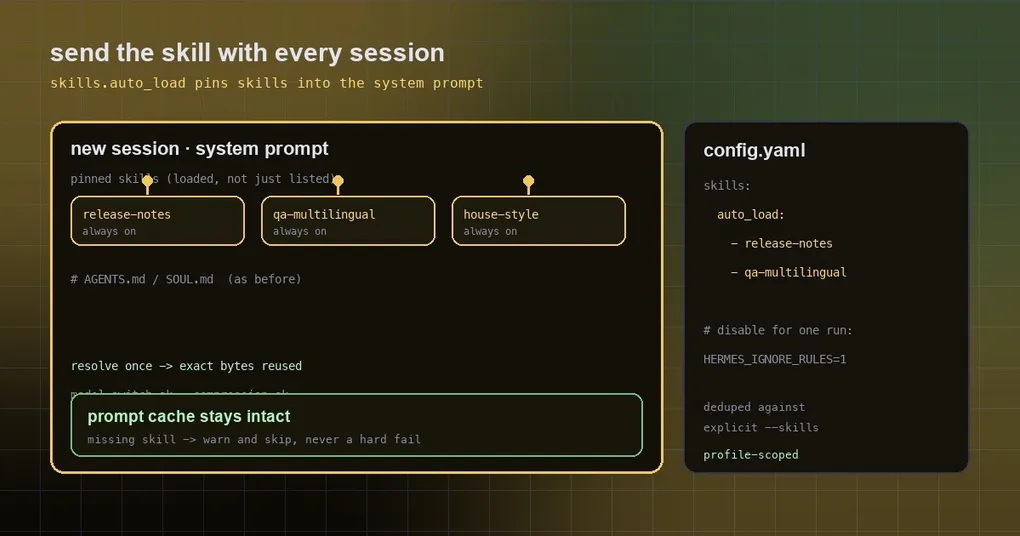
Those skills are now fully loaded at the start of every new session (injected into the system prompt as loaded skills), not merely listed in the catalog. It covers every agent surface: CLI, TUI, gateway, cron jobs and API agents. The default is an empty list, which means the on-demand behaviour you already had.
The parallel is easy to draw: Cursor ships this pattern as Custom Modes — pick a skill, pin it, keep the agent on a playbook. On the Hermes side it is a profile-scoped config list, so the playbook is there regardless of which interface or model you use today.
One detail worth calling out: skills in auto_load are deduplicated by canonical name against explicit --skills requests, and they go through the same gates — a disabled skill is not injected, and an activated one still counts toward Curator usage, so a skill nobody uses eventually gets cleaned up rather than staying “popular” forever because it was pinned.
How it differs from the other three ways a skill reaches the prompt
| Route | When it applies | Good for |
|---|---|---|
| The description index (default) | Always present, but only the short description | Most skills: the agent decides when it needs one |
skills.auto_load |
Every new session, full body loaded | Standing constraints: house style, review checklists, release procedure |
Explicit --skills at the command line |
This invocation only | One-off tasks, or trying a skill out |
| Project-local skill directories | Discovered when their trigger applies | Repository conventions that travel with the code |
They stack. auto_load is the floor, --skills is “what this run additionally needs”, and project-local skills are “the rules of this repo”.
Why it does not blow up your prompt cost
This is the most careful part of the implementation, and it is why the feature is worth trusting. Pinning a skill means every session carries a fixed block of system prompt — implemented carelessly, that breaks two things at once: request size and prompt caching.
What actually happens: the injection is resolved once, when the agent’s system prompt is first built, and the exact rendered bytes are reused across model switches, compression and static-prefix restoration. In other words it becomes part of the cached prefix instead of mutable content reassembled on every turn. The PR verifies this specifically: after the on-disk skill file is mutated, the same agent’s auto-load rendering remains byte-stable — otherwise the cache would be invalidated immediately.
The same verification covers two more behaviours: a missing skill warns and is skipped rather than breaking session start, and --ignore-rules (or HERMES_IGNORE_RULES=1) suppresses auto-load together with the rest of the auto-injected context.
When not to use it
- Do not pin a dozen skills. Every pinned skill occupies standing context; pin ten and you start paying tokens for procedures you never touch. Two or three genuinely global constraints is the sweet spot.
- Do not pin a skill you are actively iterating on. Because the render is resolved once and byte-stable, editing the skill file mid-session does not change the running session. That is the feature working as designed — it just means “edit, then start a new session”.
- Occasionally you want a clean run:
HERMES_IGNORE_RULES=1 hermes chat -q "...", or--ignore-rules; add--ignore-user-configin CI for a fully isolated run.
A real use: pin your release procedure
Say you have a fixed release routine — how the version number is derived, which QA script runs, what the section order is. Write it as a skill, then pin it:
skills:
  auto_load:
    - release-notes
    - qa-multilingual
Then check three things:
hermes config get skills.auto_load          # confirm the profile value
hermes session new                          # start a fresh session
hermes skills list                          # is it counted as loaded?
Now ask it to do the work and watch whether it uses your template on the first try, without you saying “follow our template” first. If it does not, check the skill names (a typo only produces a warning and a skip), then check that you did not start the session with --ignore-rules.
This is also what makes model switching safe: swap to a cheap model for routine work and a strong one for the hard cases, and the pinned skills come along — and because the rendered bytes do not change, the cached prefix survives the swap. If you want the same process in unattended runs too, pair it with stream-json so CI can decide whether the run succeeded, and with project-local skills so a repository’s own conventions travel with its code.
The short version
skills.auto_load looks like a small convenience and behaves like a reliability feature: it turns “a constraint I restate every time” into “the default state of a session”. You pay standing context for behavioural consistency — which matters most exactly when the agent is running with a different model, after a compression, or unattended on a schedule. To see which release shipped it and what else changed alongside it, read what v0.21.4 actually shipped; for the wider system, see the hermes skills command reference.