Put Skills in Your Repo: Project-Local Skills with a Trust Gate
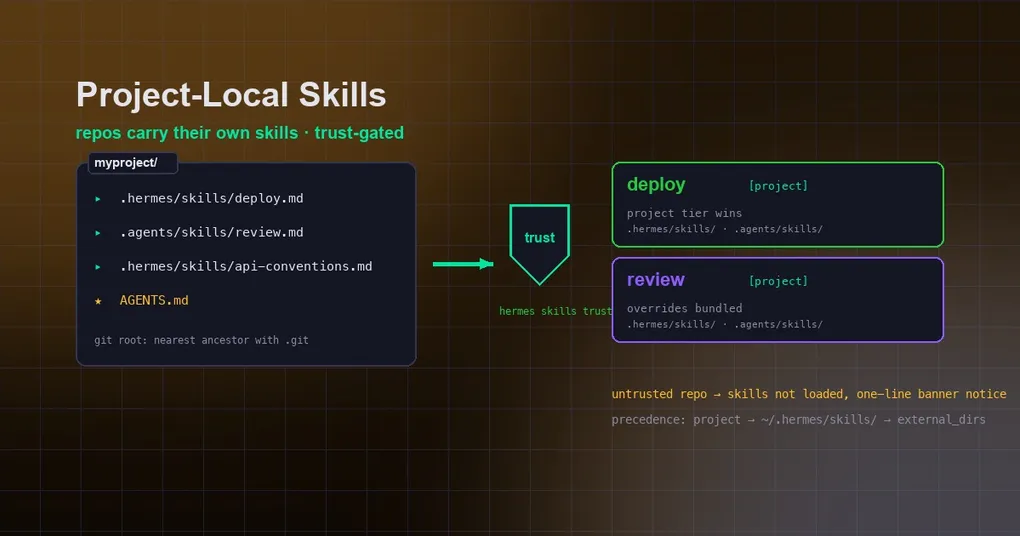
You just cloned a new repo and you want the agent to know its rules from minute one: which command deploys, how the style checks run, how tests are invoked. Your options used to be two — stuff skills into a global directory (gone on the next machine) or hope AGENTS.md covers everything. There’s now a third path: skills can live inside the repo itself, travel with it, and work for whoever clones it. Hermes just shipped that feature, called project-local skills, with a trust lock attached.
The short version: put a skills folder at the root of a git checkout, and Hermes sessions started inside that repo treat it as the highest-precedence skill tier — but for safety, nothing loads until you explicitly trust the repository (PR #88566, merged 2026-08-17).
Skills that live in the repo: .hermes/skills/ and .agents/skills/
Adding repo-local skills is just a folder:
myproject/
├── .hermes/skills/        # Hermes-native location
│   ├── deploy.md          # deployment runbook
│   └── api-conventions.md # API authoring rules
├── .agents/skills/        # cross-tool convention (shared with other agent CLIs)
│   └── review.md
└── AGENTS.md
The “project root” is the nearest ancestor containing .git — worktrees and submodules count. Launch Hermes from any subdirectory and it still finds the repo’s skills at the root.
The trust gate: hermes skills trust
Skills are executable procedure documents the agent follows, so Hermes won’t blindly auto-load skills from arbitrary cloned repos — that’s the first line of defense against prompt injection. The first time you start Hermes in a repo with project skills, the banner shows a notice:
◆ 3 project skill(s) found in /home/you/myproject but not loaded — run `hermes skills trust` to enable them.Trust the repo once (from inside it, or by path):
hermes skills trust             # trust the current repo
hermes skills trust ~/myproject # or explicitly
hermes skills untrust           # revoke
Trusted roots are stored in skills.trusted_project_dirs in ~/.hermes/config.yaml. To turn the feature off entirely (no scanning, no notices), set skills.project_discovery: false:
skills:
  project_discovery: true      # on by default
  trusted_project_dirs: []     # managed by trust/untrust
Precedence: project → local → external_dirs
Project skills are the top tier of the whole skill hierarchy: project → local (~/.hermes/skills/) → external_dirs. A repo skill named deploy overrides your same-named global skill for sessions inside that repo — that’s the point: vendored repo skills win on their home turf without touching your global profile. In the agent’s skill index, project skills are tagged [project], so provenance stays visible.
Like external dirs, project skill directories are treated as repo-owned: the autonomous skill curator never modifies them, and new agent-created skills always go to ~/.hermes/skills/.
The security boundary
The trust gate is a real load gate, not a decoration. An untrusted repo contributes nothing to the skill index, skills_list, skill_view, slash commands, or container mounts — its only surface is the one-line banner notice. Only after you trust it do repo skills enter the agent’s view.
One more detail: when the agent runs in Docker/Modal backends, trusted project skill dirs are mounted into the container under a project_skills/<idx> namespace, with the same isolation. AGENTS.md and project skills cover different ground: AGENTS.md says what this repo is; a project skill says how this repo’s work gets done. For the wider skills picture, see our 8 most useful built-in skills and skill combo patterns; for repo-level conventions, our AGENTS.md directory-chain post is a good companion.
When to use it
The sweet spot is team repositories: write deployment flows, commit conventions, and domain knowledge as skills, commit them, and every member (or CI run) that clones and runs hermes skills trust once gives their agent the same institutional memory. Personal projects benefit too — reopening an old repo no longer means re-teaching the agent from scratch.
The feature is on main — hermes update and try it.