Teaching CI to read Hermes: the stream-json event stream instead of screen-scraping
You hooked a Hermes task into CI: it reads the repository, runs the checks, writes a summary. The first run went well, so you shipped it. The second run stalled halfway through the turn and exited — and your pipeline showed green, because the wrapper only looked at exit code 0 and “stopped partway” is also 0. Then you went digging through the logs to work out which tools it called and how many tokens it burned, and found the output was written for a human to read, not for a program to parse.
The root cause is that one-shot output was always a terminal UI, never an interface. hermes chat now has a flag that turns it into an event stream.
One flag: output written for a program
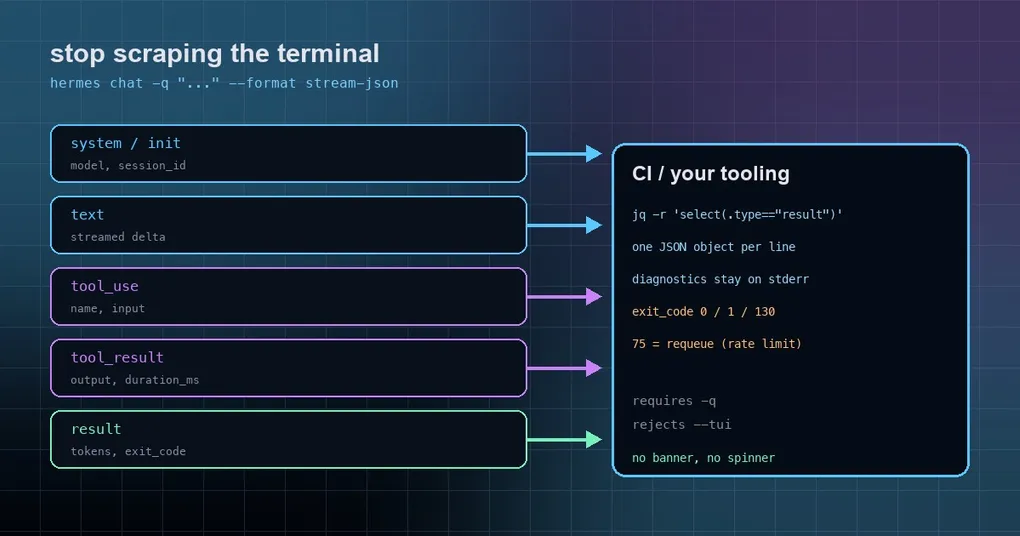
hermes chat -q "Summarize this repository" --format stream-jsonEvery stdout line is one JSON object (JSONL), while diagnostics and the session_id: line stay on stderr — so stdout goes straight into a parser. The hard constraints, up front:
- It requires
-q/--query(or--query-file) — this format exists for one-shot runs. - It implies quiet mode: no banner, no spinner, no tool previews, because “pretty” is no longer the point.
- It rejects
--tui(asking explicitly for both exits 2). - Every event carries
timestampin Unix epoch milliseconds.
The design is inspired by Muse Code’s muse exec --json: turn one unattended agent run into a contract a tool can consume.
Five event types, one table
Event type |
Key fields |
|---|---|
system |
subtype: "init", model, session_id |
text |
text — a streamed assistant text delta |
tool_use |
name, plus input when the arguments are available |
tool_result |
name, output (capped at 5000 chars), duration_ms, is_error |
result |
session_id, exit_code, text, tokens (input / output / total / cache_read / cache_write), duration_ms, and error when the turn failed |
Once a conversation starts, its terminal record is always result — including when you interrupt with Ctrl-C, where it arrives carrying exit_code: 130. So treat that record as the completion signal rather than “the process ended”: the process exit code matches its exit_code.
The exit code is the completion signal
A one-shot run (-Q, chat --oneshot, or a query with non-TTY stdio) now reports the turn’s outcome in its exit code, identically on the quiet and non-quiet paths:
0— the turn completed;1— it failed, stopped partway (partial), hit the iteration budget, or never ran at all (credentials / agent init failed);130— it was interrupted;75(EX_TEMPFAIL) — a Kanban dispatcher-spawned worker failed only because the provider was rate-limited, overloaded, returning 5xx, timing out, or the account hit a billing/quota wall, so the dispatcher requeues instead of counting a failure.
That last one deserves its own sentence: if you run unattended task queues with Hermes, handle 75 and 1 differently, or you will permanently mark “retry later” work as failed.
Consuming it in CI
The cheapest usage is to pull the final envelope with jq:
hermes chat -q "Run the repository health check and report failures" --format stream-json > run.jsonl
jq -r 'select(.type=="result") | [.exit_code, .tokens.total, .duration_ms] | @tsv' run.jsonl
To see which tools ran and how long each took:
jq -r 'select(.type=="tool_result") | [.name, .duration_ms, .is_error] | @tsv' run.jsonlAnd to hand the assistant’s final answer downstream:
jq -r 'select(.type=="result") | .text' run.jsonlIn GitHub Actions, the standard shape is to wrap the step so failures are visible:
- name: Hermes repository check
  run: |
    hermes chat -q "Review this repo and write findings to REPORT.md" \
      --format stream-json > hermes-run.jsonl
    jq -r 'select(.type=="result") | .exit_code' hermes-run.jsonl | grep -qx 0
If your consumer is Python, read it line by line — JSONL means a mid-stream failure never costs you the events you already captured:
import json, subprocess

p = subprocess.run(
    ["hermes", "chat", "-q", "Summarize the diff", "--format", "stream-json"],
    capture_output=True, text=True,
)
final = None
for line in p.stdout.splitlines():
    ev = json.loads(line)
    if ev["type"] == "result":
        final = ev
print(final["exit_code"], final["tokens"]["total"])
The flags that make CI runs reproducible
Two isolation switches pair best with this format:
--ignore-user-config— ignore~/.hermes/config.yamland use built-in defaults (credentials in.envstill load). Built for isolated CI runs, reproducible bug reports and third-party integrations.--ignore-rules— skip the automatic injection ofAGENTS.md,SOUL.md,.cursorrules, persistent memory and preloaded skills. Combined with the flag above, you get a fully isolated run.
Two more that shape the turn without touching the event format: --pass-session-id puts the session ID into the system prompt, and --checkpoints takes filesystem checkpoints before destructive file changes. --worktree runs the whole thing in an isolated git worktree, which is the right shape for “review this repo and open a PR”.
Four details you will trip over
tool_result.outputis capped at 5000 characters. For full tool output, read the session record (hermes sessions) or have the task write a file — do not expect the event stream to carry everything.textis a delta;result.textis the final answer. Accumulatetextevents to follow the stream, readresult.textfor “what this turn answered” — do not mix the two.- Never parse stderr. The
session_id:line and diagnostics belong to the human-readable channel; treating them as an interface breaks on the next patch release. - It requires
-qand refuses--tui. Both are hard validations: get them wrong and you exit 2 rather than receiving a half-working output format.
The short version
Wiring an unattended agent into a pipeline was never about “can it run” — it is about whether a machine can decide the run succeeded. --format stream-json closes that gap: the event stream makes the process observable, result.exit_code makes the outcome decidable, and tokens plus duration_ms make the cost accountable. To see which release shipped it and what else changed in the same window, read what v0.21.4 actually shipped; for the pre-flight on a CI machine, see hermes doctor and pinning skills into every session, which is how you make a CI agent carry the same playbook every time.