Mixture of Agents, explained: pay twice, get a better answer
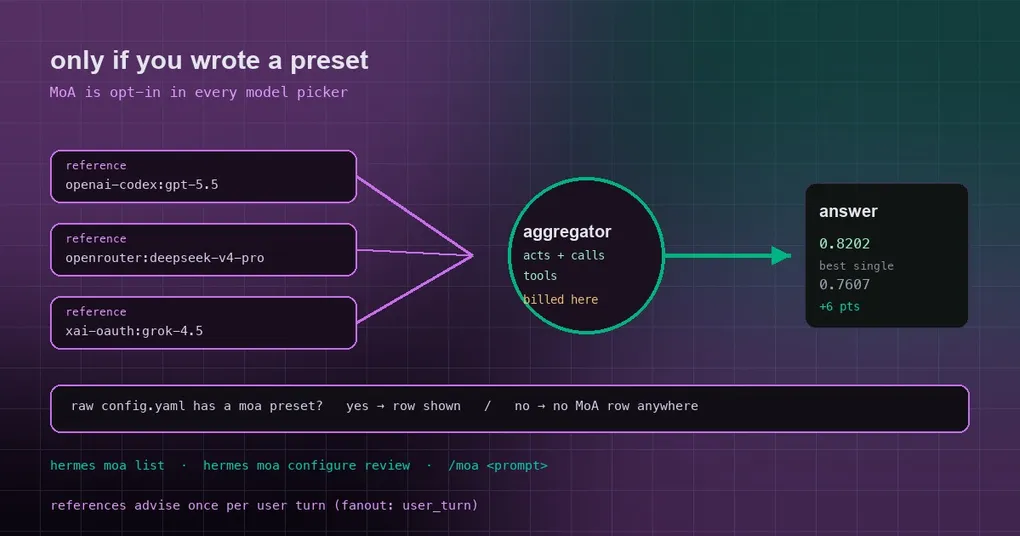
Some jobs are annoying not because they’re hard to code, but because they’re hard to think about. Rewriting the architecture of a scheduler that has been running for three years and that nobody dares to touch. Reconstructing an incident timeline out of a 45 MB log. You ask the same question three times and get three answers that are each slightly wrong in a different way — together they’d be right.
Mixture of Agents (MoA) turns “ask three models” into a pipeline: several reference models analyse the problem first, and one aggregator reads their advice and does the actual work. This post goes from how it runs to who pays for it, and ends with a recent change that is easy to misread.
1. MoA in one sentence
MoA is not a tool or a toggle — it’s a virtual model provider. Every named preset you configure shows up as a selectable model under the moa provider, so you can pick it anywhere you pick a model: CLI, TUI, gateway, dashboard, desktop app. Structurally it sits at the same level as anthropic or openrouter.
Once a preset is selected:
- Reference models run first. They receive only the conversation’s user and assistant text — not the Hermes system prompt, and not the tool-call transcript — which keeps those calls cheap and avoids strict-provider rejections.
- The aggregator is the acting model. It is called with the normal Hermes tool schema, writes the response you see, and emits tool calls, which Hermes executes as usual.
- On the next model iteration the whole MoA process runs again over the updated conversation, tool results included.
That’s the mental model: the aggregator is the protagonist, the references are advisors consulted once per turn.
2. Configuring it
Three routes, pick whichever fits:
- Dashboard → Models → Model Settings → Mixture of Agents
- Desktop app → Settings → Model → Mixture of Agents
- Command line:
hermes moa configure [preset-name]
Or write config.yaml directly. This is the documented default preset:
moa:
  default_preset: default
  presets:
    default:
      reference_models:
        - provider: openai-codex
          model: gpt-5.5
        - provider: openrouter
          model: deepseek/deepseek-v4-pro
      aggregator:
        provider: openrouter
        model: anthropic/claude-opus-4.8
      enabled: true
The config stores explicit provider/model pairs, so you can mix vendors and use two models from the same vendor. Two optional temperature fields (reference_temperature, aggregator_temperature) are simply not sent when omitted, letting each model use its provider default — the same behaviour as a single-model agent.
Managing presets from a terminal:
hermes moa list                 # show the current slots
hermes moa configure review     # create or update a preset named review
hermes moa delete review        # delete a preset
Three ways to actually use one:
/model review --provider moa        # switch this session to the review preset
/moa design a migration plan for this flaky test cluster    # one shot, then back to your previous model
/moa is deliberately one-shot convenience: it temporarily switches to the default preset, sends your prompt, and restores whatever model you were on. It never changes your model selection, so a normal prompt can’t accidentally move you onto MoA. Bare /moa with no prompt just prints usage.
3. Who gets billed
This is the part people miss: the aggregator pays for the whole run. It runs every step of the tool loop, so nearly all of a preset’s cost lands on the aggregator’s provider; the references advise once per user turn at the default cadence.
The classic trap: your main model runs on a subscription provider, and the preset’s aggregator sits on a different one. That turn is billed to the aggregator’s provider, not to your subscription. To prevent the surprise, hermes moa list and hermes moa configure print an extra line whenever the aggregator’s provider differs from model.provider, and the desktop editor and /model mark the aggregator slot as the acting, billed model.
How often the advisors run is the fanout setting, and it directly scales cost:
fanout: user_turn(the default) — advisors run once, on the first message of each user turn, and the acting aggregator works through the rest of the tool loop alone. Cheapest by construction: advisor cost does not multiply with tool calls.fanout: per_iteration— advisors re-run on every tool iteration, so their advice always tracks the latest results, at the cost of multiplying advisor latency and spend by the number of tool calls in a turn.fanout: every_n:3— the middle ground: advisors run on the first iteration of each user turn and then every third tool iteration (any N of 2 or more works). Iterations in between reuse the last advisor guidance, so the aggregator still has advice at every step — it is just refreshed every N steps. The counter resets on each new user message.
Malformed values fall back to user_turn. Note the default itself changed: before July 2026 it was per_iteration. Presets that want per-step advising set it explicitly.
4. The current change: no preset, no MoA row
This is the recent behaviour fix (PR #126509, issue #63353) that is easy to misread as “MoA was turned off”.
The model-picker row was built from the merged config, and the default config carries a synthesized MoA preset skeleton. So even if you had never written a moa: block, your model list showed an MoA provider row with a synthesized default preset — which made it look like MoA was on by default.
The row is now gated by _raw_config_has_enabled_moa_preset(), which reads your raw config.yaml without merging defaults: the row appears only if you enabled a preset yourself (or carry a legacy flat MoA config). The CLI inventory and the gateway’s interactive picker share one row builder, so both surfaces were fixed at once.
In practice: if you never configured MoA, your /model list is shorter and cleaner. If you did, nothing changes — your presets still show up exactly where they did.
5. Details worth knowing
- The prompt cache survives. Selecting a MoA preset is a normal model selection: it doesn’t rewrite past context, swap toolsets, or rebuild the system prompt mid-conversation. Reference output is appended as its own trailing message rather than merged into yours, so the cached prefix is untouched. Templates that enforce strict user/assistant alternation (llama.cpp and vLLM Jinja templates, some OpenRouter routes) reject that with a 400; Hermes retries that one request with the two adjacent user messages merged, remembers the destination’s preference for the rest of the session, and leaves every other destination on the cache-stable shape.
- Output limits are provider-owned. Preset-level and per-slot output-token caps are no longer supported; provider defaults apply instead.
- Privacy filter:
moa.privacy_filteris off by default.displayredacts only user-visible surfaces (the reference blocks in the UI and the recordssave_traceswrites);fullalso redacts the advisor text injected into the aggregator prompt. Credential shapes — API-key prefixes, JWTs, private keys, DB connection strings — are handled by Hermes’ central secret redactor. - Per-slot reasoning depth: both reference and aggregator slots can set
reasoning_effort(none,minimal,low,medium,high,xhigh,max,ultra), so one model can act as the quick advisor and another as the deep thinker. - A per-preset off switch:
enabled: falsedisables that preset’s reference fan-out, so the aggregator acts alone exactly as if you had selected it as a plain model. - Limits: an aggregator cannot be another MoA preset (recursive trees are blocked); a single reference model’s credential failure does not abort the turn — the failure is included in the reference context and the run continues; MoA is no longer listed under
hermes tools, and there is nomoatoolset to enable. - It can be a fallback: a preset works as a
fallback_providersentry (for example{provider: moa, model: <preset>}). When the primary fails, Hermes activates the preset itself — references and aggregator, withmoa://localas the virtual endpoint.
6. The official bench: about six points over its best component
On HermesBench, a two-model preset (gpt-5.5 as the reference, claude-opus-4.8 as the aggregator):
| Configuration | HermesBench score |
|---|---|
| Opus aggregator (opus-4.8 + gpt-5.5 reference) — MoA | 0.8202 |
anthropic/claude-opus-4.8 alone |
0.7607 |
openai/gpt-5.5 alone |
0.7412 |
So it isn’t averaging: it beats its strongest component by roughly six points, which is the argument for buying a second perspective on hard tasks.
7. When not to use it
MoA increases the number of model calls — one iteration can mean several reference calls plus the aggregator call. For everyday tasks, format conversions and simple lookups, a single model is faster and cheaper. It earns its cost on the jobs where one wrong assumption means redoing half a day of work: architecture design, incident post-mortems, migration plans, review of a complex refactor.
If you are tuning model routing, pair this with our auxiliary model lane guide (which calls go through the auxiliary lane) and the model overrides guide; for automatic takeover when the primary model fails, the three-layer fallback guide covers the chain. And for why MoA doesn’t disturb the prefix cache, see the cache sharing post. Command details: hermes moa reference.