An MCP server sent a screenshot and your model saw only a file path
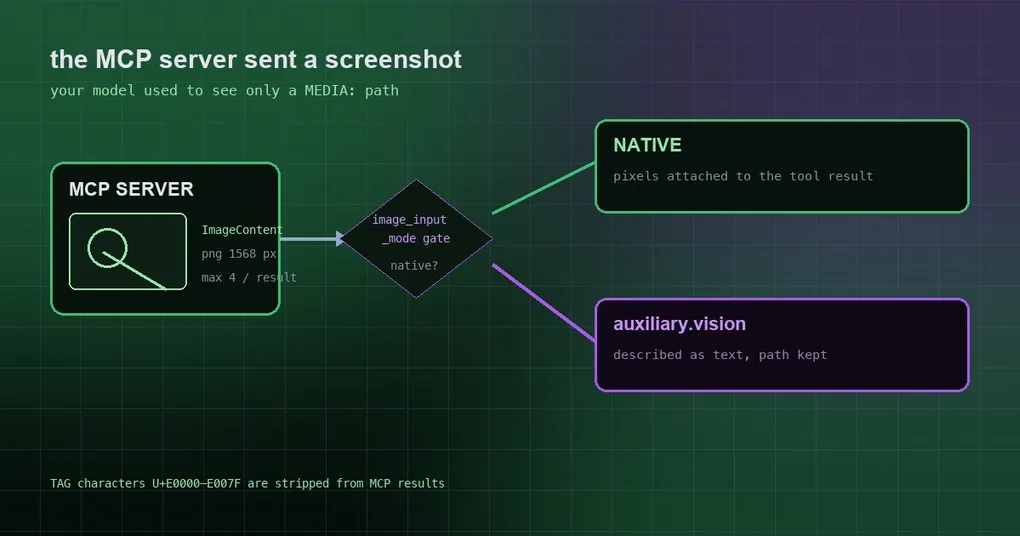
You connect an MCP server that can capture the screen — the kind that takes the shot itself and returns it as a result. You ask Hermes to look at what is on screen right now. It dutifully starts working and then reports back: all I can see is a file path. So you start suspecting the server config, then cache-directory permissions, then whether the model supports vision at all. Eventually you find out the image was there the whole time — it just never made it past the tool-result layer into the model’s hands. Two changes merged on October 6 closed this hole, and the fix is not “open a side door for MCP”: it is folding four paths into one decision.
What used to happen
An MCP tool’s ImageContent is written into Hermes’ image cache and returned in the result as a MEDIA:/path/to/image.png line. That is genuinely useful on its own — any attachment-capable surface lets you pull the file out — but the image itself was never attached to the tool result. That produced an awkward state:
- your main model can see images (
supports_vision=True); - the MCP server returned a screenshot;
- the model got a path string, and truthfully told you it cannot see the image.
The most embarrassing case is a raw cua-driver MCP server: its entire job is capturing the screen for you, and it could not see the screen at all. The same problem sat in computer_use captures, whose route only checked “does the provider carry tool-result media” — it never looked at agent.image_input_mode, nor at a catalog verdict that the model cannot see images. So on a text-only model (the commit names deepseek-v3.2 on OpenRouter) the capture went native, the agent’s backstop swapped the screenshot for a “switch to a vision-capable model” message, and the auxiliary vision model you had configured never ran. image_input_mode: text was ignored for screenshots too.
Now: one gate for all of it
The fix collapses the decision into one function: tools.vision_tools._native_tool_result_images(provider, model, cfg). It answers a single question — can this image really hand pixels to the model? — and two things must hold: image routing resolves to native (decided by agent.image_input_mode, an explicitly configured auxiliary.vision backend, and the model catalog together) and the route accepts images inside tool results.
Its docstring puts it plainly: “One predicate, so the lane never depends on which tool produced the image.” Four sources now go through that same gate:
| Source | Before | Now |
|---|---|---|
vision_analyze |
already correct | unchanged |
| Browser screenshots | already correct | unchanged |
computer_use captures |
ignored image_input_mode, went native even on text-only models |
follows the gate; text-only models get the auxiliary vision description |
MCP ImageContent |
path only | pixels attached whenever the route can take them natively |
For the MCP path specifically: the image is taken from this call’s own cache write (paths are never parsed out of server text), re-encoded into a provider-accepted format and sized to vision.embed_target_bytes (256 KiB by default, clamped between 64 KiB and 4 MiB) and a 1568 px ceiling, at most 4 per result — because the image is re-sent on every later request. The resize runs on the tool thread, off the shared MCP loop. The text half keeps its MEDIA: paths, so “give me the file” still works, and plugins calling ctx.call_mcp still receive a string.
Three modes, three behaviours
Before you reason about the gate, know the three values of agent.image_input_mode, which decide whether pixels enter the conversation history at all:
agent:
image_input_mode: auto # auto (default) | native | textauto(default): native when the model reportssupports_vision=Trueand you have not explicitly setauxiliary.vision.provider; otherwise the text route.native: always attach the image to the tool result. A text-only model then either errors at the provider or takes a last-chance text fallback — so do not turn this on for models that cannot see.text: always pre-analyze withvision_analyzeand prepend the description. The point of this lane is that pixels never enter history — the right setting when you do not want screenshots going to your main model, or when your provider bills per image.
One older rule is worth remembering: proxy aliases the catalog does not know go to the auxiliary vision model under auto. To keep those native, set native explicitly.
A practical conclusion: if you run a screenshot-style MCP server and your main model can already see images, the default auto will now just work. And if you previously switched image_input_mode to text to work around “the model cannot see the image”, you can move it back to auto so it gets the pixels — at the cost of carrying that image on every request.
Two security details that are easy to miss
MCP results are untrusted input, so these two matter:
- Invisible TAG characters are stripped. The U+E0000–U+E007F range renders as nothing in terminals and chat UIs but is fully visible to the model — the classic smuggling channel for prompt injection from a malicious or compromised server. Hermes strips them from tool results, resource content and tool descriptions, while legitimate emoji tag sequences (regional flags such as 🏴) are preserved.
- Vendor
_metais surfaced; protocol-reserved keys are not. When a server attaches a_metamapping (vendor namespaces likecom.example/handoff), it is passed to the model alongside the result. Keys under protocol-reserved prefixes such asmodelcontextprotocolormcpare dropped, and if nothing model-facing remains the_metafield is omitted entirely.
A short self-check list
- The model cannot see MCP images → confirm which lane this route takes: is
agent.image_input_modeset totext, and isauxiliary.vision.providerexplicitly set (which forces the auxiliary description)? - It says the image is too small to read → raise
vision.embed_target_bytes(up to 4 MiB), remembering that it is re-sent every turn and eats context in long conversations. - One result carries many images → at most 4 are attached; the rest stay as
MEDIA:paths in the text, so ask for the one you need viavision_analyze. - You want to know what is on screen without leaving the screenshot in history → set
image_input_mode: text.
Wrapping up
- MCP
ImageContentused to report only a path, so even a vision-capable model read no pixels. tools.vision_tools._native_tool_result_imagesis now the single gate, shared byvision_analyze, browser screenshots,computer_usecaptures and MCP images.- The three
image_input_modevalues:autofollows the model’s capability,nativealways attaches,textkeeps pixels out of history via the auxiliary describer. - MCP results have invisible TAG characters stripped and protocol-reserved
_metakeys withheld.
Two other pieces pair well with this one: context variables in MCP config for aligning config with context, and the MCP catalog security boundaries for hardening once third-party servers are in play.