Close the Laptop and Your /loop Dies: Why Detached Schedules Now Survive
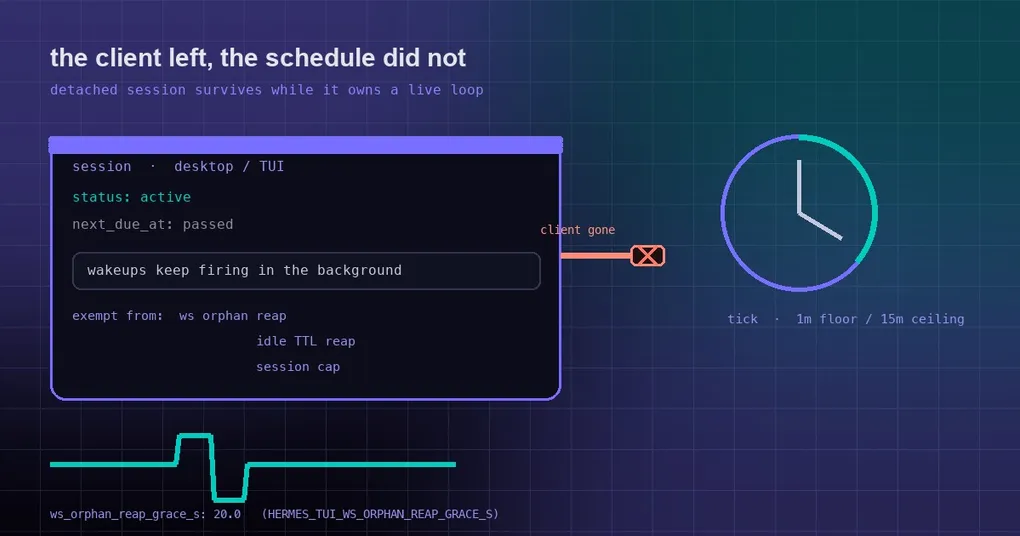
It’s 11pm. You type /loop 10m watch the CI build and tell me when it's green into the desktop app, close the laptop, and go to bed. In the morning the thread is empty — no wakeups at all. The loop’s status still says active, and its next due time passed hours ago. Nothing froze the timer; nobody was left to fire it.
That was a real defect for /loop and /heartbeat in the desktop app, the dashboard chat and the TUI: the moment the client disconnected, the session was reclaimed and the schedule went with it. PR #135393 fixed it on October 9 with a direct idea — a session that still owns a live schedule is exempt from the reapers. Here’s why it froze, what the fix does, and where it still can’t help you.
First: who fires a loop tick?
/loop is an in-session timer. Every tick re-runs your prompt as a real turn against current state — check the CI run, check the queue, read the file as it is now — rather than replaying the first answer. Ticks need someone to fire them.
There are two kinds of driver in Hermes:
- Routed loops. A
/loopset from a messaging platform (Telegram, Discord, Slack, …) carries aroute(platform + chat_id) in its state. The messaging gateway’s own wakeup scanner fires those —gateway/run_goals.py::_loop_wakeup_fire_one. They never depended on a client being attached. - Route-less loops. A loop set in the desktop app, the dashboard chat or the TUI has no route. Its only driver is the per-session notification poller thread inside the serving backend —
_maybe_fire_tui_loop_tick/_maybe_fire_tui_heartbeat_tickintui_gateway/session_notifications.py.
The second kind is the problem, because that thread is born and dies with the session record. On disconnect:
_schedule_ws_orphan_reaparms a timer whose grace period comes fromws_orphan_reap_grace_s— 20 seconds by default;- when it fires, an idle (
running=False) detached session is popped and torn down. Only live delegated work and a turn that is actually running are exempt; - teardown sets the poller’s stop event, so no further tick is ever claimed;
- the persisted loop state still reads
active, andnext_due_atsimply passes. On reattach the overdue tick fires once — no burst of catch-up ticks.
The TTL reaper (_reap_idle_sessions) and the session cap (_enforce_session_cap) can collect the same session later for the same reason.
The fix: if the schedule is yours to fire, the session stays
The patch adds a check, _session_owns_live_wakeup_schedule(session), which means exactly this: if this process is the only driver of an active /loop or /heartbeat for that session, the reapers must keep the detached session — and with it the poller — alive, or the schedule freezes until a client reattaches. Routed schedules are fired by the gateway, so they never pin a session here.
All three reaping paths now ask that question first: the WebSocket orphan reaper, the idle-TTL reaper and the session-cap trim.
The boundaries are deliberate rather than “keep it forever”:
- a loop pauses on its own tick budget (both self-pacing and the budget ceiling are bounded);
- a stopped or paused schedule releases the session immediately;
- the check fails open to
False— an unreadable state store must never make a session unreapable.
A second fix landed the same day: settled interrupts
The exemption itself had a deadlock. An interrupted detached turn sets both the client-gone and the turn-cancel latches. If the active /loop then re-armed the orphan timer after that turn had already settled, neither latch ever cleared: no tick could claim the turn, and every reattach was refused with 4009, so the loop never reached its budget.
Commit 0670ba4524, merged the same day, resolves it: a settled client-gone interrupt beats the wakeup-schedule exemption. It’s a good illustration of why one state-machine fix usually needs a follow-up in the same window — and both commits are in the same batch.
Where it still can’t help
- The backend process has to stay up. A desktop-spawned local backend exits with the app. For unattended loops, run the session on a long-lived backend — a remote
hermes serve, or the dashboard. - For work that must survive restarts and terminals,
/loopis the wrong tool by design: it lives inside a session, while cron lives outside all of them. For that split, see our full cron automation guide and the hermes cron reference. - For
/loopitself — fixed intervals, self-paced cadence, the/proactivealias — the loop command guide has the worked examples.
The knob and the commands
ws_orphan_reap_grace_s defaults to 20.0 seconds and can be overridden with the HERMES_TUI_WS_ORPHAN_REAP_GRACE_S environment variable. The official configuration docs suggest raising it alongside the keepalive values if your clients reconnect slowly, and note that periodic session maintenance also completes cleanup for closed sockets and re-arms a missing orphan timer — so a detached chat can’t hold its ownership lease forever just because its initial cleanup or timer was lost.
Day-to-day usage:
/loop 5m check the deploy status and tell me if it's live yet
/loop 10m /recap
/loop            # no interval: Hermes paces itself (1m floor, 15m ceiling)
/heartbeat       # have the session report on a cadence instead of re-running a prompt
Release status
PR #135393 and the follow-up 0670ba4524 both merged on 2026-10-09, after v0.21.6 shipped on October 8, so they are on origin/main only right now. hermes update will pick them up, or wait for the next release; the wider stability picture is on our v0.21.6 release page.
The takeaway
The bug wasn’t an inaccurate timer. It was a reaper that didn’t know the session still had work pending. The fix gives the reaper one explicit question to ask — is this process the sole driver of a live schedule? — and only then withholds collection. If you want a loop to actually run unattended, upgrading is half of it; the other half is making sure the backend outlives your laptop, which is a deployment choice, not a bug.