Your whole agent in one file: desktop backup, and a cloud move with an undo button
When you replace a laptop, the thing you least want to migrate is the agent itself: dozens of profiles, a pile of skills, memory files, a cron database, and that one .env nobody dares delete. The usual approach is tar, followed by hoping every path still resolves on the other side. Moving to the cloud is worse, because now you also have to work out which half belongs to “the agent” and which half belongs to “the machine it runs on”.
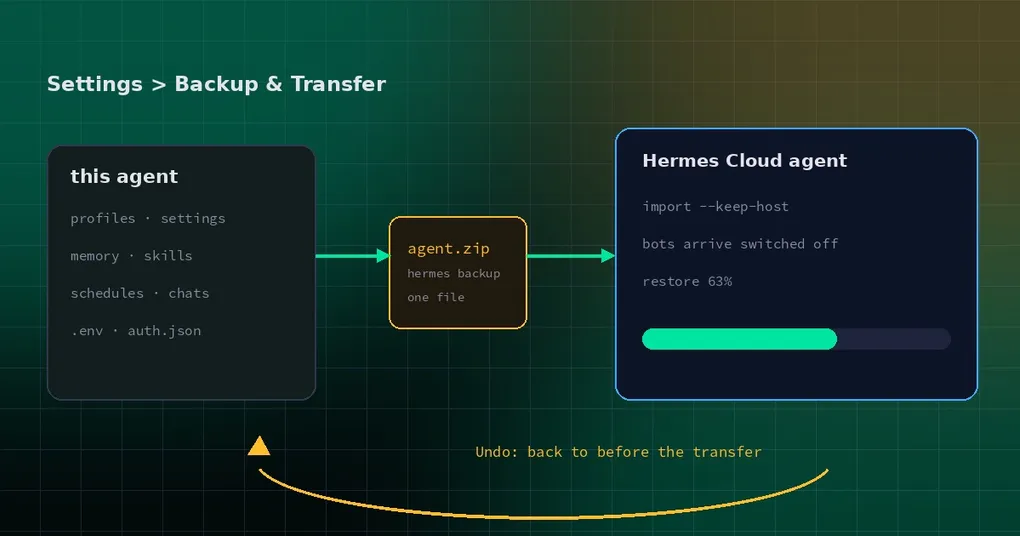
That is now one page in Settings: Settings ▸ Backup & Transfer. Two cards — back up, transfer — and both of them wrap commands you can run yourself.
Backup: one zip, including the parts you always forget
The first card is Back up this agent. It runs hermes backup and hands you the zip from whichever backend wrote it. What is inside is explicit: every profile, settings, memory, skills, schedules, chats, .env and auth.json.
“Every” is the important word. Hand-written backup scripts reliably miss three things:
- Memory and skills, because they live in their own data directories rather than in the config folder;
- Cron jobs, because the definitions live in a database, not in a JSON file you remembered to copy;
- Credentials, because
auth.jsonand.envare so used to being gitignored that the first model call on the new machine is where you discover they never came along.
The CLI is the same operation, with a few flags worth knowing:
hermes backup                                 # full backup to ~/hermes-backup-<timestamp>.zip
hermes backup -o ~/backups/agent.zip
hermes backup --quick --label pre-upgrade     # critical state only
hermes backup -k 5                            # keep only the newest 5 full backups
--quick is a critical-state snapshot: config, state.db, .env, auth, cron. Before an upgrade, or when all you want is to preserve “this machine’s identity”, it is much faster than a full backup. -k handles retention: the newest 3 full backups are kept by default, and 0 keeps everything.
A transfer is not a new format
The second card is Transfer to Hermes Cloud. The implementation detail matters, because it decides whether this feature locks you in: there is no separate migration format. A transfer is an ordinary hermes backup, restored on the cloud agent with hermes import --keep-host.
So the same thing is available from a terminal, or in CI:
# 1. on the source machine
hermes backup -o ~/agent-move.zip

# 2. on the target machine
hermes import ~/agent-move.zip --keep-host
--keep-host is the interesting half. A plain import lays the backup down as-is, which would overwrite the target’s own identity along with everything else. --keep-host says: replace this agent with the backup, but keep what the host set up for it:
- the Nous Portal sign-in;
- the model and provider selection;
- tool-gateway, dashboard and scheduler settings;
NOUS_*/HERMES_*environment variables injected by the host.
Put differently: the backup carries who the agent is, what it remembers and what it can do; the host keeps where it runs and which identity it speaks with. That is what makes it safe to overwrite a cloud agent whose configuration the platform manages.
The undo point: back up, then overwrite
The dangerous outcome of a migration is not failure. It is half failure: some files replaced, a profile created but incomplete, a service that starts and does not work. You cannot go back, and you cannot tell which state you are in.
Three designs in this flow exist to prevent that.
First, it takes its own parachute. Before anything is replaced, the target agent is fully backed up. That backup is the undo point, and every later undo returns to it — no recursion, no drift.
Second, you have to tick a box. The confirm panel lists what will be replaced and what the agent keeps, and you must tick “I understand this replaces <agent>” before the button works. It feels like friction; it also eliminates “I thought this was a sync”.
Third, failure names files. If the restore fails part-way, the error screen lists the files that could not be restored and offers Undo (back to before the transfer) and Retry. Undo always uses the first undo point, no matter how many retries happened in between.
One more detail: progress has three stages — back up, upload percentage, restore — and Cancel only exists during backup and upload. Once the restore starts it cannot be stopped, and the button disappears rather than silently doing nothing. An interrupted restore is more dangerous than a finished one.
Why the bots arrive switched off
If the source machine runs Telegram, Discord or similar bots, after the transfer you will find them off on the new machine — token and settings intact, just not started.
That is deliberate. The desktop transfer passes --messaging-off, so every messaging bot in the backup arrives switched off and the machine it came from keeps answering. Otherwise two machines fight over one bot token, and the behaviour becomes unpredictable: duplicate replies, lock contention, each kicking the other’s connection.
The sane order is: transfer → confirm the cloud agent looks right → turn each bot on from the Messaging page → turn the corresponding bot off on the old machine. The desktop app only suggests turning local bots off after the transfer is done, not before.
Details you will notice
- The section sits at Settings ▸ Backup & Transfer, right after Sessions. It is built in, not a plugin; the deep link is
/settings?tab=backup. - ⌘K has two entries —
Back up this agentandTransfer to Hermes Cloud— both opening the section. - The old
/move-to-cloud?agent=Xroute (hermes://open/move-to-cloud?agent=X) now redirects here and preselects that agent. - On a Webapp served by Hermes Cloud the section shows only the Backup card, because “move to the cloud” is meaningless there.
- A cloud agent that predates the feature is caught before upload: “This cloud agent needs a Hermes update before it can receive a transfer,” instead of a failure halfway through.
The transfer itself tolerates interruptions: uploads are chunked, a late retried chunk cannot truncate newer bytes, and starting an upload reclaims abandoned ones. An undo removes the profile the transfer created, but does not delete the cloud agent’s own workspace or HOME dotfiles — those were not produced by the transfer.
When to use it
- New machine: whole-agent migration beats copying directories one at a time; take a
--quickidentity snapshot first, then a full backup. - Local to cloud: keep the agent always-on, with the local copy as the backup.
- Cloud to local: works in reverse too, but remember the host’s provider settings are preserved, so do not expect the cloud credentials to come back with it.
- Before an upgrade:
hermes backup --quick --label pre-upgradeis cheap insurance.
If you care how credentials are stored inside a backup, read keychain and secret encryption. Other hermes import flags are in the command reference, and the backup command in hermes backup.
The short version
The value here is not “a new button”. It is that three easy-to-botch things became defaults: the backup includes the parts you always forget, the migration has an undo point nothing can overwrite, and two machines cannot fight over one bot token. If you would rather do it by hand, it is two commands — hermes backup and hermes import --keep-host.
Shipped in the v0.23.2 window.