Your Self-Hosted Chat UI Can Finally Watch the Agent Think
Ten at night, on the self-hosted web UI you set up for your team, a colleague types “check what broke in last week’s build logs.” A spinner turns. Then nothing. Twenty seconds, forty seconds — they assume it hung and refresh the page. The agent was actually deep in the logs, running commands, arguing with itself about which failure mattered. The OpenAI-compatible layer just never told anyone.
If you run Hermes as a backend behind Open WebUI, LobeChat, LibreChat, NextChat, ChatBox, or a frontend you wrote against the Vercel AI SDK, that silence is the worst part of the experience. PR #115797, merged on September 19, closes the gap: those frontends can now show the model’s thinking as it happens, the same way the official surfaces do.
The problem was never the agent — it was the transport
Hermes has carried a reasoning stream for a while. The agent maintains a reasoning_callback, and the CLI, the desktop app, and the web dashboard all use it to render a live “thinking” block.
The two OpenAI-compatible SSE writers never installed that callback. Reasoning was dropped exactly at the transport boundary — the same answer you could watch being reasoned about in a terminal arrived at your own frontend as dead air. The fix itself is unglamorous: wire the existing callback into the writers, advertise it, document it.
Two streams, two event shapes
The details matter, because different frontends consume different formats.
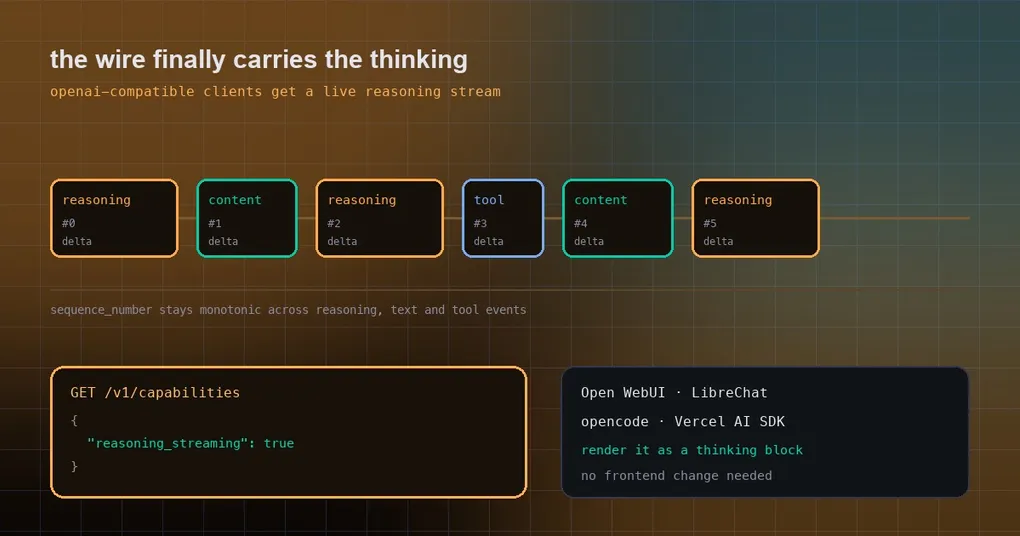
/v1/chat/completions (streaming): reasoning deltas arrive as choices[0].delta.reasoning_content, while answer text stays in delta.content. reasoning_content is the DeepSeek-style field that Open WebUI, opencode, and the Vercel AI SDK already recognise — they render it as a collapsible thinking block without any frontend change on your side.
/v1/responses (streaming): each thinking burst is a spec-native reasoning output item. The event order is response.output_item.added (with item.type set to reasoning) → response.reasoning_summary_part.added → one or more response.reasoning_summary_text.delta → ..._text.done → ..._part.done → response.output_item.done. The item closes before the next message or function_call item opens, and it is echoed in response.completed:
{"id": "rs_...", "type": "reasoning", "status": "completed", "summary": [{"type": "summary_text", "text": "..."}]}sequence_number stays strictly monotonic across reasoning, text, and tool events, so a client that assembles by sequence number cannot reorder anything.
Non-streaming works too: /v1/chat/completions returns the turn’s reasoning on choices[0].message.reasoning_content, and /v1/responses returns the same reasoning output item ahead of the message.
Capability discovery: GET /v1/capabilities now advertises features.reasoning_streaming: true. A client can decide whether to render a thinking block or fall back to a quiet mode without guessing at version numbers.
Wiring it up in three steps
If your API server is not enabled yet (it is off by default), turn it on in the environment file:
# ~/.hermes/.env
API_SERVER_ENABLED=true
API_SERVER_KEY=change-me-local-dev
# Only needed if a browser must call Hermes directly — keep it an allowlist
# API_SERVER_CORS_ORIGINS=http://localhost:3000
Start the gateway:
hermes gateway
# [API Server] API server listening on http://127.0.0.1:8642
Confirm reasoning actually shows up before you touch the frontend:
curl http://localhost:8642/v1/chat/completions \
  -H "Authorization: Bearer change-me-local-dev" \
  -H "Content-Type: application/json" \
  -d '{"model": "hermes-agent", "stream": true,
       "messages": [{"role": "user", "content": "What is 23 times 47? Work it out first, then answer"}]}'
The stream alternates delta.reasoning_content and delta.content chunks. Point the frontend at http://localhost:8642/v1 and you are done — a UI like Open WebUI already knows how to draw a thinking block; this is the first time there is something to draw.
Three things worth knowing
One: you can turn it off, but not globally. Reasoning is emitted only when the model actually produces reasoning and the resolved reasoning config allows it. The per-request opt-out is model_options.reasoning.enabled: false. If your model does no reasoning at all, you will see nothing here, which is expected rather than broken.
Two: do not expose the API server to the internet. Behind that port is the agent’s full toolset, terminal commands included. API_SERVER_KEY is required for every deployment, including the default loopback bind. For cross-machine access, use an SSH tunnel or Tailscale instead of binding 0.0.0.0 and hoping.
Three: this lives on main for now. The PR merged on September 19; the newest tagged release is v0.21.3 from September 14. To use it today you follow main (hermes update, or the branch instructions in the repo), or you wait for the next tag. On older builds /v1/capabilities simply lacks the field, and a frontend that checks it falls back cleanly.
Why this is worth a post
People who self-host a frontend usually do it for one of two reasons: a nicer interface, or data that never leaves their network. Both groups hit the same wall, because the value of an agent is precisely the deliberation before the conclusion — and the OpenAI-compatible layer used to hand over only the final full stop.
If your concern is the opposite direction — making the model think less and spend fewer tokens — that is a different knob: reasoning_effort is adjustable per request, which we unpacked in the reasoning-effort guide. One controls whether it thinks; this one controls whether you can watch. Both now exist.
Starting from scratch? The install guide covers the backend, and the gateway command reference covers the other platforms it can serve. Next time a colleague stares at a spinner, at least they will know it is thinking.