The screenshot is right there, but Hermes says the file is missing: there is an invisible space in the name
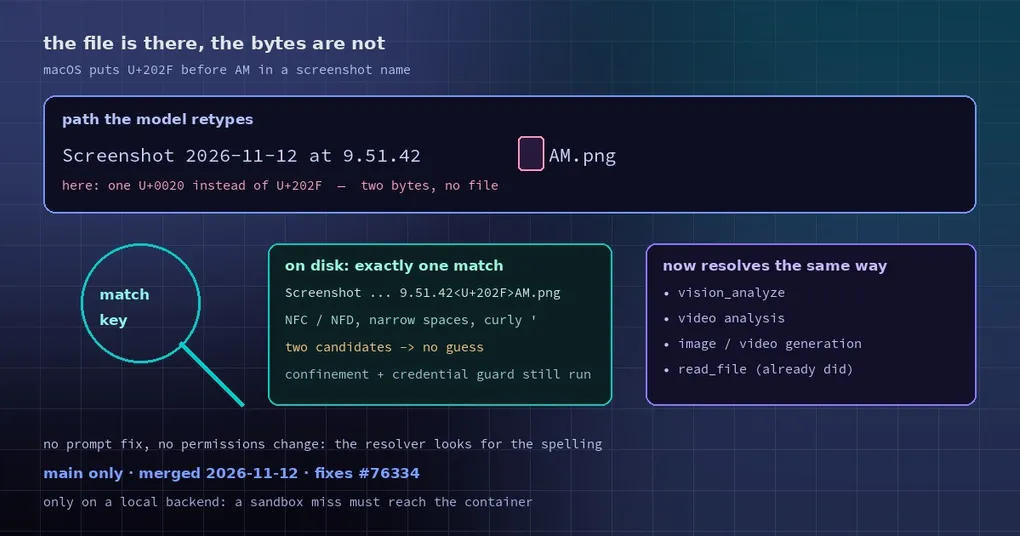
You drop a fresh screenshot into the chat and ask Hermes to look at the error on screen. The file saves fine, the path prints fine, and then the step that opens the image fails: media file not found. You check Finder. The file is sitting right there, with exactly that name.
The catch is in “exactly that name”. When macOS names a screenshot, the space before AM/PM is not a normal space. It is U+202F, a narrow no-break space. On screen it looks identical to a plain space — a hair narrower, invisible at a glance. When a model retypes the name, it emits U+0020, and two different bytes mean the path points at a file that does not exist.
PR #154046, merged on November 12, makes vision analysis, video analysis and image/video generation find the on-disk spelling for themselves.
One character, a whole broken chain
The failure runs like this:
- The path lands in context:
Screenshot 2026-11-12 at 9.51.42 AM.png— character 26 is U+202F. - The model receives a string that looks normal, but when it generates text the spaces it produces are all U+0020.
- The image viewer calls
open()on that path, the OS compares bytes, and finds nothing. - The error says
media file not found. It does not say “one argument differs by one byte”.
The worst part is how it reads: it looks like a permissions problem or a path problem, so you go and audit paths, permissions and sandboxes while the real cause is a character you cannot see.
Small detail that made it feel inconsistent: read_file already handled this case. So the same file was readable by read_file and unreadable by vision_analyze.
The fix: match on what the eye sees, but only when one file fits
It works in two layers.
A match key. tools/file_operations_common.py gained filename_match_key, which normalises a name to “what a human reads as the same”: NFC and NFD Unicode compositions, narrow and special spaces, curly apostrophes.
A lookup on disk. _on_disk_spelling in tools/image_source.py runs after a path miss and looks in the same directory for the one file whose name differs only invisibly:
target (normalised):  screenshot 2026-11-12 at 9.51.42 am.png
actually on disk:     Screenshot 2026-11-12 at 9.51.42<U+202F>AM.png   <- match
Two details are worth keeping in mind:
- One candidate only. If a directory holds both
a AM.pnganda<U+202F>AM.png, it does not guess — reading the wrong image is worse than failing. - Security still applies. The resolved path goes through the same media-directory confinement and credential-read guard, so the correction bypasses no boundary. It also only runs on a local backend (
TERMINAL_ENV=local); under a sandbox a miss must still reach the in-container read, or the sandbox boundary would break.
Which tools now benefit
One resolver for “the spelling on disk” is shared by these call sites:
| Tool | Before | After |
|---|---|---|
vision_analyze (looking at an image) |
media file not found |
finds the file, analyses normally |
| Video analysis | the same miss | finds it too (_materialize_video returns the U+202F path) |
| Image / video generation given a local reference file | failed outright | _confine_source_images rewrites image_url and references to the on-disk spelling, leaving URLs and genuinely missing files alone |
read_file |
already handled it | unchanged |
The clearest line in the verification record: for the same screenshot, the old branch’s tool row reads "success": false … media file not found, the new branch’s reads "success": true, and the model then answers the colour in the image correctly. A new test file, tests/tools/test_image_source_unicode_space.py, fails on the old branch with SourceNotFound.
What you can do yourself
The fix means Hermes copes on its own, but you can also sidestep it:
- Rename the file.
shot-1.pngand no invisible character can ever enter the name. Worth doing in any batch script. - To see whether hidden characters are there:
ls -bescapes invisible characters, or printrepr(path)in Python — U+202F shows up immediately. - Prefer drag and drop. Letting the tool take the path itself (drag, attachment upload) beats having a model retype a long filename.
This was never only about one character. NFD filenames (common on macOS for accented names) and curly apostrophes caused the same class of miss, and the same match key now covers them.
If image errors keep coming back, two related reads: the vision context budget for what happens after a large image is downscaled, and HEIC photos from an iPhone. Two other paths that avoid “the model retypes a path” entirely: pasting images in the terminal and the clipboard image command.
Release status
PR #154046 merged into main on November 12, 2026. It fixes issue #76334 and cherry-picks the earlier #62126 with authorship kept. v0.23.1 shipped on November 10 and does not include it. Two related issues, #76376 and #124742, covered overlapping (not identical) cases — prompt-side guidance, NFD and curly quotes — and this match key absorbs them all.
Update (2026-11-17): these changes shipped in v0.23.2 (November 16) —
hermes updatebrings them in. The “not in v0.23.1” wording above is a snapshot from publication time.