Your clipboard screenshot, as Hermes input: the hermes clipboard image command
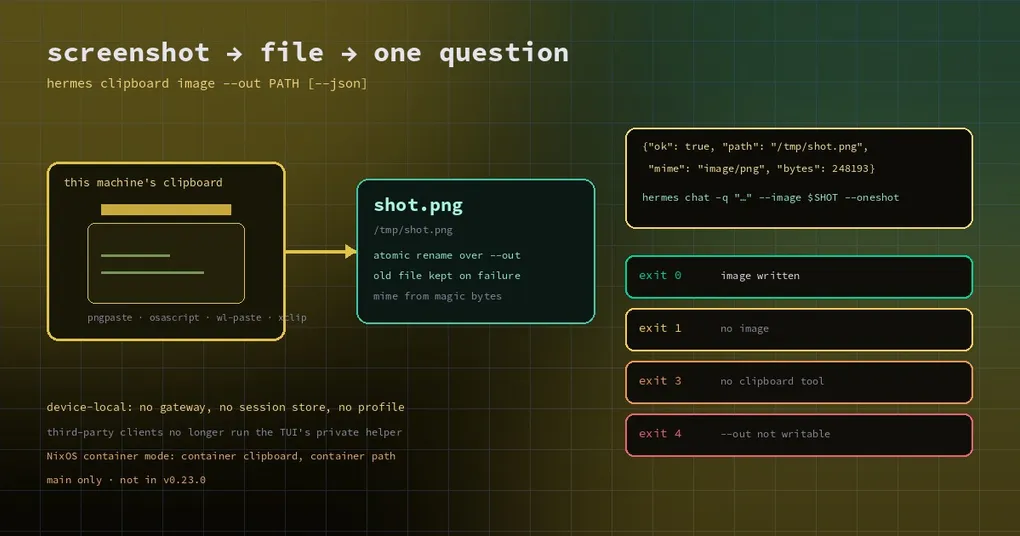
You took a screenshot and you want to ask one question about it: “which stage is this error coming from?” Sitting in a terminal, the natural move is Ctrl+V. That move does not exist inside a script — scripts run commands, they do not press keys. So you wrote three lines of shell around xclip, discovered they do nothing on Windows, needed a different set on macOS, and eventually gave up and saved the file by hand.
The change merged on November 6 moves that into Hermes itself. hermes clipboard image writes the machine’s clipboard image to a file: it prints the path on success, and with --json it returns a stable JSON reply and a set of distinct exit codes. It reads only the clipboard of the machine it runs on — no gateway, no session store, no profile file.
The old way: run the TUI’s private script
Hermes has been able to paste images into the terminal for a while, and the implementation in hermes_cli/clipboard.py does a lot of platform-specific work. But the only exposed entry point was an internal script: ui-tui/scripts/clipboard_image.py. A third-party client that wanted clipboard images had to point PYTHONPATH at the Hermes source tree and call that script.
It worked, and it was fragile in three places at once: the path could move, the arguments could change, and even its true/false reply could change. The deeper problem was “where is the source tree?” — why would a client know where the user installed Hermes?
The new command wraps the same extractor (hermes_cli.clipboard.save_clipboard_image) in a documented command with exit codes and JSON.
One command, a file on disk
hermes clipboard image --out /tmp/shot.pngOn success it prints the path. --out is created or overwritten, and its directory is created if needed. In scripts you will usually want the JSON form:
hermes clipboard image --out /tmp/shot.png --json{"ok": true, "path": "/tmp/shot.png", "mime": "image/png", "bytes": 248193}mime is not guessed from the extension — it is read from the file’s magic bytes, so PNG, JPEG, GIF, BMP, TIFF and WebP are all identified. Normally the output is always PNG, because the extractor converts; the one exception is when you copied an image file (a Windows/WSL file drop), which is copied byte for byte and may be a jpg or a webp.
Every outcome has its own exit code
In automation the worst failure mode is not failing — it is failing without saying why. This command splits the outcomes:
| Situation | reason in the JSON |
Exit |
|---|---|---|
| An image was written | none, ok: true |
0 |
| The clipboard holds no image (text only) | no_image |
1 |
| No usable clipboard tool is installed | no_tool, plus the tools it looked for |
3 |
--out cannot be written |
write_failed |
4 |
| Bad arguments | no JSON, argparse usage error | 2 |
Keeping no_image apart from no_tool matters: one means you did not take a screenshot, the other means this machine cannot read a clipboard at all. They need different fixes. Run it on a server with no graphical session and you get no_tool, not a vague failure.
Why this deserves its own command
Because it settles a specific engineering question: reading a clipboard has to be local.
Think about how gateways are deployed. A user’s Hermes gateway may run on a remote box or in a container, while the human and their clipboard are on a laptop. If “read the clipboard” were a gateway RPC, it would read the clipboard of the far machine — useless, usually empty. So the command is deliberately device-local: no gateway connection, no session store, no profile file, strictly “write this machine’s clipboard image to this path”.
The writing half is careful too. It extracts into a private temporary directory beside the destination and renames the finished file onto --out, so on any failure the existing file is left exactly as it was — no half-written image. Overwriting an existing file keeps its permission bits, so a 0600 temporary file does not silently widen them.
Wiring it into Hermes
Once you have a path, the rest is ordinary. hermes chat already accepts --image, so one screenshot can ride along with one question:
hermes clipboard image --out /tmp/shot.png --json > /tmp/shot.json
hermes chat -q "Which stage is this error from? One conclusion and one command to check it." --image /tmp/shot.png --oneshot
Skipping the intermediate file is easy with jq:
SHOT=$(hermes clipboard image --out /tmp/shot.png --json | jq -r .path) && hermes chat -q "What is misaligned in this UI?" --image "$SHOT" --oneshotDrop --oneshot and hermes chat stays interactive, with the image attached to that one question — which is the everyday loop of “screenshot, ask, keep talking”.
The platform details you will actually hit
- macOS:
pngpastefirst (fast, more formats), thenosascriptas the always-present fallback. - Windows:
powershellfirst, thenpwsh. - Linux: under WSL it tries
powershell.exefirst; on Waylandwl-paste; on X11xclip. A failed WSL probe falls through, because WSLg may still have a workingwl-pasteorxclip. - NixOS container mode: every
hermessubcommand runs inside the managed container, this one included, so it cannot see the host clipboard and--outis a path inside the container. That is a boundary of container mode, not a bug.
One thing this is not: drawing the image. Inline images in the CLI and TUI covers how attachments and tool-produced pictures appear in the transcript. This command is the other direction — how an image gets from the clipboard onto disk — and the two are usually used together.
Can you use it today
The command is on main (November 6, PR #150285) and not in the v0.23.0 tag. Checking is trivial: if hermes clipboard --help prints anything, your build has it; “invalid choice” means it does not. It is documented in the hermes clipboard section of the CLI reference, so once you upgrade the page matches what you have.
Update (2026-11-10): these changes shipped in v0.23.1 (November 9) —
hermes updateis enough. The “not in v0.23.0” statements above are still accurate; v0.23.1 closes the gap.
And if you want to know whether this machine can read a clipboard at all, the command answers that itself: with no image available it distinguishes “no image” from “no tool”, and the latter lists the tool names it looked for — which is essentially your install list.
The short version
hermes clipboard image is a small command that fixes an interface boundary: it promotes “read the local clipboard” from a TUI implementation detail into a documented entry point with JSON and exit codes, and it states the device-local rule plainly. For anyone scripting against it, the most useful part is not the command but the four exit codes — a case statement now separates “no screenshot”, “no tool”, “cannot write” and “done”, instead of grepping error text.