The Hermes in Docker lost half its dependency tree — the image never recorded a baseline
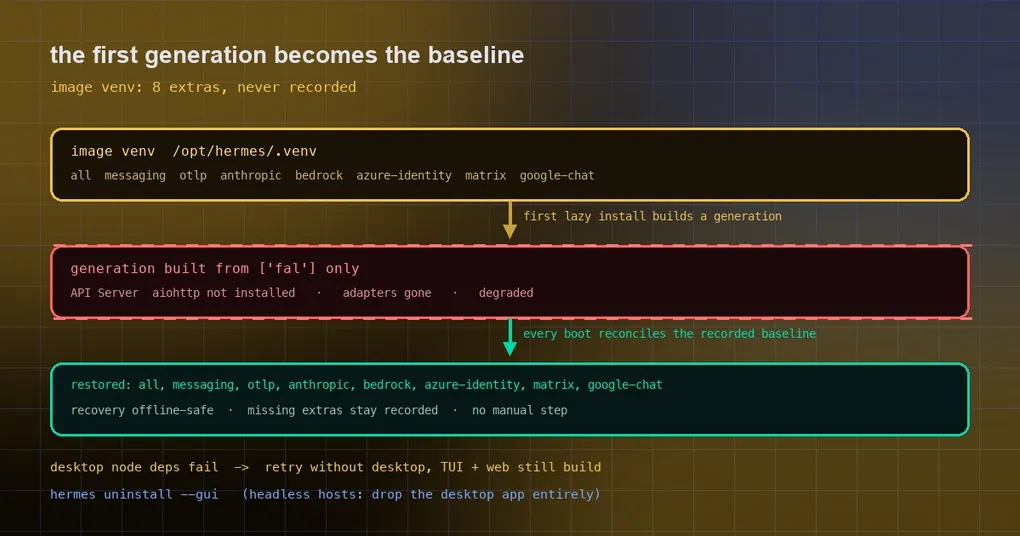
You open the Hermes in your Docker container in the morning and the API server will not come up: aiohttp not installed. The messaging adapters are gone, the MCP servers are gone, hosted agents show as degraded. You changed no configuration, the image has not moved — the only thing that happened is that the container installed one optional dependency the day before.
This is not a broken image. It is a quieter mechanism: the first dependency generation a container builds for itself becomes the baseline for every boot after it. When the dependencies baked into the image were never recorded, the first self-built generation quietly threw them away.
How a “dependency generation” works
Dependencies in Hermes are not a one-way install that stays put. They are managed by a dependency manager (PM) that produces a generation on every install or update: it records a selection (which extras should be present) plus a stamp, and that generation is what later boots are checked against.
The design rests on one assumption: the baseline is recorded, so increments can build on it. When you lazily install one optional dependency later, it should union onto the recorded baseline. If the baseline is empty, that one lazy install becomes the baseline and displaces everything else.
security.allow_lazy_installs defaults to true, which means missing packages can be installed on demand. That convenience is exactly what amplifies the problem, because any lazy install can trigger “build a new generation”.
Why containers are the perfect place to get bitten
The Docker image does something entirely reasonable on its own — it bakes eight extras straight into /opt/hermes/.venv:
all messaging otlp anthropic bedrock azure-identity matrix google-chatUnpacked, that is the gateway, OTLP telemetry, Anthropic / Bedrock / Azure SDKs and credentials, the Matrix adapter and the Google Chat adapter. Everything you need to actually run.
The trouble is that at image build time, those extras were never recorded as PM’s dependency selection. So the sequence goes:
- the container builds its first generation because of some lazy install — a plugin with its own dependencies, or you enabling an on-demand channel such as fal, parallel-web or exa;
- that generation is built from only the extra requested in that moment;
- from the next boot onward, that incomplete selection is the baseline.
That is the opening scene: API server, messaging adapters and MCP servers all gone at once. Since v0.21.6, any container on the official image that has built a generation of its own has this in front of it.
Worth saying plainly: the diagnosis was not missed. Another contributor independently reached the same conclusion at the same time — no recorded baseline in the image — and proposed a fix for new installs. What shipped does two more things on top of prevention: it repairs volumes that are already broken, and it records the requested extra list rather than an inventory of what was installed.
Why the requested list and not an inventory? Because on a real image build the inventory turned out to omit meta extras like all, cron and sms — extras that own no package of their own and therefore cannot be enumerated, yet must stay in the baseline.
Fix one: the image build records its baseline
The image build now writes those extras into the store’s dependency facts, through the very same recording path the bundled build already used. Every later install is therefore a union on top of that baseline instead of a fresh start.
Fix two: every boot restores what went missing
Prevention only helps new images. What about the volumes already broken? They heal at boot.
Each boot now compares the extras the image recorded against the selection the volume actually holds, and restores anything missing through the normal explicit sync path. A volume broken down to ["fal"], or to an empty list, recovers on its first boot with a fixed image, with no manual step.
A few edges are handled carefully:
- if the restore fails — offline, for instance — the image’s venv still boots, and the missing extras stay recorded as missing, so one lazy install before the next boot cannot drop them again;
- a recorded extra that the source no longer declares is ignored (matched by PEP 685 name);
- a malformed recorded fact (bad extras, missing or non-string stamp) reports
invalid recorded dependency staterather than silently reading as “nothing recorded”; enabled-features.jsonis deliberately not written, soallow_lazy_installsbehaves exactly as before. This change touches the baseline and nothing else.
The same failure shape, a second time: the desktop app taking the TUI down
The same batch carries another “one part fails, everything pays” example — and this time the one paying is a headless server.
A source update prepares dependencies by installing ui-tui, web and apps/desktop as one union npm ci. Only the desktop app pulls native addons that need a compiler: node-pty, electron. So an Ubuntu server that has never run the desktop app and has only g++ 9 — which rejects -std=gnu++20 — failed the whole dependency install, and the TUI and web UI were never built even though they have nothing to do with the desktop app. Every launch printed a source update could not be finished automatically (6 attempts).
Now that case retries once without the desktop app, builds the TUI and web UI as usual, and records the desktop build as owed:
Desktop app build owed: desktop dependencies failedIt also prints a genuinely useful way out:
ⓘ If this host never runs the desktop app, hermes uninstall --gui removes it and
  future updates stop building it.
On a headless machine that is the cleanest answer — do not carry the desktop app at all:
hermes uninstall --guiThe hint appears in both situations that need it: after that successful retry, and on any headless Linux update (no DISPLAY or WAYLAND_DISPLAY) that selects the desktop app.
What to check and what to do
Running in Docker:
- first confirm the symptom matches — the API server, messaging adapters and MCP servers disappearing together, with agents reported as degraded;
- pull the fixed image and restart; a broken volume restores its missing extras on first boot, and the volume does not need to be recreated;
- if you cannot move the image yet, installing the missing extras explicitly will restore that boot — but the baseline is still wrong, so the next lazy install can drop them again.
Running on a headless server:
- if updates keep failing with
could not be finished automatically, check whether the desktop app’s native dependencies are the blocker; - if this host never runs the desktop app, remove it from the checkout with
hermes uninstall --gui; - future updates then stop building
node-ptyandelectronfor a front end you do not use.
Two habits that generalise:
- dependency trouble is rarely “one package broke” and much more often a generation whose baseline was written wrong. When something suddenly loses a whole capability set, suspect the baseline before reinstalling packages one by one;
- lazy installs are convenient precisely because they turn “missing” into “the new default”. If you want long-term stability, a recorded baseline beats an ad-hoc install every time.
The short version
Both fixes in this batch are about one thing: dependency state needs a trustworthy baseline record. The Docker image baked eight extras in without recording them, so the container’s first self-built generation erased them; the desktop app’s native modules failed to build and took an unrelated TUI and web UI down with them. The first is solved by recording at build time and restoring at boot; the second by degrading to the part that is actually needed.
For the surrounding operational reading, see running Hermes in a shared container, the state.db WAL problem and what to do when an update blows up your disk. The command details live on the hermes uninstall and hermes update reference pages, and the install guide is where to start from scratch.