Your Cron Job Fired an Hour Early: the DST Bug Hermes Just Fixed
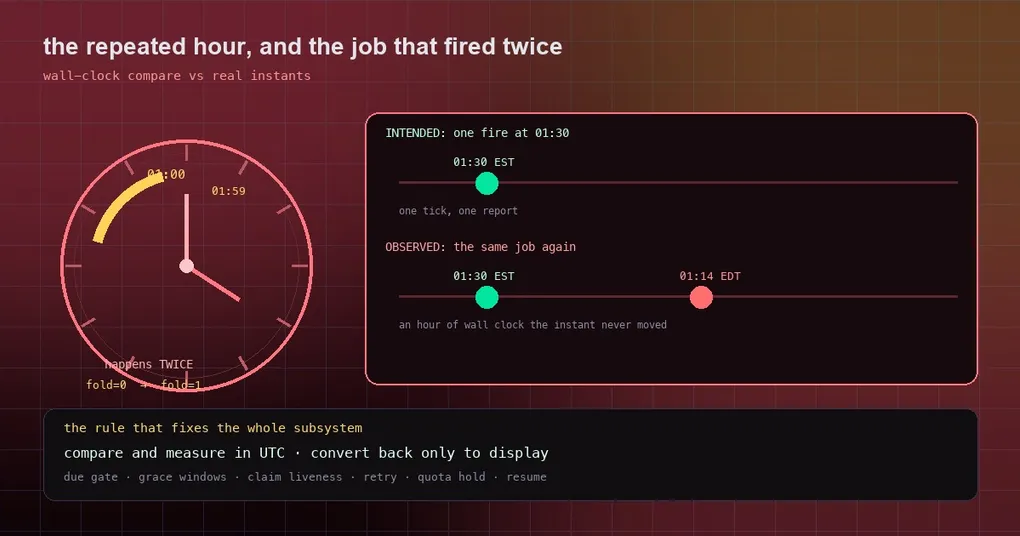
It is the night the clocks go back, and your nightly 01:30 report runs twice — or your 09:00 briefing arrives at 08:00. You changed nothing, the server never restarted, and the logs show the scheduler doing exactly what it was told. Nothing in your config is wrong. The bug was arithmetic: Python adds and subtracts aware datetimes inside one timezone by wall clock, and the repeated hour is precisely where wall clock and real time stop agreeing.
Hermes fixed it (#120314, salvaging #119710). If you run any job with a configured timezone, this is worth ten minutes of your attention.
The repeated hour is a trap for fold
Every job Hermes runs from a schedule carries an instant. The zone comes from the profile’s configured ZoneInfo — hermes_time.get_timezone() returns it, or None for a server-local install. hermes cron create has no timezone flag of its own; the profile setting is the one that counts.
Now consider a zone that observes daylight saving. At the fall-back transition, 01:00–02:00 local happens twice: once at the old offset (EDT) and once at the new one (EST). Python keeps both by attaching a fold flag — fold=0 for the first pass, fold=1 for the second.
The catch: when you compare or subtract two aware datetimes that share the same tzinfo object, Python compares them by wall clock and ignores fold entirely. So 01:11 EST, which is 06:11 UTC, was treated as due at 01:14 EDT, which is 05:14 UTC. The same blind spot sits in aware + timedelta, which is wall-clock arithmetic too and drops fold on the way out.
One line in the source says it better than a paragraph can:
def _seconds_after(dt, seconds):
    """*dt* plus real *seconds*, in *dt*'s zone. Aware ``+ timedelta`` is wall-clock arithmetic
    that drops ``fold``, so inside a fall-back hour it lands an hour off."""
    return (dt.astimezone(timezone.utc) + timedelta(seconds=seconds)).astimezone(dt.tzinfo)
The fix for the whole subsystem is that one idea, applied everywhere: compare and measure in UTC, convert back to the caller’s zone only for display.
What actually changed
The due scan was rewritten around UTC instants and real elapsed seconds. The list is long enough to show how deep wall-clock arithmetic had reached:
- the due gate itself, the fast-forward grace window and the one-shot grace window,
- dispatch lateness,
- claim liveness — whether another worker’s claim on a job is still fresh,
- stale-error re-arm, the timezone-repair pre-gate and one-shot recovery,
- the external-provider misfire backstop that fires overdue jobs.
The same class of bug turned up in four more places, and all four are now instant-based:
unreachable_retry.plan_retry. A job that failed and asked to be retried in 300 seconds computednow + 300 sat01:30 ESTand landed on01:35 EDT— 55 minutes in the past. The retry then fired on the very next tick instead of waiting five minutes.quota_hold. The end of a provider’s usage window could be an hour off, andhold_activecompared wall clocks.resume_job. The “the slot elapsed while you were paused” check compared wall clocks._repeat_alert_withheld. The repeat-alert window was measured in wall time.
One place was examined and deliberately left alone: the skew check in claim_job_for_fire already worked on instants, because the scheduled time it compares against is stored as a UTC string, so the two values carry different tzinfo objects and Python falls back to real-time comparison by accident of construction. That is exactly the kind of detail this bug class feeds on.
Two related traps Hermes already handles
While you are in your own scheduler’s code, two neighbouring problems are worth knowing about, because Hermes hits them too:
Naive legacy timestamps. Older rows stored times with no timezone at all. Hermes reads those as system-local wall time — what created them — and converts, rather than assuming they were UTC. That choice exists to avoid declaring a future job “not due” simply because the machine’s zone differs from the profile’s.
A stale offset after a timezone change. If you move your profile from one zone to another, a stored timestamp can carry an offset that makes a future run look overdue — the source comment gives the example of 21:00+10 becoming 13:00+02. Hermes compares the naive wall clocks to separate “your clock has not reached this yet” from “this genuinely never ran”.
There is a third case, and it is the reason a stale next_run_at is classified rather than just discarded: a legitimate timezone migration and a hand edit to a cron expression need opposite responses. Normalising a legacy UTC row into the profile timezone changes its representation without changing intent, so re-anchoring it as if someone had edited the expression would skip a due occurrence that never fired. Hermes therefore checks whether the stored wall clock is still a legal occurrence of the current expression: if it is, the row came from a migration; if not, it came from an edit.
What this means for you
- Only jobs with a configured timezone were affected. A server-local install was never wrong.
- The window is narrow and rare — roughly one hour, twice a year, in zones that observe daylight saving. If you never noticed, you were probably not running anything inside that hour.
- The symptom is not always “early”. Depending on which side of the transition a comparison fell, a job could land an hour late too.
- Nothing to configure. There is no flag to set and no config key to flip; jobs pick the fix up with the code.
- If you cannot upgrade today, the practical mitigation is to keep critical schedules out of the repeated hour — on the two DST-change days, move a 01:30 job to 03:30.
To see what your own jobs think their next run is, hermes cron list shows the scheduled jobs and hermes cron status tells you whether the scheduler is running at all — plenty of “my job fired early” reports turn out to be a second scheduler process. hermes cron runs shows durable execution attempts per job, hermes cron incidents lists recorded failure incidents, and hermes cron doctor checks your jobs for common health problems, which is the fastest first stop after any odd firing.
The fix is on main after the v0.21.4 tag, so it arrives with your next pull of main or the next tagged release. For the wider picture, our cron doctor guide walks through the health checks in detail and the cron automation guide covers schedules and delivery modes from the beginning.