You only opened that community skill — and it ran a shell command
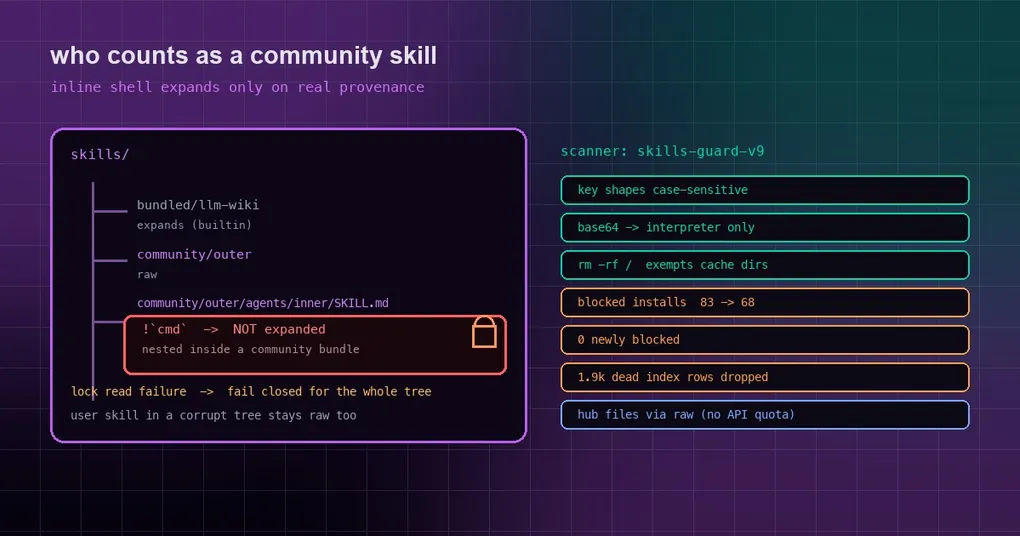
You install a skill from a community hub, glance at the success line, and move on. Weeks later you open it in a session just to read what it actually does — and that look was the dangerous part: opening the skill used to be enough to execute its inline-shell snippet. You ran no command. The command ran anyway.
The problem was never “the scanner missed something”. It was that the question “what counts as a community skill” was answered too optimistically. Four trust boundaries were tightened at once, and the same batch cleaned up a roomful of false positives plus two installs that could never succeed.
What inline shell is, and when it actually runs
A Hermes skill body may contain an inline-shell snippet: a !`cmd` marker inside SKILL.md. When you open or load that skill, the command is expanded through bash -c and its output is injected into the skill body, which lets a skill carry live data — the current branch, a timestamp, a count.
It is off by default:
hermes config get skills.inline_shell # False by defaultYou enable it in config.yaml:
skills:
  inline_shell: true
  inline_shell_timeout: 10   # seconds per snippet
The catch is that inline_shell: true is a switch that arms every installed skill at once. What decides whether a snippet actually runs is therefore not the scanner verdict but the runtime’s answer to “is this a community skill?”. That answer is what changed.
The three holes in the old answer
The old _is_community_hub_skill check rested on three assumptions, and all three were optimistic:
- It only matched a directory exactly equal to the recorded install path. A skill nested inside a community bundle — say
agents/inner/SKILL.md— did not count as community at all. - It read only the active profile’s hub lock. When another profile reached the same skill through
skills.external_dirs, the provenance lived in someone else’s lock and the check came up empty. - A lock it could not read was treated as “not community”. This was the worst one: a truncated or malformed
.hub/lock.jsonturned every skill in that tree back into a trusted one — a fail-open default.
Here is the before and after:
| Case | Before | Now |
|---|---|---|
| A skill nested inside a community bundle | Expanded | Stays raw |
Another profile reaching it via external_dirs |
Expanded | Stays raw |
The tree’s .hub/lock.json truncated or wrong shape |
Treated as non-community, expanded | Whole tree fails closed |
| No lock file at all (no hub installs on this machine) | Did not expand | Unchanged |
The check now has two hard rules: it matches the install directory or any directory under it (on resolved paths), and it reads the active profile’s lock and the lock that owns the skills tree the directory lives in — the nearest ancestor named skills/ that carries a .hub/lock.json. In other words, who is looking at the skill no longer changes what it is considered to be.
The trade-off is documented on purpose: while a tree’s lock is corrupt, skills you wrote yourself in that same tree stop expanding too. A broken lock cannot tell us which directories are community installs, so the whole tree fails closed until the lock is repaired.
The other side of the scanner: skills-guard-v9 fixes false positives
An earlier piece covered the scanner’s blind spots. This batch fixed the opposite failure — blocking too much.
The data first. Over 14 days of new clients, scan_blocked was the number one reason hub skill installs failed (hermes-index 39 events across 8 install-days, clawhub 19/15, skills-sh 5/4, url 6/4). All of those are real failures — the install was refused. The cause was not dangerous content; it was imprecise pattern matching. In an 89-entry random index sample, roughly 10 of 13 blocks were pattern false positives.
One root cause is a classic: the whole rule table compiled with re.IGNORECASE, so the AWS-key rule AKIA[0-9A-Z]{16} matched the placeholder AKIAxxxxxxxxxxxxxxxx. Likewise, rm -rf /, base64 -d |, setuid and HTML-comment injection fired on Dockerfile cache cleanup, on | jq, on ordinary prose and on layout comments.
After the fix, on a random sample of 421 real index skills, blocked installs drop from 83 to 68 — 33 unblocked, 0 newly blocked — and every crafted attack still blocks.
Concretely, the scanner now:
- treats key shapes as case-sensitive —
AKIA,ghp_/github_pat_,sk-,sk-ant-,glpat-,BEGIN PRIVATE KEYno longer match all-lowercase placeholders; - exempts package-cache cleanup from the
rm -rf /rule (/var/lib/apt/lists,/var/cache/apt|apk|yum|dnf) while checking every operand — which also catchesrm -rf --no-preserve-root /, missed before; - narrows
base64 -dpipes: only fires when the decoded bytes reach an interpreter at any later stage (sh/bash/python/perl/node/eval/xargs/env/sudo/iex/pwsh), or are fed straight into| tar(an embedded payload the scanner never sees). Data consumers like| jqand| grepno longer fire; - requires injection phrasing for HTML comments — “ignore previous instructions”, system prompt, hidden instructions — instead of firing on any comment;
- only treats setuid as critical for real calls (
set*id(,cap_set[ug]id,chmod u+s,g=s, octal 2xxx–7xxx); the bare word becomes a note. This also catcheschmod 4755, which the old rule missed; - fires on
curl … | sudo -E bashas a curl-pipe-shell, where the old rule only recognised| bash; - bumps the scanner version to
skills-guard-v9(andplugin-guard-v10for plugins), which invalidates cached verdicts so everything is re-scanned.
One detail is worth repeating: the change introduced a regression of its own, fixed the next day. Once the rule started checking every rm operand, a trailing // comment was read as a path rooted at /, so rm -rf node_modules dist // clean came out critical. The fix keeps a bare // after the first operand from counting as root, while rm -rf // and rm -rf //etc stay critical. A re-scan of a cached 633-skill sample produced an identical verdict, install decision and finding set.
The 1,900 index rows that could never install
If you ever picked a skill out of the index and watched it fail, the failure probably looked like stale_index — and the client had already spent about 40 GitHub API calls getting there.
The cause is mundane: skills.sh holds roughly 20,000 rows, and about 1,920 to 1,985 of them ship with no resolved_github_id — no downloadable location at all. The index builder treated three genuinely different situations as one: a 404 repository, a tree that read fine but contained no matching skill, and a truncated tree. All three were published as-is. Its fuzzy match also stripped - but not _, and it never handled the single-skill layout where a repo’s only SKILL.md sits at the root — even though the client does install those.
The builder now distinguishes ok / truncated / gone (repo 404) / error; normalises both sides with [-_] (so pdb-database matches pdb_database); and resolves repos whose only SKILL.md sits at the root or in a generic skills/, .agents/skills/ or .claude/skills/ directory. Rows in a vanished repo, and rows with no match in a complete tree, are dropped. For truncated trees (posthog/posthog has 58k entries) it probes candidate paths instead, capped at 10 rows per repo. An error — 5xx, timeout, auth — keeps its rows unresolved, so a transient failure never deletes anything. The build log now prints a line worth grepping for: Resolved N/M paths, dropped D uninstallable (G repo gone, R not in repo).
A 75-row sample makes it concrete: the old builder shipped 75 (27 of them unresolved); the new one ships 57, with 0 unresolved and 18 dropped (3 repos gone, 15 where the skill is not in the repo).
Two installs that could never succeed, now fixed
Built-in restores failed forever. If you deleted a skill but files remained in its directory, or an earlier copy died partway, you were left with a directory that had no SKILL.md — and every retry returned [Errno 17] File exists. A second layout broke it too: when the category directory is a symlink, the loader follows the symlink so the skill works, but the restore’s rglob does not descend it, so the containment guard reported Unsafe install path. Now a canonical SKILL.md counts as present and the copy uses dirs_exist_ok, filling in around leftovers instead of failing. A failed restore is also recorded as source=bundled rather than falling back to source=hub.
Anonymous API budget. Installing a hub skill spent one Contents API call per file in the skill folder. With 60 anonymous calls per hour, a skill with roughly 58 or more files could never install (hermes-index rate_limited: 26 events across 9 install-days in 14 days). Files are now read from raw.githubusercontent.com/<repo>/<sha>/<path> first — the same immutable bytes, and they do not count against the API limit — falling back to the Contents API only when the raw read fails (private repo, raw outage).
What to do now
- Check the inline-shell switch:
hermes config get skills.inline_shell. Leave it off unless you need it — it is the cheapest defensive line you have. - Remember that cached verdicts were invalidated: the scanner version changed, so skills are re-scanned on next access. Anything that was wrongly blocked is worth retrying.
- On shared deployments, make sure each profile’s
.hub/lock.jsonparses. A single corrupt lock now disables inline shell for its whole tree until repaired. - Do not reach for the bypass by reflex.
hermes skills install --forceignores a blocked verdict, and it exists for the case where you have reviewed the content yourself — not for “the scanner is being annoying again”.
The short version
The thread running through this batch is that trust moved from a static guess to a provenance decision: where a skill came from, which lock records its install, and who is looking at it all matter more than whether the directory happens to look like a community install. When the answer is unclear, everything fails closed — including the slightly annoying consequence that a corrupt lock temporarily disables inline shell for an entire skills tree until you fix it.
For the background, start with our post on the scanner’s three blind spots, then the hermes skills command reference. If you install third-party skills, two more are worth your time: plugin isolation and host boundaries and the trust gate for portable plugins and MCP. And if you would rather pick from sources that have already been reviewed, read how the plugin catalog handles that.