Third-Party Plugins Move Out of the Main Process: Inside plugins.isolation: host
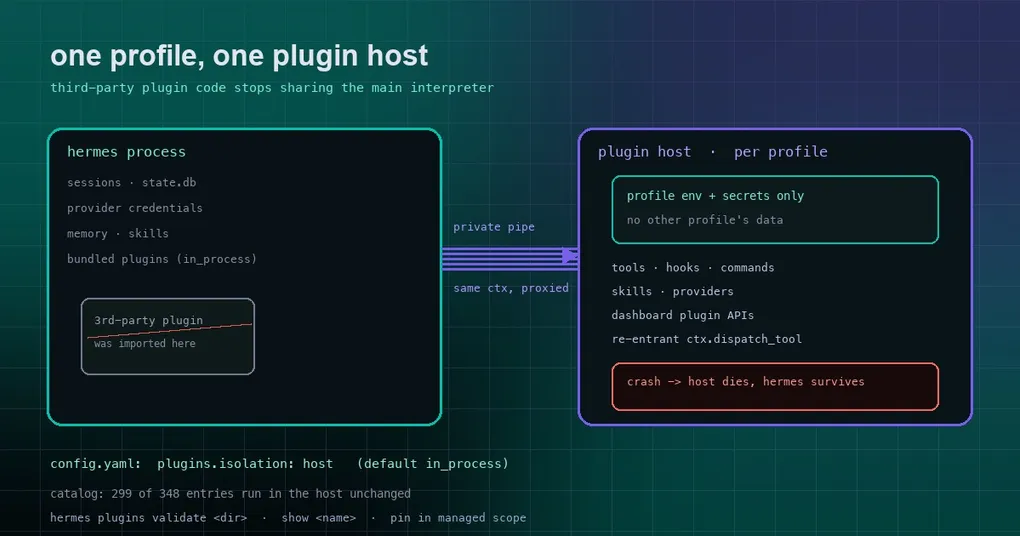
Picture one machine carrying several profiles: your own, a team-shared one, and a demo profile for clients. Someone installs a community plugin — a small thing that pipes a ticketing system into chat. From the moment it is imported, that plugin lives in the same Python process as every session, every provider credential, and every API key in memory. A plugin author with good intentions can still ship a global variable, a monkeypatch, or a thread that never shuts down, and all of those can reach things they were never meant to touch.
Hermes now gives you a switch for that: move third-party plugins out of the main process. The configuration is one line, plugins.isolation: host, and the plugin itself does not change at all.
The default has not changed; the new mode is one host per profile
Let’s be precise, because nothing changes until you ask for it. The default is still in_process: plugins are imported into the Hermes process, exactly as before. Only an explicit host changes behaviour.
plugins:
  isolation: host        # default: in_process
  host:
    launcher: []         # optional argv prefix for the host, e.g. a sandbox runner
With host, every profile gets a separate Python process started on demand — the plugin host — which imports only that profile’s user-installed plugins and talks to Hermes over a private pipe. Bundled plugins are unaffected and keep running in-process.
One design detail is easy to miss and matters a lot: the host process starts with only that profile’s environment and secrets. A plugin used to see whatever credentials the process carried; now it sees its own profile’s. In a multi-tenant deployment, that is the practical meaning of “one tenant’s plugin code never shares memory with another tenant’s data.”
Plugins do not change: same ctx, serialized across the pipe
The annoying part of most isolation stories is that you have to rewrite code. Not here.
Inside the host, a plugin receives the same ctx it always did. Tools, hooks, slash commands, CLI commands, skills, and provider objects (image and video generation, web search, browser, TTS/STT, memory, context engines, cron) register exactly as before. Hermes registers matching proxies on its side that call into the host when needed — the docs call the object handed to plugins a RemotePluginContext.
It is also re-entrant: while handling a tool call, a plugin can call back into Hermes through ctx.dispatch_tool, ctx.get_config or ctx.llm — and Hermes waits on it, just as if the plugin were still local. For plugin authors this is essentially free isolation.
There is a price, and it is published rather than discovered. A handful of surfaces genuinely need in-process code, and under host those plugins are refused with a clear reason instead of quietly losing features. The documented list: gateway platform adapters (register_platform), approval transports, Telegram and other platform handlers, model-provider profiles that build their own SDK client (create_client), streaming dashboard endpoints, and plugins that monkeypatch Hermes modules. Run those with isolation: in_process.
Crashes stay inside the host
The first payoff of isolation is not security, it is stability. Under host:
- a plugin’s module never enters the Hermes process, so it cannot read another profile’s data out of memory or patch Hermes internals;
- a plugin that crashes or exits kills its host, not Hermes. The call in flight returns a tool error, then Hermes restarts the host and reloads its plugins (with bounded retries) while every other session keeps running.
If you have ever installed a plugin and watched the whole gateway go down with it, this section is for you.
Turning it on, checking it, pinning it
Enable it with the config block above. Two commands tell you the truth immediately:
# Check whether a plugin can run under host mode; it explains any refusal
hermes plugins validate <dir>

# See where a specific plugin runs
hermes plugins show <name>
host.launcher exists for stricter setups: it takes an argv prefix that wraps the host process in your own sandbox runner. The docs also recommend running the agent’s terminal on an isolated backend (Docker, SSH, and so on) — isolating the plugin while the agent’s own terminal can still read the operator’s files only gets you half of the isolation.
Then there is the most practical problem in shared deployments: plugins.isolation is ordinary profile config, so anyone who can edit a profile’s config.yaml can turn it off. When the profiles belong to the very people you are isolating from each other, pin the value in the managed scope instead — a root-owned /etc/hermes/config.yaml that every profile reads. The managed value wins over every profile’s own config, and hermes config set refuses to change it:
# /etc/hermes/config.yaml (root-owned; read by every profile on the machine)
plugins:
  isolation: host
  host:
    launcher: [...]
How much of the catalog is ready
The obvious worry: if I turn this on, will my installed plugins still work?
The docs give the number from the time of writing: 299 of the 348 plugin-catalog entries run in the host unchanged. That is the real value of the unsupported list above — it turns “will this break?” into a short, checkable list rather than an experiment you run on your own machine.
When you can get it
The feature merged to the main branch on October 3, 2026. The latest release is v0.21.5 (tag v2026.9.24), so it currently lives on main only and is not in any tagged release yet. Installations tracking main pick it up on their next hermes update; release users get it in the next tag.
For the wider plugin system — install sources, the enable allow-list, sub-category directories — see the plugin catalog guide. Catalog delistings and supply-chain rules are covered in the catalog CI gate write-up, and if your pain is “I have to restart before a plugin change takes effect,” the live plugin rewire guide is the closer match.
The short version
Installing a plugin used to mean inviting someone else’s code into your process. Now you can keep it outside, and the plugin does not even know the difference. On a single-user laptop, you will probably never touch this line. On a machine that carries several people or tenants, it belongs in the category of switches you wish you had enabled before the incident, not after.
If you run a shared deployment, do two things: run hermes plugins validate across what you have installed, then write plugins.isolation: host into the managed scope rather than leaving it to each profile to decide.