The Hermes Plugin Catalog Is Here: Stop Guessing Which Plugin Is Safe
Ever found yourself staring at a GitHub search for Hermes plugins, wondering which of the look-alike repos is actually maintained — and what the code will do on your machine once you install it? That hesitation is reasonable: a Hermes plugin is Python that runs inside the agent process, so installing one is closer to handing a stranger a key to your house than to adding a dependency.
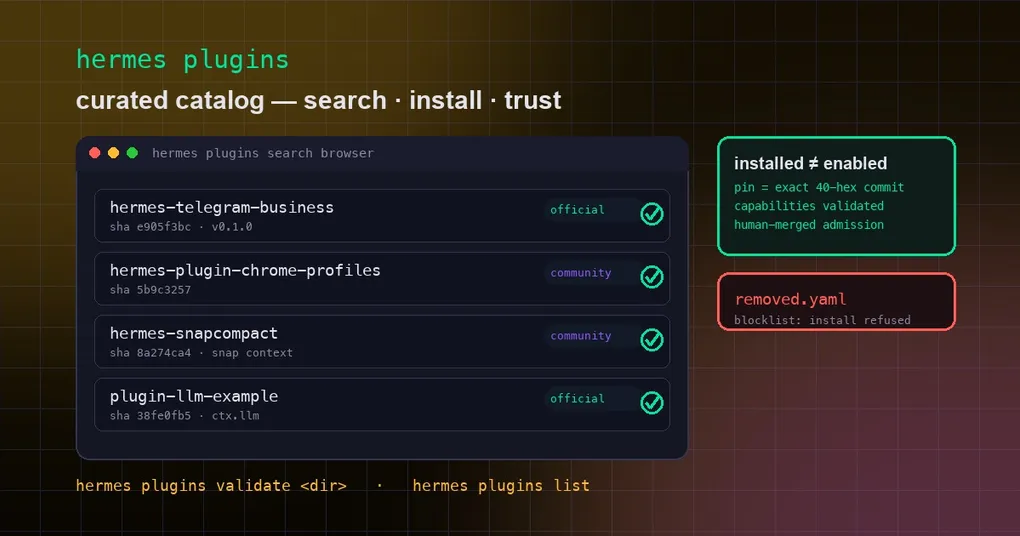
PR #69446, merged on September 9, targets exactly that pain: Hermes now ships a human-reviewed plugin catalog that solves discovery and trust in one place. Instead of hunting across GitHub, you run hermes plugins search against an official, curated index. Instead of gambling on a README, every catalog entry is pinned to an exact commit and must declare its capabilities up front — so you know what you are installing before you install it.
What the plugin catalog is
First, one distinction: the plugins here are native in-process plugins — the extensions that run inside Hermes, register their own tools and hooks, and are managed through plugins.entries. That is a different layer from the MCP server catalog, which connects external services over Model Context Protocol. The MCP catalog answers “how do I reach outside services”; the plugin catalog answers “how do I extend Hermes itself.”
Physically, the catalog is a set of YAML files in the repository’s plugin-catalog/ directory — one file per plugin entry:
name: hermes-telegram-business   # unique catalog key; install by this name
repo: https://github.com/NousResearch/hermes-telegram-business
sha: e905f3bc5eeaa5a9dab9bc5155601b3ebec75757  # full 40-char commit pin
description: One-line description
maintainer: NousResearch
tier: official          # official or community
platforms: []           # empty = all platforms
capabilities:           # what this plugin claims to register
  provides_tools: []
  provides_hooks: []
  provides_middleware: []
  requires_env: []
The catalog launched with 7 seed entries: 3 official (plugin-llm-example, plugin-llm-async-example, hermes-telegram-business) and 4 community (hermes-plugin-chrome-profiles by @anpicasso, hermes-snapcompact, jackal-verified, herdr-auto-reconcile). The official entries come from NousResearch’s own repos; the community ones from independent maintainers — chrome-profiles switches browser tools between local and remote Chrome/Edge profiles over CDP, and snapcompact archives conversation history as dense bitmap frames that vision models read back at roughly a third of the token cost.
Search, install, list: the three commands that matter
Everything revolves around hermes plugins. Note that this landed on main on September 9 and is not in any release yet — the newest official release, v0.21.1 (September 7), predates it. To use it today you need a build that includes the merge.
Search the whole catalog — no argument lists everything; a keyword matches names, descriptions, and declared tools:
hermes plugins search
hermes plugins search telegram      # matches name/description/tools mentioning telegram
hermes plugins search --json        # machine-readable, for scripts
Install — by bare catalog name, by Git URL, or owner/repo shorthand:
hermes plugins install hermes-telegram-business   # catalog hit: installs the reviewed pinned SHA
hermes plugins install anpicasso/hermes-plugin-chrome-profiles  # owner/repo = custom (unreviewed) source
hermes plugins install https://github.com/xxx/my-plugin          # full Git URL
The source distinction is the heart of the trust model. A bare name that hits the catalog installs the exact audited commit, prints the tier and pin ([official] pinned @ e905f3bc), shows the capability summary, and records provenance in a .hermes-catalog.json sidecar next to the plugin. A Git URL or owner/repo shorthand prints a yellow “custom (unreviewed) source” warning — you are on your own there. Either way you are asked whether to enable the plugin right away; installed does not mean enabled, and the enable prompt shows what the plugin wants to register.
See what you have:
hermes plugins list
hermes plugins list --plain          # compact plain text instead of a Rich table
hermes plugins show hermes-telegram-business   # details for one plugin
The trust model: why the catalog earns its keep
The catalog’s credibility is not a badge — it is a chain of enforced mechanics, documented in the catalog’s README:
- Human-merged admission. Entries get in only through a PR to the hermes-agent repo, reviewed and merged by a maintainer. No self-serve registry, no automated ingestion.
- Exact commit pins, mandatory. Every entry requires a full 40-character SHA. Branches, tags, and short SHAs are rejected. Installs check out that exact commit — never the latest HEAD — so what the catalog says and what you run are the same code.
- Two-week pin maturity. A pinned version must be at least two weeks old at pin time, mirroring the supply-chain policy used for other pinned dependencies — time for the community to notice a compromised release before Hermes ships a pointer to it.
- Pin bumps are new PRs. Updating an entry’s SHA is a fresh, re-reviewed PR whose diff (old SHA → new SHA) is the review surface. Every pointer movement has a human looking at the upstream commit range.
- Declared capabilities must match reality.
hermes plugins validateloads the plugin in a scratch subprocess and diffs the declaredprovides_tools/provides_hooksagainst whatregister(ctx)actually registers. Mismatch fails the entry — undeclared capability creep is treated as a security issue. Admission CI runs this against every changed entry. - Removal = blocklist. When an entry is pulled for security or policy reasons it lands in
removed.yaml, and any install matching its name or repo is refused on every surface (CLI, dashboard, desktop). The CLI has a loud--allow-removedescape hatch that prints a red warning; the others do not.
The catalog also retires a piece of history: the interim community plugin index pointed at a canonical repository URL that never actually existed and had no admission gate. This change removes that index entirely and consolidates everything into the in-tree catalog.
Validate, update, and day-to-day management
Once plugins are installed, the usual lifecycle commands apply:
hermes plugins update hermes-telegram-business   # catalog installs re-pin to the reviewed SHA
hermes plugins disable hermes-telegram-business  # disable without removing
hermes plugins enable hermes-telegram-business   # re-enable
hermes plugins remove hermes-telegram-business   # uninstall (aliases: rm, uninstall)
hermes plugins capabilities                      # declared vs granted capabilities per plugin
Writing a plugin and want it listed? hermes plugins validate <plugin-dir> is the same gate admission CI runs — pass it locally before opening the PR, and hermes plugins doctor goes deeper against real runtime contracts. Clients refresh the catalog from the docs site’s JSON (/docs/api/plugin-catalog.json) at most every 6 hours and fall back to the in-tree copy offline, so a network blip never blocks an install.
One reminder on the safety floor: plugins run inside the Hermes process, so the catalog lowers risk — it does not zero it. After installing anything, hermes plugins capabilities is worth a periodic glance to see what each plugin actually holds. For the plugin mechanism itself — configuration and writing your own — our pip model-provider plugin guide walks through it; combined with the MCP server catalog, official channels now cover most of what you would otherwise hand-roll.