The Agent Can Now Reach Into Your Blender Scene — Official Blender Lab Integration
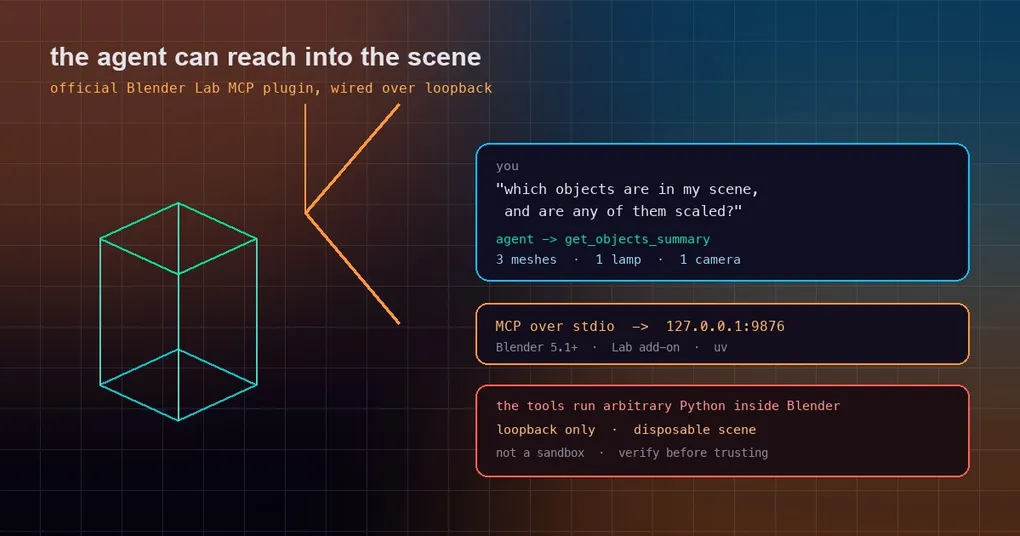
Every 3D artist has the same 20-minute routine: open the file, select objects one by one, read the transforms, rename the ones with names like Cube.017, fix the scale on two meshes, export. It is not hard work — it is just a lot of clicking, and none of it needs your judgement. Meanwhile the model you are talking to can write a Python script that does the whole thing in four lines, if only it could see your scene. That gap closed this week: Hermes now ships an official plugin that connects the agent to a running Blender session through Blender Lab’s MCP server.
What actually shipped
Three pieces landed together:
- PR #119365 — the catalog entry.
blenderis now an official entry in the Hermes plugin catalog: tierofficial, maintainerNousResearch, categorytools, and flagged for onboarding, meaning it can be offered to new users as a first connector. It ships in the v0.21.5 tag. - hermes-plugin-blender — the wrapper. A small package containing the MCP launch configuration and a Blender workflow skill. It runs the upstream Blender Lab MCP server over stdio; it contains no native Python hooks, no tool overrides, no desktop JavaScript and no self-updater.
- A workflow skill. The package teaches the agent how to drive Blender, which matters more than it sounds: connecting a tool is easy, using it in the right order on a real scene is the part that needs procedure.
If you have met MCP before — the topic of the application-backed MCP servers post — this is the same idea pointed at a creative application instead of a database.
Install it in two commands
hermes plugins install NousResearch/hermes-plugin-blender
hermes plugins enable blender
Add hermes -p <profile> in front if the agent should live in a specific profile — same as any catalog install described in the plugin catalog guide. The catalog also exposes it under the short name blender for hermes plugins install blender.
One honest limitation worth stating up front: installing this does not install Blender. It does not change Blender preferences, does not install the Blender Lab add-on, and does not open a scene.
The prerequisite that fails first
Everything hinges on the official Blender Lab MCP add-on being present and running, on the same machine as the Hermes backend:
- Blender 5.1 or newer. Older versions are out of scope.
- The Blender Lab MCP add-on installed and enabled inside Blender, with Online access enabled, and its bridge started on loopback port 9876. No bridge, no conversation — the plugin’s server will have nothing to talk to.
- Git and uv available to the Hermes backend. The server is fetched from source, which is why the plugin pins an exact upstream revision (
2cea8d56…, upstream v1.0.3) rather than resolving a floating version at launch. - Patience on the first start. The initial download and build took several minutes in the maintainers’ own Windows checks — long enough that a normal MCP connection timeout can interrupt it mid-download. Warm the environment yourself first:
uv tool run --from "git+https://projects.blender.org/lab/blender_mcp.git@2cea8d566dde07fbac28a61d698909d69724e853#subdirectory=mcp" blender-mcp --helpRun that, restart Hermes (or use your release’s plugin/MCP reload command), and the first real connection will be fast instead of racing a timeout. This is the single most useful piece of advice in the plugin’s README, and the one most likely to save you a confusing hour.
Note the source: that is projects.blender.org, the Lab’s own repository — deliberately not the same-named package on PyPI, which the README explicitly warns against substituting.
What the agent can do with it
The Blender Lab server exposes a tool surface for scene work over the bridge: listing objects, reading transforms, creating and transforming objects, reading back state, and deleting. One query — a scene summary — is the canonical way to check that everything is alive before you trust it with anything else. Once the package is installed, the skill is available through skills_list, and you can read it with skill_view under its qualified name.
The maintainers’ verification scope is worth quoting precisely, because it is narrower than the marketing sentence you might expect: headless scene read, create, transform, readback and delete were verified on Windows ARM64 and x64 against Blender 5.2.2 LTS. Explicitly not verified or implemented: graphical screenshots, deferred operations, and any automatic application/version/liveness detection. A successful MCP tool listing does not prove the scene is ready to work on — that is why the skill starts by asking for a real response from the running session.
The security line to read before real work
Blender Lab’s own disclosure, carried into the plugin, is blunt: its tools execute arbitrary Python inside Blender, with no protection against file deletion or data exfiltration. So:
- Keep the bridge on loopback. Port 9876 on
127.0.0.1is the design; do not expose it to a network. - Prefer a disposable scene — or an isolated machine — for exploratory work. A copy of the file you can throw away is the cheapest safety net there is.
- Treat it as unprompted authority, not a sandbox. An agent driving Blender can, by design, do anything you can do in Blender. The loopback bridge limits who can reach it, not what it can do once reached.
- Licensing, if you redistribute anything: the wrapper configuration and documentation are MIT; the Blender Lab server and add-on remain GPL-3.0-or-later and are owned by their respective authors. No Blender Lab code is vendored into the Hermes plugin.
If you are weighing a creative-tool integration against a data one, the risk profile is genuinely different: a wrong query against a database is recoverable, a wrong bpy call against an unsaved scene is not. The MCP catalog security guide covers the general trust model for catalog installs; for mutable creative work, add “is there a backup?” to the checklist.
Does this matter beyond Blender?
The interesting part is not 3D. It is the pattern: an application that ships an MCP server over a loopback bridge is now addressable by an agent that has skills, memory and a scheduler. The plugin is a thin wrapper — a pinned revision, a launch command, a skill — precisely because the heavy lifting lives in the application’s own server. That is the shape to expect from the rest of this trend: the agent does not learn every tool; it learns the protocol and the procedure.
For you that means two things to watch. First, when an application you use publishes an MCP server, the integration cost drops to an install command plus a skill. Second, the security review moves with it: you are no longer asking whether a plugin is trustworthy, you are asking whether the application’s tool surface, exposed to an autonomous agent, is trustworthy. In Blender’s case the answer is a documented “no sandbox, loopback only, disposable scenes” — which is honest, and exactly the kind of disclosure you should look for before wiring an agent into anything that edits files you care about.
Getting started, in order
- Update Blender to 5.1+ and install the Blender Lab MCP add-on; enable Online access and start its bridge on 9876.
- Warm the server environment with the
uv tool runcommand above so the first connect is fast. hermes plugins install NousResearch/hermes-plugin-blenderthenhermes plugins enable blender.- Restart or reload, then ask for a scene summary and confirm you get a real answer from the open file — not a cached description.
- Run it on a duplicate scene for the first week, and only then point it at work you would be sad to lose.