App-backed MCP servers: why Hermes now checks whether that app is installed first
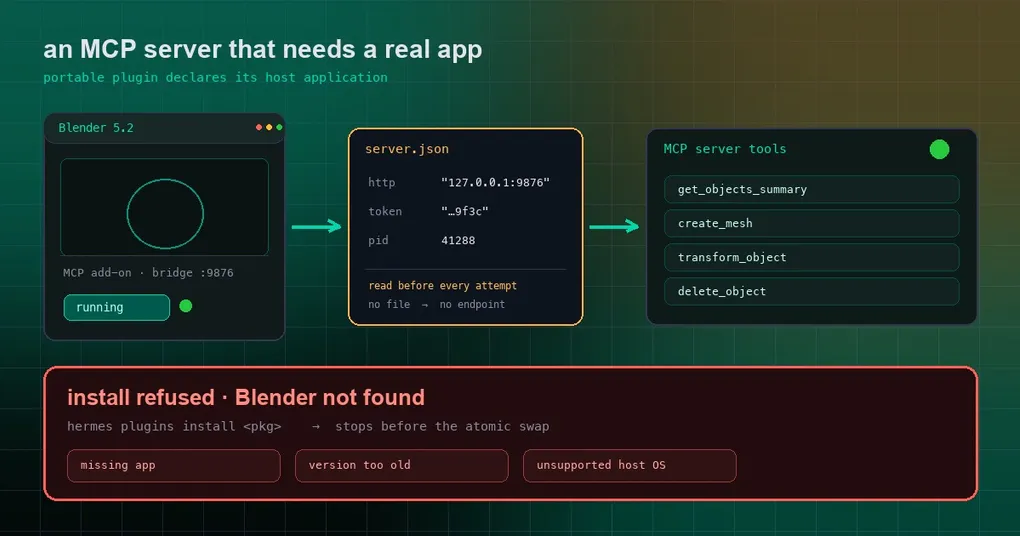
You install Blender. You enable the official MCP add-on inside it. Then you follow a tutorial, let Hermes install a Blender plugin, and the install says “done” — and sure enough, get_objects_summary shows up in the tool list. So you ask: “What objects are in my scene right now?” The answer comes back: “tool not connected.”
You open mcp.json. The address is fine. You restart Blender. Still nothing. The real problem is that the port was never in mcp.json to begin with — Blender picks one at startup and writes it into a runtime file of its own. The address you hand-wrote into the config was stale from day one.
Three changes landed recently to close exactly this class of “the config looks right, it just won’t connect”: plugins can declare which application they need (#119049), the runtime trusts only the endpoint file the app writes (#119050), and the plugin catalog gained its first real case, Blender Lab (#119365).
Why “put the address in the config” was never going to work
Local tool-style apps talk to Hermes over a loopback bridge. To avoid fighting over ports, a desktop app typically allocates one dynamically at startup and then writes its current http address, a temporary token, and its process pid into a runtime file — for Blender that is the bridge on port 9876. Two consequences follow:
- A hard-coded URL goes stale eventually, and it goes stale quietly. The config is syntactically perfect; only the connection is dead.
- A tool that won’t connect used to have exactly one message: “not connected.” You could not tell whether the app was closed, the port moved, or the version was too old.
So the design inverted: don’t guess — ask the application.
A plugin can declare which application it needs, in plugin.json
Portable plugins (the kind that ship a plugin.json plus files, no native code) gained a declaration block under extensions."com.nousresearch.hermes".servers. The server name has to match an entry in the plugin’s mcp.json:
"extensions": {
  "com.nousresearch.hermes": {
    "servers": {
      "blender": {
        "app": {
          "darwin": {
            "presence": "bundle",
            "location": "/Applications/Blender.app",
            "version": { "kind": "plist" }
          },
          "win32": {
            "presence": "executable",
            "location": "%ProgramFiles%/Blender Foundation/Blender/blender.exe",
            "version": { "kind": "uninstall_registry", "display_name_prefix": "Blender" }
          },
          "linux": {
            "presence": "executable",
            "location": "/usr/bin/blender",
            "version": { "kind": "none" }
          }
        },
        "requires": { "app": true, "min_version": "5.1" },
        "liveness": {
          "kind": "server_json",
          "path": "%LOCALAPPDATA%/Blender/server.json",
          "fields": { "url": "http", "token": "token", "pid": "pid" }
        }
      }
    }
  }
}
The parser is strict about every line of that, which is worth knowing before you write one:
appis keyed by operating system and accepts onlydarwin,win32andlinux, with at least one block required.locationmust be absolute or start with~,%VAR%or$VAR; anything containing..or a URL scheme is rejected outright.presencehas two values:bundle(a macOS app bundle) andexecutable.- A version source (
version.kind) is one ofplist(darwin only),uninstall_registry(win32 only, and it demands adisplay_name_prefix),pe_resource(win32), ornone. If you setrequires.min_version, every OS block must actually be able to read a version — anoneblock fails validation. liveness.kindisserver_jsonornone. Choosingserver_jsonrequirespath; optional keys areendpoint_path(default/mcp) and the field-name overridespid_key,url_key,token_key(defaultspid,http,token).
Note the split between the two blocks: app is data (“where the application lives”), requires is policy (“whether I insist it is there”). That separation is deliberate.
The install gate: don’t install what cannot work
Before, a missing application was purely a runtime problem — the plugin landed in its directory, its tools registered, and you only found the void when you called one. Now the installer checks every declared server before the atomic swap and refuses on any of these:
| Refusal | Trigger |
|---|---|
missing_app |
The declared application is not on this machine |
version_too_old |
The app is there, but older than requires.min_version |
unsupported_os |
This host is not covered by any OS block |
| Platform mismatch | A catalog entry’s platforms list does not match the host OS family (windows / macos are accepted as aliases for win32 / darwin) |
For catalog installs the check happens before cloning or writing the plugin target, so you never end up with a half-installed directory. Validation reports the availability state as an informational row too:
hermes plugins validate --install-depsAt runtime, only the file the app writes is authoritative
This is the firmest part of the change. Every connection attempt to a declared server first re-reads that runtime file and uses the endpoint inside it:
- The runtime file is authoritative. A missing file, a malformed endpoint, or a dead
pidraisesLiveEndpointUnavailable— and Hermes does not fall back to the statically configured URL. There is a test holding that line:test_missing_runtime_file_never_falls_back. - The token is registered before it is used. A temporary token found in the runtime file is handed to the redactor before Hermes builds an
Authorizationheader from it, so it will not leak when you paste logs or read a transcript later. - Application requirements also gate tool admission. A server with app requirements does not get its tools offered into the available set while the host cannot satisfy them.
When a tool is gone, say why
The worst version of this experience is not “the tool is missing” — it is “the tool is missing and nobody will tell you why.” Declared-but-unavailable tools now return structured state: the current state, the application details, one concrete user action, and a retry policy. The deferred-tool catalog and the empty-search summary also keep one stable line for each hidden declared server.
Five states are distinguishable:
| State | Meaning | Roughly what to do |
|---|---|---|
missing_app |
Not installed | Install the app, then install/enable the plugin |
version_too_old |
Installed but too old | Upgrade the app |
app_not_running |
Installed, not running | Launch it and let the bridge come up |
endpoint_unavailable |
Runtime file missing or endpoint invalid | Restart the bridge from inside the app |
no_interactive_session |
Needs a graphical login session | Run it in a desktop session, not a headless service |
Also note the retry policy is only ever after_user_action (do the thing above, then retry) or never_here (this host will never satisfy it, e.g. the OS is unsupported). “Try again” and “stop trying” are different answers, and the tool now gives you the right one.
The real case already in the catalog: Blender Lab
The official plugin catalog now carries a blender entry, wrapping this public repository: hermes-plugin-blender.
# installs the catalog entry's pinned sha, not a branch tip
hermes plugins install NousResearch/hermes-plugin-blender
hermes plugins enable blender
What it does is plain: it launches the official Blender Lab MCP server over stdio (upstream source pinned to commit 2cea8d56, v1.0.3), and that server connects to the Blender add-on’s bridge on 127.0.0.1:9876. One original workflow skill ships with it.
Three things to know before you rely on it:
- You bring the prerequisites. Blender 5.1+, the official MCP add-on (installed, enabled, Online access allowed, bridge started), plus Git and uv on the backend machine. Installing the package does not install Blender, change its preferences, install the add-on, or open a scene.
- Warm the uv environment before the first connection. The first upstream build takes minutes; that was measured on Windows, and a normal MCP connection timeout will interrupt it:
uv tool run --from "git+https://projects.blender.org/lab/blender_mcp.git@2cea8d566dde07fbac28a61d698909d69724e853#subdirectory=mcp" blender-mcp --help- This wrapper does not use the app gate yet. Its README states plainly that automatic application, version and liveness detection is neither implemented nor verified by the wrapper, and that prerequisites are manual. In other words: the
app/requires/livenesscontract is live in core, and this particular plugin has not adopted it — the usual “capability first, plugins follow” sequence.
One more thing that belongs in the open: Blender Lab itself warns that its tools execute arbitrary Python inside Blender, with no protection against file deletion or data exfiltration. Keep the bridge loopback-only, use it on trusted workflows, and prefer a disposable scene. This is not a sandbox.
Platform asymmetries and the corners that are still open
- Host checks are not symmetric across platforms. Windows requires a nonzero process session (either the active console session or a process window station). Linux requires a readable process session ID and the current user’s runtime directory. macOS returns true — the standard library has no subprocess-free way to ask about the current graphical session.
- Auth-disabled application builds may never write the runtime file. The PR lists that as an open question pending hardware verification; such a build would sit in
endpoint_unavailablepermanently. - The activation boundary did not move. When a plugin loads mid-run, its gateway-side handlers (slash commands, button callbacks, inbound transforms) wire up immediately — but tools and system-prompt sections still wait for the next session (the prompt-cache invariant), and portable MCP servers need an explicit
mcp.reload.
Wrapping up
If your plugin talks to desktop software, the problem was never that the config was written wrong — it was that a human should not be writing that address at all. Now a plugin declares its application dependency, the installer refuses before it touches your profile, the runtime trusts only the endpoint the app itself publishes, and a dead tool finally tells you which link in the chain broke.
For the surrounding plugin picture, see the plugin catalog trust model and the official remote MCP catalog; if your concern is the security boundary of local tools like this one, MCP catalog security is the closer read. For the repo-vendored variant, the project-local skills guide covers .hermes/skills/ and its trust gate.