One commit, three silent failures: backup deleted the wrong file, JSON written wrong, quotes flattened
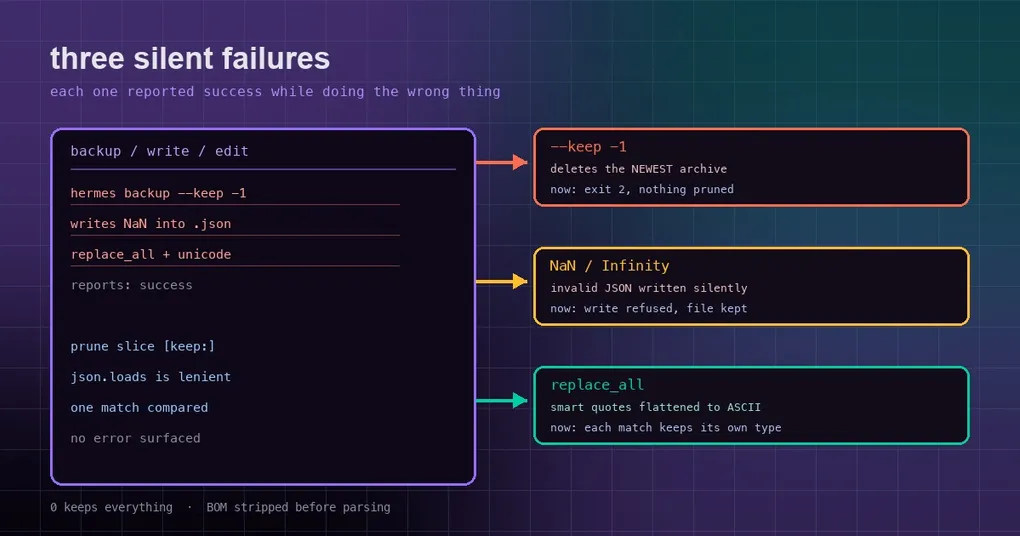
Your backup script finishes and prints one last line: “Backup complete”, exit code 0. You go to bed. The next day you reach for the newest hermes-backup-*.zip to restore something — and it is gone. Every archive still sitting there is older than the one you needed. The command never errored; it just deleted exactly the file you were counting on.
Or this: a tool writes a value into your config.json. It loads fine on your machine. A colleague parses the same file with a different language and gets an exception — the file contains something standard JSON does not allow.
Those two, plus a quieter formatting problem, share one failure mode: the command returned success while doing the wrong thing. PR #130619 (P1, merged 2026-10-01) closes three bugs of exactly that shape, fixing issues #128886, #128888 and #128894. Here is each one.
Pitfall 1: --keep -1 deletes your newest backup
First, what --keep is meant to do. hermes backup --keep N means: after a full backup, delete older hermes-backup-*.zip files in the output directory beyond the newest N. The default is 3, and 0 keeps everything. (You can confirm this yourself with hermes backup --help.)
The bug was in how that number got parsed. Before the fix, --keep used type=int and /snapshot prune N used a bare int(). That let signed values like -1 or +5 through, all the way down to the line that does the work:
newest_first[keep:]That is a slice over a list sorted newest-first. When keep is 0 or positive it trims the old archives off the tail, which is right. When keep is negative, newest_first[-1:] cuts out the last element — the newest archive — and deletes it. The command still prints success.
After the fix the negative value is rejected at the door:
hermes_cli/subcommands/backup.pyadds_non_negative_keepas the argparse type, usingisdecimal()internally so only an unsigned, non-negative integer gets through. Negative, signed, or non-integer input now fails with exit code 2 and the messagemust be a non-negative integer (0 keeps everything).- The interactive
/snapshot prune <N>uses the sameisdecimal()rule:-1orxprints the usage line (Usage: /snapshot prune [keep-count]) and deletes nothing.
The default is still 3, and 0 still means keep everything.
Pitfall 2: a JSON write slips in NaN
The second one is sneakier, because it does not surface at the moment of writing.
Before writing a file, Hermes runs a JSON syntax gate to catch malformed content. That gate used Python’s json.loads. The problem: json.loads accepts NaN, Infinity and -Infinity by default — JavaScript extensions that standard JSON does not have. So a write that introduced those constants passed the gate. It reads back fine in Python on your machine, but the moment another language (a strict Rust, Go, or Node parser) reads it, the file never opens again.
After the fix (tools/file_operations.py), the rule is precise: refuse only when this write introduces a constant the file did not already contain. The edges:
- An old file that already holds
NaNstill accepts unrelated edits — it is not frozen. - A new file containing a constant is refused, and never created at all.
- A BOM is stripped before parsing, so a UTF-8 BOM cannot confuse the check.
- A quoted
"NaN"string,1e308(a legal large number), andnullare all unaffected.
The rejection message reads:
Refusing to write '<path>': candidate content uses NaN, which is not valid JSON. The file was NOT created or modified. Use null or a string instead and retry.Note the last sentence — “The file was NOT created or modified”: the refusal happens before the write, so not a byte on disk changes.
Pitfall 3: replace_all flattened your quotes and dashes
The third is about typography, and only bites when you use batch replacement.
Hermes’ fuzzy matching includes a unicode_normalized strategy: it normalizes Unicode variants like curly quotes and em-dashes before comparing. That way a " (straight quote) in your search still matches “…” (smart quotes) in the file. After a match, a separate step is supposed to preserve the file’s original Unicode — keep the file’s own smart quotes rather than dropping the new straight ones in, so editing one phrase does not restyle a whole paragraph into ASCII.
The bug appeared when replace_all (replace every occurrence) was on. That preservation step compared all matched regions concatenated together against the normalized old_string. With a single match it held; with several it never could — the concatenation simply is not the same text as one old_string. The comparison failed, the code fell back to splicing the ASCII version into every spot, and every smart quote and em-dash in the file got flattened to " and --.
After the fix (tools/fuzzy_match.py):
_unicode_edit_plan()computes the old-to-new edit table once, independent of any particular file region, soreplace_allcan reuse it._apply_replacementsapplies_preserve_unicode_in_replacementto each matched region separately, then re-indents. Every hit keeps its own original typography — one occurrence can use smart quotes while another uses straight quotes, and each stays as it was.
What the three have in common: they all return success
Line the three up and they are three faces of one thing:
--keep -1: prints success, exits 0, deletes the newest backup.- The NaN write: passes the syntax gate, “succeeds”, only blows up in another parser.
- The flattening: reports success with a correct hit count, but the file is damaged more than you asked.
None of them crashes. A crash would be easy — you would see it, roll back, move on. The dangerous part is returning success: no error, no exception, no non-zero exit. You only find the damage on next use (restoring the backup, reading the JSON elsewhere, diffing into a wall of straight quotes), often long after.
The root cause is shared too: validation sat in the wrong place. --keep should have rejected negatives at the door, but let them reach the slice. The JSON gate should have checked “does this introduce something the standard forbids,” but only checked “can Python read it.” Typography preservation should have run per occurrence, but used a concatenated whole. Every fix does the same thing: move the check to the point where the decision actually happens.
What to do now
Nothing to configure; this is a few minutes of self-checking:
- Glance at your backup directory.
ls ~/hermes-backup-*.zipand confirm the newest one is present with a sane timestamp. If you ever used a negative keep, check this closely. - Validate important
.jsonfiles with a strict parser. In Python,json.loads(..., parse_constant=...)will actively reject NaN/Infinity, or just read the file with any strict JSON library in another language. “It opens on my machine” does not mean it opens elsewhere. - Check files you batched with
replace_all.grep -nfor a straight quote"or a doubled hyphen--— where a smart quote or em-dash should be, that is the flattening signature.
On version status, honesty first: the latest stable release is v0.21.5 (tag v2026.9.24, released 2026-09-24), and this change only landed 2026-10-01 — so it is on the main branch only and has not shipped in any release yet. If you track main, your next hermes update brings it in; stable users will get it at the next tag.
The short version
- Three P1 issues (#128886 / #128888 / #128894) are fixed together by PR #130619 — all “returned success while doing the wrong thing” silent failures.
hermes backup --keep -1and/snapshot prune -1used to delete the newest archive; negatives are now rejected at the door (exit code 2, or a usage line), while the default 3 and “0 keeps everything” are unchanged.- A JSON write that introduces
NaN/Infinity/-Infinityis now refused and never lands; a file that already had the constant keeps accepting unrelated edits. unicode_normalizedplusreplace_allused to flatten every smart quote and em-dash; each occurrence now keeps its own typography.- The change is on main only, not in any release, and reaches stable users at the next tag.
For the mechanics in more depth, see the hermes backup command reference, the hermes config command reference, and the credential redaction and Keychain secret encryption write-ups — they all cover the same family of trust problem: it looks fine locally and breaks one layer away.