A patch number, 229 PRs, and three terminal commands you can use today
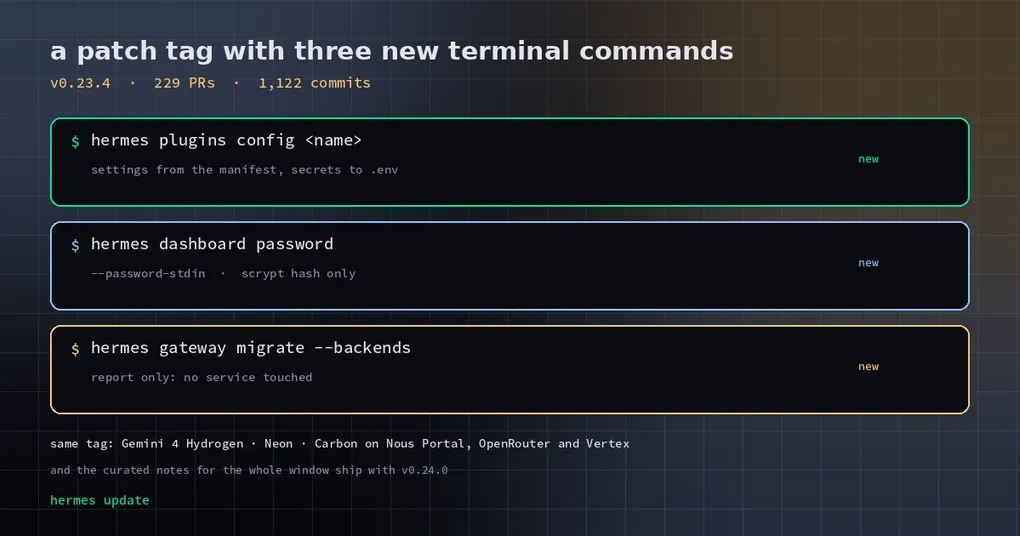
It is half past midnight and you are ssh’d into the small box that runs your Hermes. You want to change the dashboard password. You know hermes dashboard offers a prompt for exactly this — but it is a TTY prompt, and in a shell you reached through docker exec it just sits there. On the same machine there is a plugin missing one key, and you have spent ten minutes in config.yaml trying to guess a field name that the plugin declares in its own manifest.
Both of those became subcommands in v0.23.4. The version number looks like nothing: it is a patch.
A patch number with 229 PRs behind it
v0.23.4 was published on November 24, 2026 at 08:17 UTC (the release body dates it November 23), four days after v0.23.3. Measured at commit 8fc03744473, the official numbers are:
| Metric | v0.23.3 | v0.23.4 window |
|---|---|---|
| Merged PRs | 370 | 229 |
| Non-merge commits | 1,657 | 1,122 |
| Changed files | 3,948 | 1,316 |
| Lines | +222,379 / −96,154 | +96,873 / −6,703 |
| Closed issues | 60 | 281 |
Compared with the previous window, deletions drop by an order of magnitude (−96k to −6.7k), which says this was additions and clean-up rather than a large refactor. Closed issues went up more than four-fold: a backlog of small sharp edges finally got swept.
The release body also says something you rarely read: most of what landed in this window is deliberately undocumented there, and the curated notes ship with v0.24.0. So this is not a window summary. It is the handful of items the notes do name, and that you can use today.
One: hermes plugins config puts plugin settings back in the terminal
Changing a plugin’s settings used to mean opening the desktop Plugins page or guessing field names in config.yaml. Now:
hermes plugins config <name>The fields are the same ones the desktop page renders, read from the plugin’s manifest, plus whatever environment variables the plugin declares in requires_env. A plugin with a manifest gets a working settings screen in the terminal for free.
The write path is the part that matters:
- ordinary settings are validated against the schema and saved to
config.yaml; - secrets and environment variables go through the credential route into the profile’s
.env, never intoconfig.yaml.
Config files get backed up, diffed and pasted into issues. .env at least has .gitignore in front of it. On a home directory with several profiles, that boundary is the whole point.
Two: hermes dashboard password works without a TTY
The subcommand is plain:
hermes dashboard passwordThe behaviour behind it is not. It writes username, password_hash and secret under dashboard.basic_auth: the password only ever lands as an scrypt hash, and secret is filled in only when config.yaml has none, so a restart does not invalidate every signed-in session.
For scripts, feed it on stdin:
printf '%s' "$DASH_PASSWORD" | hermes dashboard password --password-stdinIt never reads the password from argv — that would put it in shell history and in ps — and it never prints or logs it.
One trap worth knowing before you conclude the command is broken: HERMES_DASHBOARD_BASIC_AUTH_USERNAME, HERMES_DASHBOARD_BASIC_AUTH_PASSWORD and HERMES_DASHBOARD_BASIC_AUTH_PASSWORD_HASH win over config.yaml. The command therefore removes same-named lines from this home’s .env (naming them, never showing the values) and tells you which of those variables the current environment still sets.
Three: hermes gateway migrate --backends reports before it touches anything
Hermes never installs a hermes serve or hermes dashboard service itself. Every backend on a machine was therefore set up by someone else: a systemd unit copied from the docs, a hand-written launchd plist, the NixOS and Home Manager hermes-backend unit, the Docker image’s s6 longrun, a Compose sidecar, a Desktop SSH backend, or a process somebody started by hand.
--backends begins with a read-only inventory:
hermes gateway migrate --backendsOwnership is not inferred from unit names. It looks at what the process actually runs and which unit’s MainPID it belongs to — because Nix calls that unit hermes-backend and the names do not line up at all. On Windows 11 24H2 and later, where wmic is gone, the scan reads the process table and names the Task Scheduler task or Startup-folder entry instead.
The documented boundary is tight: the report stops, restarts and kills nothing, writes no service file, unit, plist or ledger, and opens no network connection. It runs ps, reads /proc and plists, and issues systemctl show, list-unit-files, launchctl print and schtasks /Query queries.
The actual move is a separate set of switches (--apply, --status, --restore) with a finer exit-code contract than most CLIs: 0 migrated, restored or nothing to do; 2 invalid invocation; 3 blocked by preflight with nothing changed; 4 failed, rolled back and the old backend verified working; 5 failed with an incomplete rollback and manual steps printed; 6 this backend kind cannot be migrated automatically; 7 a background run that never confirmed the run lock; 8 the backend found now is not the one the plan was confirmed for, or an earlier run is unfinished. We walked through that path in the gateway backend migration guide.
Four: the Gemini 4 models that shipped in the same window
The notes also mention, without expanding: gemini-4-hydrogen, gemini-4-neon and gemini-4-carbon are now selectable on Nous Portal, OpenRouter and Vertex, next to the existing gemini-4-argon.
One difference between them is not obvious: xhigh is accepted by Hydrogen and Neon only. Send xhigh to Argon or Carbon and the API answers 400, which is why Hermes encodes the rule in agent/reasoning_effort.py. The reverse limit is just as hard: thinking cannot be disabled on Gemini 4, so a minimal request or a thinkingBudget gets a 400, and Hermes sends its lowest level (low) instead of a disable.
Which model to pick, and how the long-decode budget works, is in the Gemini 4 model guide. The same window also brought skills.index_desc_limit for the skill-index width (we covered that one separately), approval cards in Desktop for sandbox folder and site requests, gateway clients announcing their identity, and a long run of Desktop streaming performance fixes.
Should you upgrade
If you only chat through the CLI, nothing here is urgent. If any of the following is true, the upgrade is close to free and pays off immediately:
- you run a dashboard in a container or any no-TTY environment and want to set or rotate its password;
- you have plugins with non-trivial settings, especially ones that need an API key;
- the machine has a leftover serve or dashboard backend and you want to know who owns it before touching it;
- you want to try Gemini 4 Hydrogen or Neon, the two models where
xhighactually applies.
hermes updateThe Microsoft Store build follows the Store. A Desktop app installed from the .exe / .dmg does not change in this release and updates with the next bundled one. Docker and Hermes Cloud want nousresearch/hermes-agent:stable (or :latest).
The previous rollup is on the v0.23.3 release page, and this one on the v0.23.4 release page. Four days, 229 pull requests, one increment in the version number — that is roughly how this project ships now: stable tags move fast, readable notes move slowly.