Your Old Dashboard Can Finally Move Into the Gateway, With a One-Command Undo
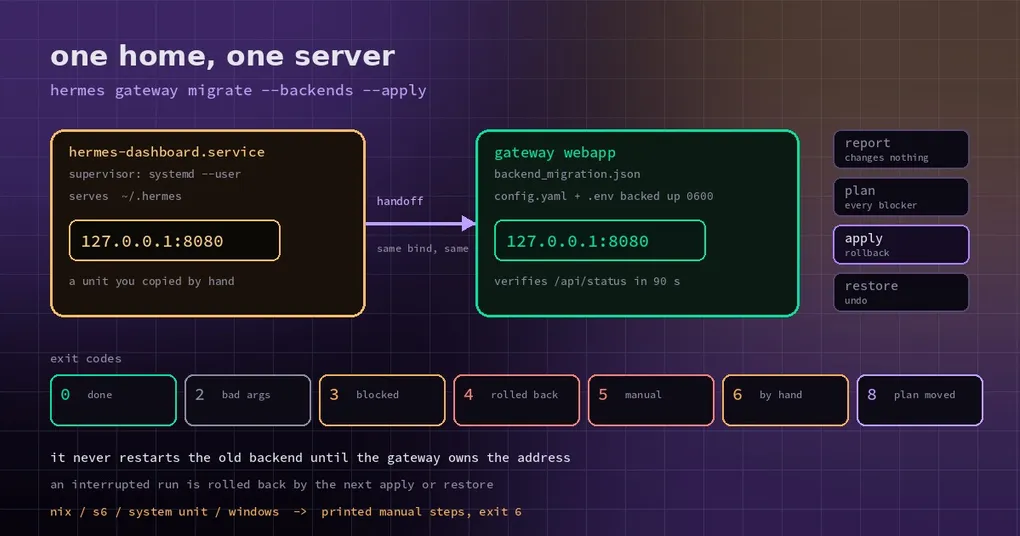
You open hermes gateway status and everything looks fine. But localhost:8080 still serves that familiar old dashboard — the hermes-dashboard.service you copied from the docs last year, still running, never retired. Meanwhile the gateway wants to serve Webapp for the same home, so two processes each believe they are the server for this HERMES_HOME. Day to day nothing breaks; the trouble shows up at upgrade time, when hermes update keeps telling you this profile still runs an old backend.
The old way out was manual: stop the unit, edit .env, install the gateway service, start the Webapp. Get one step wrong and you reconstruct the scene from memory. The migration engine merged on November 18 (PR #157430) turns that into three steps: read the report, read the plan, then apply — or undo.
What is actually being moved
hermes dashboard and hermes serve are two early ways to run an HTTP backend beside the agent: one serves the admin UI, the other gives external tools an OpenAI-compatible endpoint. Hermes never installs those services itself, so every one on your machine was installed by a person: a systemd unit copied from the docs, a hand-written launchd plist, a Nix-managed hermes-backend, a long-lived s6 slot in a container, a Compose sidecar, or an old nohup you forgot about.
The gateway’s Webapp does the same job — open your workspace in a browser — with one difference: it is part of the gateway, so it does not need a second process squatting on another port.
So the move is narrow: hand the address the old backend listens on to the gateway’s Webapp, then stop and disable the old backend. The address does not change — loopback stays loopback, a wildcard stays a wildcard, one IP address stays that address — and neither does the port.
Step one: let the machine report on itself
hermes gateway migrate --backends --dry-run
hermes gateway migrate --backends --dry-run --json
Each row names the backend’s supervisor (systemd unit name, scope and unit file; a launchd label and plist; Nix-managed; an s6 slot; a container; Desktop; a detached process; or unknown), the HERMES_HOME it serves, and who owns it. The command stops nothing, restarts nothing, kills nothing, writes no service file, touches no unit or plist, does not read the spawn ledger, and opens no network connection.
Backends are found by what they actually run, not by what their unit is called. The hermes-serve.service you copied by hand, Nix’s hermes-backend, a container’s slot name — all show up; and a unit renamed to look like something else cannot hide.
One side effect is easy to miss: normal Hermes startup still runs first, so the HERMES_HOME layout is created, a default SOUL.md is written if missing, the install is recorded, logs are opened, and cache/scratch is pruned. It is not side-effect free — the side effects just stay inside Hermes’s own directories.
Step two: read the plan, not a list of commands
hermes gateway migrate --backends --apply --dry-run
hermes gateway migrate --backends --apply --dry-run --json
The plan says: which backend it found (supervisor, pid, address); which address the Webapp would take over; whether sign-in is required; which HERMES_DASHBOARD_* settings would be copied into .env (names only, never values); whether a public URL would be written to webapp.public_url; the state of the gateway service and the Webapp bundle; how many turns are running on the old backend; and the ordered steps.
Exit codes are the first thing to read:
0— the move could run, or no old backend serves this home;2— the invocation is invalid;3— blocked; the blockers are listed;6— this kind of backend cannot be migrated automatically.
The dry run changes nothing: no file, unit, plist, config.yaml, .env or process. It reads the old backend’s /api/health and, when sign-in is required, /api/auth/providers. A backend from before v2026.7.30 has no /api/health: the dry run stops and tells you to restart that backend with the updated hermes first.
Step three: apply, and let it verify itself
hermes gateway migrate --backends --apply          # asks once on a terminal
hermes gateway migrate --backends --apply --yes    # no prompt
Before changing anything it records the current state in backend_migration.json in the home, with mode-600 backups of config.yaml and .env under backend_migration/. Then, in order:
- build the Webapp bundle if it is missing;
- copy
HERMES_DASHBOARD_*settings that exist only in the old unit’s environment into.env(names printed, values never); - install the gateway as a user service with
hermes gateway install(a launchd agent on macOS); - stop and disable the old unit — its file is kept, and a drop-in
UNIT.d/hermes-migrated.confwithRestartPreventExitStatus=78makes a later manual start exit once instead of grabbing the port back; - start the gateway;
- within 90 seconds, check every address it now listens on:
/api/statusanswers from the gateway and the Webapp page itself is served.
A backend you started by hand is stopped by its recorded process ID, and only while that ID is still the same process.
When it fails: rollback, then undo
Any failure puts back what this run changed, and only that: the files, the gateway service exactly as it was, and the old unit with the enablement it had (enabled, enabled-runtime, static or disabled).
--restore is the full undo:
hermes gateway migrate --backends --restore
hermes gateway migrate --backends --restore --yes
It stops the gateway, puts the backups back, and restores and restarts the old unit.
One detail is worth knowing: the old backend is restarted only once the gateway no longer listens on its address. When that cannot be proven, the run stops with numbered manual steps (exit 5) rather than leave two backends side by side.
A run that is killed (the machine reboots, the process is signalled) leaves no half state: the next --apply or --restore rolls that run back before doing anything else, and never continues it forward.
There is another guard for the case where you edit config during the move: apply, rollback and --restore write a file back only if it still holds the exact bytes the migration wrote. A file you changed keeps your edits, the run ends with exit 5, and the output names the file it kept and where its backup is.
What it refuses to touch
It would rather refuse than guess. Common blocks (exit 3, nothing changed):
- a turn is still running on the old backend — add
--force-interruptto move anyway; config.yamlor.envis a symbolic link — replace it with a real file, or the backups and the undo would land outside the home;backend_migration/orbackend_migration.jsonis a symbolic link;- the same-named unit or LaunchAgent belongs to another Hermes home;
- a legacy
hermes.serviceis installed — runhermes gateway migrate-legacyfirst; - the selected config backend is not the file one (say
HERMES_CONFIG_BACKEND=remote), because the backups and the undo only coverconfig.yaml.
Nix, s6 or another container, a systemd system unit, Windows, and hosts where the gateway cannot be a service all end with exit 6 and print the manual steps, one command per line. Every printed hermes command names the home (hermes -p work ...; the default profile is hermes -p default ...), so a profile chosen with hermes profile use cannot redirect the steps. These steps are not guesses: the same checks run first, and only then are they printed.
Background runs, one writer per home, and the dashboard button
A move can take a while. --detach runs it in the background, outside the caller’s systemd unit, and --status follows it:
hermes gateway migrate --backends --status
hermes gateway migrate --backends --status --json
Only one state-changing run (apply, restore, or the rollback of an interrupted run) can touch a home at a time. A second one exits 3 with “already running” and changes nothing; the dashboard’s buttons get a 409 in the same situation. --status and --dry-run never wait for the lock.
--expect TOKEN is for automation: --dry-run --json prints an opaque expect_token, and if the backend found at run time is no longer that one, the command changes nothing, exits 8, and says the plan changed. A background run receives the same token and checks it again before it changes anything.
The dashboard’s System page carries a Move to a single Hermes card that runs the same machinery. It appears only when an older server serves the profile’s home, or when the last run needs reporting (rolled back, failed, still running). Confirming it runs hermes -p PROFILE gateway migrate --backends --apply --yes --detach; when the move finishes, the same address answers from the gateway and asks you to sign in again.
Status: the report is released, the engine is on main
- The read-only report
hermes gateway migrate --backends(PR #152245) shipped with v0.23.3, so it is safe to run on a production box today; - The
--apply,--restoreand--statusengine (PR #157430) merged on November 18 and lives onmain— it is not in the v0.23.3 tag. On v0.23.3 and earlier, those flags are unknown arguments.
Update (2026-11-25): these changes shipped in v0.23.4 (November 24) —
hermes updatebrings them in. The “not in v0.23.3 / onmainonly” wording above is a snapshot from publication time.
In practice: use the report now to count and identify the backends on your machine, and run the actual move after the next release.
The one-paragraph version
Run --backends --dry-run for the report, --apply --dry-run for the plan and its blockers, then --apply to move. It backs itself up, verifies the address, rolls back on failure, and --restore undoes a finished move. Backends it cannot move automatically are never forced — you get exact manual steps instead.
If this command is new to you, our earlier post on the read-only backend report explains every field; once the move is done, restarting the gateway when it is idle covers timing, and the graceful upgrade guide has the full upgrade checklist.