Something else is running your Hermes dashboard — and now a command says who
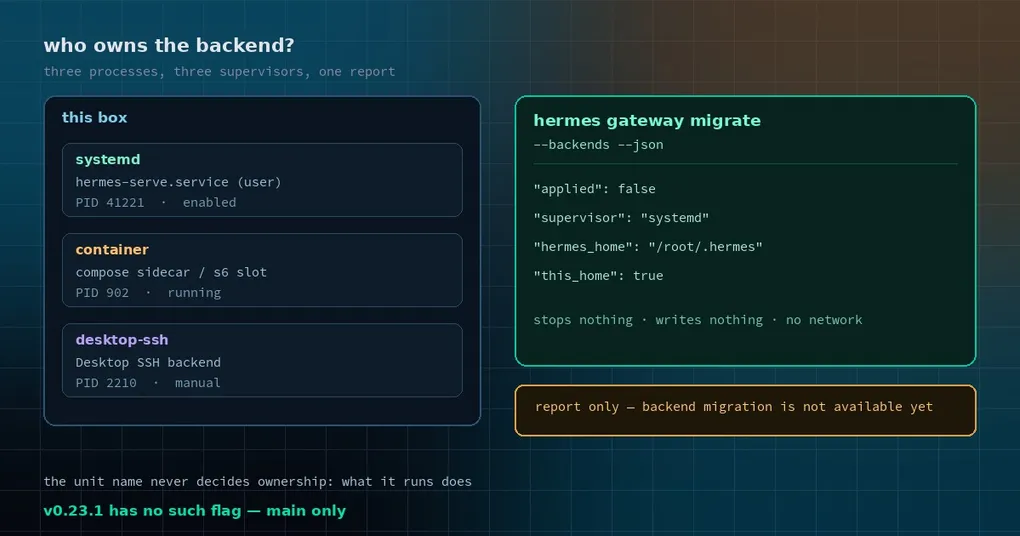
Last week you opened localhost:8080 and the dashboard listed sessions you did not recognise. ps aux | grep hermes came back with three processes, two carrying --profile, one from a container. You vaguely remember copying a systemd unit off the docs last winter, then trying Docker Compose, and Desktop starting an SSH backend somewhere in between. The question is simple and almost impossible to answer from memory: which one is still running, which installation does it serve, and which one would I touch if I wanted to clean up?
Until now that question was answered by guessing. hermes gateway migrate exists to fold per-profile gateways onto one host gateway; it never claimed to inventory the leftover background services on the machine. The new flag merged into main after v0.23.1 fills that gap: hermes gateway migrate --backends, a report-only command.
Let us be precise about what it does not do, because it does very little: it does not stop, restart or kill anything. It does not write a service file, unit, plist or ledger. It does not open a network connection. Backend migration itself is not implemented — every record ends with the same notice: Report only: changes no service; backend migration is not available yet.
Why it has to look without touching
Here is the background. Hermes never installs a background service for hermes serve or hermes dashboard. Every backend you find on a machine was set up by someone else: a systemd unit copied from the docs, a hand-written launchd plist, the NixOS or Home Manager hermes-backend unit, the Docker image’s s6 dashboard longrun slot, a Compose sidecar, a Desktop SSH backend, or a process you started in a terminal one afternoon and never stopped.
That produces an awkward situation. The only trustworthy source of truth for “how many backends are there and whose are they” is what the process actually runs and which unit’s MainPID it is — never the unit’s name. Nix calls it hermes-backend; the copy you made from the docs might be hermes-serve.service; in the container it is a slot name. Matching by name is guaranteed to miss things.
So the collection is deliberately narrow: it runs ps, reads /proc and plists, and issues systemctl show / list-unit-files and launchctl print queries. That is all. It deliberately does not read the spawn ledger, because reading a corrupt ledger quarantines (renames) it, and a read-only report should not have that side effect.
One thing is easy to miss: normal Hermes startup still runs first — it creates the HERMES_HOME layout, writes a default SOUL.md when missing, records the install under HERMES_HOME/installs/<id>/, opens logs/agent.log and logs/errors.log, and prunes cache/scratch. So it is not side-effect free; the side effects just stay inside Hermes’ own directories and never touch operating-system services.
Using it: two invocations and a JSON shape
hermes gateway migrate --backends            # human-readable report
hermes gateway migrate --backends --json     # the same report as JSON
The docs example also carries --dry-run, which adds nothing in report mode — the command changes nothing either way and does not reject the flag.
The text output looks like this (format taken from format_report):
Serve/dashboard background services (report only; nothing was changed)

• systemd hermes-serve.service (user): PID 41221
    runs:    /root/.hermes/hermes-agent/.venv/bin/python -m hermes_cli serve
    file:    /root/.config/systemd/user/hermes-serve.service
    state:   enabled
    home:    /root/.hermes (this HERMES_HOME)
    report:  Report only: changes no service; backend migration is not available yet.
• container (docker): PID 902
    runs:    python -m hermes_cli serve --host 0.0.0.0 --port 8080
    report:  Report only: changes no service; backend migration is not available yet.
    note:    The process belongs to a container defined by a Compose file or run command.
The JSON is one fixed wrapper:
{
  "applied": false,
  "backends": [
    {
      "supervisor": "systemd",
      "running": true,
      "pid": 41221,
      "argv": ["/root/.hermes/hermes-agent/.venv/bin/python", "-m", "hermes_cli", "serve"],
      "unit": "hermes-serve.service",
      "scope": "user",
      "unit_path": "/root/.config/systemd/user/hermes-serve.service",
      "state": "enabled",
      "hermes_home": "/root/.hermes",
      "this_home": true,
      "not_applied": "Report only: changes no service; backend migration is not available yet.",
      "notes": []
    }
  ]
}
applied is always false. That is not a forgotten placeholder: the maintainers removed a migration-advice field from the output because the service-migration design is not signed off. The report states present facts only — no advice key, no would key.
What the fields actually mean
The two fields worth reading are supervisor and notes, because they answer “who is responsible for keeping this process alive”:
| supervisor | Meaning |
|---|---|
systemd |
The unit was written by hand (Hermes never installs one) |
nix-systemd |
The unit file is generated by Nix and read-only |
launchd |
The plist was written by hand |
nix-launchd |
The plist is generated by Nix and read-only |
s6 |
The slot is declared by the container image |
container |
The process belongs to a Compose file or docker run |
desktop-ssh / desktop-local |
Owned by a Desktop SSH session or the Desktop app |
detached |
No supervisor owns it |
manual |
Started from a shell or another program |
unknown |
Its supervisor could not be identified |
hermes_home and this_home answer the other half of the confusion. A single user can have several installations and several profiles, and the running service is not necessarily serving the HERMES_HOME you are currently in. The report marks (this HERMES_HOME) so you can tell at a glance whether a backend is the one you are using.
Detection: by what it runs, then by what it is called
Running backends are found by their command line, so a unit called foo.service that happens to run hermes serve is still listed.
Units that are enabled but currently stopped are listed only when their name matches one of three patterns: hermes-serve*, hermes-dashboard*, hermes-backend*. That mirrors hermes update’s systemd pass, which also only covers those three prefixes (including the Nix hermes-backend.service). Names outside them are not touched by either command.
One macOS detail is worth knowing: a process started by Nix’s backend.waitFor launcher keeps launchd ownership and its plist home. An unmatched ppid-1 process stays unknown rather than being classified as detached. In other words, it prefers saying “I don’t know” over giving you a wrong answer.
What it is good for, and what it is not
Three uses hold up:
- Inventory before cleanup. Before deleting a leftover unit, run this once and confirm which
HERMES_HOMEit serves, so you do not delete the installation you are still using. - Stale install debugging. If the dashboard shows sessions that do not match your machine, you are probably talking to the container backend rather than this one.
- Read-only ops scripts.
--jsonplusapplied: falsemakes it safe to drop into a monitoring script: exit code 0, even when a scan fails, and no chance a probe mutates the machine.
What it will not do:
- It will not migrate anything. There is no
--applyand no advice output. Folding two per-profile gateways onto one host gateway is still plainhermes gateway migrate(--multiplex, whichhermes updateruns for you);--backendsis a side report. - It refuses
--yesand--multiplex. The command exits 2 with “--backendsis a read-only report”, so nobody mistakes it for a migration. - It does not change
hermes update. Units outside those three prefixes remain outsidehermes update’s reach.
Status: on main, not in v0.23.1
PR #152245 merged on 2026-11-10 at 15:40 UTC, while the v0.23.1 tag points at a commit from 11-10 00:24 UTC — most of a day earlier. So:
- on v0.23.1 or anything older,
hermes gateway migrate --backendsis an unknown flag and the command does not exist yet; - on a source install following
main, it works today.
Update (2026-11-17): these changes shipped in v0.23.2 (November 16) —
hermes updatebrings them in. The “not in v0.23.1” wording above is a snapshot from publication time.
For more of the gateway layer, the gateway command reference covers the whole surface, and two earlier posts go deeper on the same boundary: tuning the gateway loop watchdog and how Desktop saves gateway connections. If you run several profiles, the profile allowlist post asks the same “where is the edge” question.
A read-only command is not exciting. But “how many backends are running on this box” used to be answered by squinting at systemctl list-units and guessing. Now there is something to read.