At the office, your homelab disappears: the Webapp now borrows the connections Desktop saved
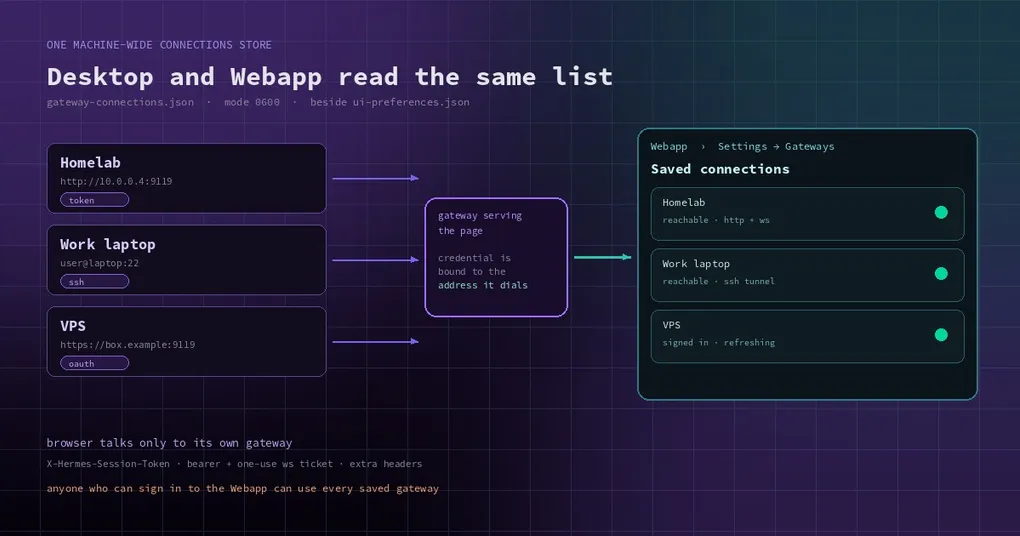
Wednesday afternoon, a borrowed laptop, a meeting room. You open a browser, type the Webapp address of the machine at home, and want one glance at the cron jobs running on your homelab. What you get is a single gateway: the local one. Desktop has three or four saved, and you could recite their names from memory — Homelab, work laptop, that VPS you pay for monthly.
It is not a permissions problem and you are not logged out. The Webapp only ever knew about the gateway serving the page. Everything else lived in the desktop app’s own data directory, invisible to the browser side.
On November 7 a batch of commits changed that: saved connections stopped being private desktop data and became one store the whole machine shares. The Webapp reads the same list, and it can dial any entry the way Desktop does.
One file, two hosts
The change is plain: Desktop used to keep its connection registry and native OAuth sign-ins in Electron’s userData directory. They now live in the Hermes home, beside ui-preferences.json:
gateway-connections.json— the connections themselves: labels, URLs, SSH hosts, and each entry’s own session token and extra headersgateway-connection-tokens.json— OAuth sign-ins, keyed by connection
Both are mode 0600, owner-only. Electron’s main process and the Webapp’s server both write them and both read the same file, so adding Homelab in Desktop shows up in the browser after a refresh — and the other way round, with no restart. The first launch of a build with the shared list copies connections.json, connection.json and native-oauth-tokens.json out of the old userData directory once, keeping the same ids, so nothing needs setting up again and you do not get duplicates. The old files are left untouched (older builds keep working) and are never read again.
The write contract matters, because two hosts writing one file is the whole trick: writers take a <store>.lock directory lock, replace the file whole via temp file plus rename, keep an unparseable file aside as .corrupt-<ms> instead of overwriting it, and treat only a missing file as “no store”.
The browser still talks to one gateway
This is the part people get wrong. The Webapp does not make your browser dial the VPS directly — it cannot, and it should not. Every request and socket from the browser still goes to the gateway serving the page, and that gateway forwards it to the saved target:
- token mode: the saved
X-Hermes-Session-Token - OAuth mode: a refreshable bearer, with a one-use ticket for the WebSocket handshake
- plus any extra headers saved on that connection
The remote needs no configuration of its own — it sees an ordinary client. Each saved gateway joins the Webapp’s gateway switcher and the sidebar’s gateway groups, so you can switch between them, group by Gateway & profile, and drag sections into the order you want (that renames and reorders sidebar labels only, never the gateway).
OAuth moved server-side too: the machine serving the page drives the RFC 8252 native flow itself, holds the PKCE verifier, sends the browser to the remote’s /auth/native/authorize, and receives the callback at /webapp/gateway-connections/oauth/callback. Tokens rotate through the remote’s /auth/native/refresh — one in flight per connection at a time; a 401 drops the sign-in, an outage keeps it.
If your browser is not on the machine serving the page — the normal case, since you are at the office and the gateway is at home — the redirect lands on your own loopback and the server never sees it. The connection editor then gives you a field to paste that address back, which completes the sign-in.
SSH connections work in the browser as well. The server carries a port of Desktop’s SSH path: a ControlMaster to the entry’s host, the same serve --isolated --host 127.0.0.1 --port 0 spawn (with a session-token file and an owner nonce) under the remote update-marker mutex, and a 127.0.0.1-only forward for the relay to target. Ownership is scoped to this machine’s connection store, so Desktop and the gateway never reap each other’s serve. Both ends must be Linux or macOS; a Windows remote or a Windows local host is refused as an unsupported platform.
The price, stated plainly
This is where I want you to stop and read twice.
The Webapp’s trust boundary is “anyone who can sign in to this page”. Once someone can, they can use every gateway saved on this machine — as whoever the saved credential belongs to. The docs say it without softening: save only gateways you would let those people reach.
What limits the blast radius is what the browser can do with the answers: a relayed response runs under a sandboxing content policy, is never cached by the browser, and cannot redirect outside that gateway; the relay keeps no cookie jar; removing a connection closes its open sockets at once.
Five reasons a credential could land at the wrong address
Half of this batch is bug fixes, and they all belong to one family: the credential and the address it was sent to could disagree. That part is more instructive than the feature.
One: two reads per dial. Dialing used to read the entry’s URL, then read its token, headers and sign-in again by id. An edit landing between those reads paired the old address with the new one’s credential. The store now hands out a single dial snapshot — entry, URL, token, headers, and the URL-bound sign-in from one registry read. Token mode dials the snapshot’s URL; OAuth’s ensure_access_token returns the token together with the address that issued it, and the socket ticket is minted only by the address the socket actually dials.
Two: sign-ins were not bound to the URL that issued them. Token sets were keyed by connection id, and ids are recycled label slugs. Change a URL, or remove and re-add under the same label, and the relay could send host A’s bearer to host B and POST host A’s refresh token to host B’s /auth/native/refresh. Each stored set now carries its issuing baseUrl; a set whose baseUrl differs from the entry’s current URL reads as signed out in both twins, and refresh posts only to the set’s own URL. Any registry write that removes an entry or changes its url or authMode drops the set on both sides.
Three: a cross-site page could borrow your relay. The Webapp session cookie is SameSite=Lax, so a cross-site top-level navigation to /api/relay/<id>/<path> carried it, and the relay made that GET on the saved gateway with the saved credential. The response was sandboxed and unreadable, but a remote GET with side effects still ran. Now a relayed request whose Sec-Fetch-Site is present and not same-origin gets 403 before anything is sent; the page’s own fetches, and clients that send no Fetch Metadata, relay as before.
Four: a pasted callback could redeem against the wrong connection. Completion used to redeem the code and store the tokens first, and only then compare the flight’s connection with the id in the path. The flight is now matched under the flights lock before redemption: a redirect pasted for another connection gets 400 without a single token request, and that connection’s own flight stays usable.
Five: cloning and exporting carried plaintext tokens out. hermes profile create --clone-all copied both machine-wide stores into the clone, and hermes profile export then shipped plaintext session tokens, because the export scrubber did not recognise the {"encoding":"plain","value":…} envelope. Both stores joined PROFILE_CREDENTIAL_PATHS; clone-all skips them and their .lock directory; the export scrub masks every envelope in staged JSON.
While we are here: why are these secrets plain text on disk instead of in the OS keychain? Because the Webapp’s server has to read them, and the keychain does not exist for a server process. File permissions are the protection, plus one boundary — the renderer and plugins never see token bytes (the plugin SDK’s host.connections() returns labels, kinds and the primary id only). A secret an older build encrypted with safeStorage is decrypted once during import; one that will not decrypt is not dropped, it is kept as it was and listed in the file’s importNotices until Desktop’s keychain answers and converts it.
How to use it
Desktop and the Webapp share the path because they share the page: Settings → Gateways. Scroll to Registered gateways and click Add connection:
- Local — the runtime this app manages (app-managed, cannot be removed)
- Remote gateway — a running
hermes serve; give the URL and pick session token or OAuth - SSH — one composite
user@host:22field, plus an optional full path to the remotehermesexecutable - Hermes Cloud — comes from the Portal sign-in and discovery flow, no hand-typed URL
Then click Test. It probes the connection’s own HTTP and WebSocket legs, so “Reachable” means chat will actually work rather than the port answering. In the Webapp, Test on an SSH row opens the same managed tunnel the gateway uses, starting (or reusing) hermes serve on the remote; that tunnel is not cleaned up on you — it stops when you remove the connection or stop the gateway, or on its own after the remote idle timeout dashboard.ssh_isolated_idle_grace_s (15 minutes by default) with no client and no work.
Duplicates are rejected when you save: one local entry ever; remote and cloud entries deduplicate on the normalized URL (across both kinds, so a cloud entry and a remote entry cannot point at the same URL); SSH entries deduplicate on user@host:port plus remote profile.
When you can actually get it
Honestly: not yet, if you run official releases. These commits landed on November 7, and v0.23.0 shipped on November 5 — they are on main and in no tag. hermes update gives you releases, so you wait for the next one, or track main.
Update (2026-11-10): these changes shipped in v0.23.1 (November 9) —
hermes updateis enough. The “not in v0.23.0” statements above are still accurate; v0.23.1 closes the gap.
Until then, Desktop’s saved connections have worked for a while (see the multi-gateway desktop guide). What changed is that the browser half stops being a second-class citizen.
And if your remote gateway sign-in has been fighting you about loopback redirects and jump hosts, the three routes in completing OAuth on a remote server still hold. The new part is that the server now runs the whole native flow for you, and lets you paste the address back when the callback lands on the wrong machine.
The short version
Saved gateway connections went from a desktop app’s private business to shared machine infrastructure: one 0600 JSON file, two hosts writing it, the browser talking only to its serving gateway, credentials bound to an address before they are forwarded. The capability itself is simple. The five fixes are the valuable part — they show that “who does this credential belong to” is a trap everywhere once edits and concurrent multi-host writes are allowed.
For the command surface, see the site’s hermes gateway reference; for the desktop side, the interface mode guide covers how the app presents local and remote backends.