How to Complete OAuth on a Remote Server: SSH Tunnels, Pasted Callbacks, and Device Codes
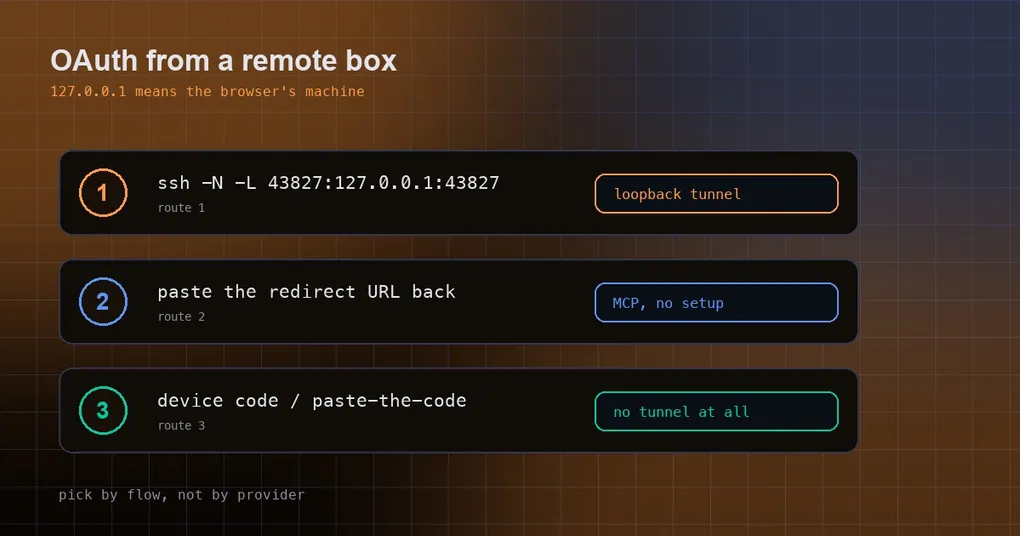
You install Hermes on a cloud VM, or on a dev box behind a bastion host, and now you want Spotify in the loop — or a remote MCP server like Linear, Sentry, or Atlassian. You run the command, Hermes prints an authorize URL, you open it in your laptop browser and click Allow. The browser then lands on a 127.0.0.1 address and shows nothing but “This site can’t be reached”. Back on the server, Hermes is still quietly waiting for a callback that will never arrive.
This is not a misconfiguration. It is a physical mismatch in where the OAuth handshake happens: the 127.0.0.1 in the redirect URI means “the machine your browser is on”, while the listener is bound on the remote host. Below are the three routes that work, plus the providers that never needed a tunnel in the first place.
Why it breaks on a remote host
One minute of theory, because it makes the fix obvious. Hermes uses two kinds of OAuth login:
- Loopback redirect. Hermes starts a tiny HTTP listener on
127.0.0.1on the local machine. When you approve, the authorization server redirects your browser tohttp://127.0.0.1:port/callback, and that little listener grabs the code. Spotify and most OAuth-protected remote MCP servers work this way. - Device code / paste-the-code. No callback URI at all. The auth server hands you a short code and a verification URL; you approve in any browser, and Hermes polls until the token appears.
Both are smooth when Hermes and your browser share a machine. The first one breaks otherwise: your laptop’s browser hits the laptop’s 127.0.0.1, while the listener sits on the server’s 127.0.0.1. Different machines, same-looking address.
So why not just bind the listener to 0.0.0.0, or swap in the server’s public hostname? Because auth servers validate the redirect URI against a fixed allowlist. Spotify and most MCP authorization servers require the loopback form http://127.0.0.1:port/callback; bind anywhere else, or pick a different port, and the request is rejected as a redirect_uri mismatch. The fix is not to move the listener — it is to carry that loopback port to your laptop, which is exactly what an SSH local forward does.
Route one: an SSH local forward (Spotify as the example)
Open a second terminal on your laptop and dedicate it to the tunnel:
# Local terminal: forward laptop:43827 to remote-host:43827
ssh -N -L 43827:127.0.0.1:43827 user@remote-host
-N means “do not open a remote shell, just hold this forward open”. Leave that terminal running until login completes.
Then, in a separate SSH session, run the auth command:
ssh user@remote-host
hermes auth spotify --no-browser
--no-browser skips the auto-open step (there is no browser on the server). Hermes prints an authorize URL and, crucially, the port it actually bound:
Waiting for callback on http://127.0.0.1:43827/callbackPaste the authorize URL into a browser on your laptop and approve. The auth server redirects to 127.0.0.1:43827/callback — this time that address is your laptop, it hits your tunnel, the request is forwarded to the remote listener, and the terminal reports success. You can tear the tunnel down afterwards.
Where does the port come from? That Waiting for callback on ... line. Spotify defaults to 43827, but if the port is busy Hermes may auto-bump — always read the number from the output instead of copying a blog post.
Through a jump box, use SSH’s built-in ProxyJump so the loopback port never lands on the bastion:
ssh -N -L 43827:127.0.0.1:43827 -J jump-user@jump-host user@final-hostOn older OpenSSH without -J, the long form is:
ssh -N \
    -o "ProxyCommand=ssh -W %h:%p jump-user@jump-host" \
    -L 43827:127.0.0.1:43827 \
    user@final-host
Three traps worth knowing up front. Mosh roaming does not carry -L forwards, so if you run Hermes inside tmux over mosh, open a separate plain SSH session purely for the tunnel — that connection must stay alive through the flow while your interactive session keeps working. If you use ssh -o ControlMaster=auto, forwards share the master connection’s lifetime; if the tunnel will not come up, kill the master with ssh -O exit user@remote-host and retry.
Route two: paste the redirect URL back (MCP servers)
Remote MCP servers use the same loopback flow, but on an interactive terminal Hermes offers a shortcut that needs no tunnel: paste the callback URL back at the prompt.
After you click Allow in the browser, the page redirects to a 127.0.0.1 address and fails to load — that is expected. Copy the full URL from the browser’s address bar and paste it into the Hermes prompt:
  MCP OAuth: authorization required.
  Open this URL in your browser:

    https://mcp.linear.app/authorize?response_type=code&...

  Or paste the redirect URL here (or the ?code=...&state=... portion) and press Enter:
> https://mcp.linear.app/callback?code=abc123&state=xyz
  Got authorization code from paste — completing flow.
Pasting just the ?code=...&state=... query string works too. This route needs zero SSH configuration and applies to any MCP server with auth: oauth.
You only need the tunnel from route one when the flow must complete unattended — a scripted re-auth where nobody can paste interactively.
One desktop-side difference: in the desktop app’s Skills → MCP panel, the native app receives the callback on your computer and relays it to the selected connection and profile, so no SSH tunnel and no dashboard.public_url are involved, and tokens stay with the owning backend profile. Leaving the MCP tab or changing its scope cancels a pending sign-in.
Route three: device code and paste-the-code (no tunnel at all)
If the provider uses a device-code flow, nothing about your network needs to change — you approve once in a browser and Hermes polls. Quick reference for “do I need a tunnel”:
| Provider | Loopback port | Tunnel needed |
|---|---|---|
| Spotify | 43827 by default | Yes, when Hermes is remote |
| MCP servers with the oauth auth mode | auto-picked per server | Yes, or paste the redirect URL back |
| xai-oauth (Grok SuperGrok) | n/a | No, device code |
| anthropic (Claude Pro/Max) | n/a | No, paste the code |
| openai-codex (ChatGPT Plus/Pro) | n/a | No, device code |
| minimax, nous-portal | n/a | No, device code |
| openrouter | local only | No: over SSH Hermes switches to a headless flow and asks you to paste the code shown in the browser |
OpenRouter is the newest of these. hermes auth add openrouter --type oauth runs OpenRouter’s browser PKCE flow and, on success, mints an API key into the credential pool (its source is recorded as manual:openrouter_pkce) — no copy-pasting a key from a web page. Locally it uses a bind-first loopback listener on an OS-assigned port, which sidesteps the probe-then-rebind race by naming a port it already owns. For remote sessions it detects the SSH environment and switches to OpenRouter’s documented headless mode: no callback_url, the code is shown on screen, and you paste it. Omit --type and it still behaves as an API key login, so the older hermes auth add openrouter --api-key ... workflow is unchanged.
Four failures you will actually hit
- Editing config in a live session then trying to log in: 30 seconds and it gives up. When you add an OAuth MCP server to
config.yamlfrom inside a running Hermes session, the CLI auto-reloads MCP connections with a 30-second timeout. That is nowhere near enough for an interactive OAuth flow. Runhermes mcp login <server>in a fresh terminal instead — it has no such cap and waits the full five minutes for your paste. - Tokens land in the wrong
~/.hermes. Credentials are written under whichever user ran the command. If your gateway or systemd service runs as a different account (sayroot, or a dedicatedhermesuser), authenticate as that account, otherwise the tokens sit in your home directory and the service cannot see them.sudo -u hermes -ior equivalent. bind [127.0.0.1]:43827: Address already in use. Something on your laptop already holds the port — a stale tunnel, or a local Hermes listener. Find and kill it withlsof -iTCP:43827 -sTCP:LISTEN, then retry the forward.- Authorization timed out waiting for the local callback. The redirect never reached the remote listener. Confirm the tunnel terminal is still alive (an
ssh -Nsession prints nothing, so look at the terminal itself), make sure the port matches the latestWaiting for callback on ...line, restart the tunnel, and re-run the auth command.
One security note worth repeating: OAuth tokens are long-lived credentials, so where they land and who can read them matters. For the surrounding machinery, see credential pools and browser autofill and keychain-backed secret encryption. If the server you are connecting is third-party, read the MCP catalog security guide and the official remote MCP catalog rundown before you wire it into a gateway.
The short version
Ask one question: does this provider use a callback, or a code?
- Callback-based (Spotify, OAuth MCP servers): on an interactive terminal, paste the redirect URL back — simplest. For automation, forward the loopback port with
ssh -N -L, taking the port from Hermes’s own output, and watch out for mosh, tmux, and ControlMaster. - Code-based (xai-oauth, openai-codex, anthropic, minimax, nous-portal, and OpenRouter over SSH): change nothing. Open the link, enter the code, press Enter.
One easily forgotten follow-up: after logging in, restart any long-running gateway or service so it picks up the credential in its own process. And if you are setting up the machine from scratch, the install guide covers the whole path.