One switch, two desktops: Hermes Simple / Advanced interface mode
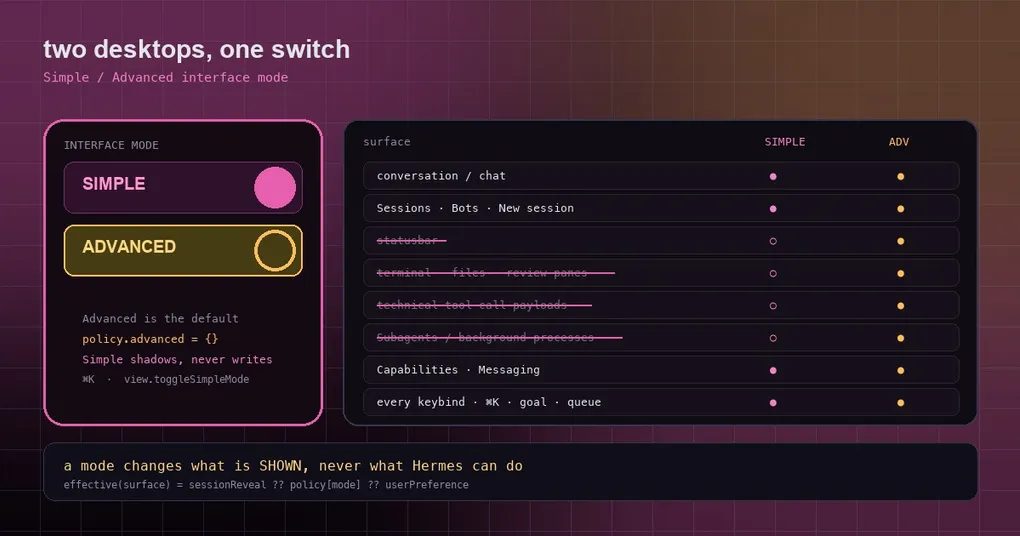
You recommend the Hermes desktop app to a colleague who does not write code. They open it and freeze for three seconds: a rail of profiles down the left, a statusbar along the bottom, a terminal pane on the right, every tool call in the transcript expanded into a wall of JSON, coloured diffs on top of that, and “Subagents” and “Background processes” sitting in the sidebar. They ask: “Where do I type?” Then they close the window.
The same thing happens to long-time users in the opposite direction: when you just want to think about one thing, all of that instrumentation is noise. The desktop app’s new Interface mode (#118587) exists for both audiences — Simple and Advanced.
What the two modes are
In one line: Advanced is the app as it is today, and Simple is chat-first. And there is a firm rule on the boundary — a mode changes what is shown, never what Hermes can do.
What Simple puts away:
| Hidden in Simple | Notes |
|---|---|
| Statusbar | The live instrumentation strip |
| Profile rail | Exception: it stays if a second profile makes it the only way to switch |
| Terminal / file browser / review panes | The panes themselves |
| Technical tool-call view and inline code diffs | The JSON walls and coloured diffs in the transcript |
| Artifacts and Scheduled jobs sidebar rows | Plus any contributed row tagged Advanced-tier |
| HUD, flip and right-sidebar titlebar buttons | Including contributed titlebar tools |
| Subagents and Background process status groups | Two of the status groups |
| The composer’s git row, PR and profile filter rows | The small controls around the input |
| Thinking starts collapsed | Collapsed, not removed |
What Simple deliberately keeps: the conversation itself, Sessions and Bots, New session, Capabilities and Messaging (those are how anyone sets Hermes up, so they stay), Settings and the layout editor in the titlebar, every keybind, ⌘K, Todos, Goal, Queue, preview chips, billing and free-tier notices, and the agent’s focus_pane. Also, the Ctrl-plus-backtick combination still opens the terminal for the current session — an escape hatch is kept.
Simple’s layout editor is trimmed to the mode picker plus two cards, “Sidebar left” and “Sidebar right”. Templates, saved decks and Save current layout are Advanced.
How you switch
Three entry points, one piece of state behind them:
- the mode picker in the layout editor;
- Settings → Appearance → Window & layout;
- the row in ⌘K.
Underneath it is a rebindable action, view.toggleSimpleMode, and the choice persists under the key hermes.desktop.interfaceMode.v1.
Why this implementation beats a preset
This is the most instructive part of the change. In a lot of apps, a “simple mode” is a preset: switching in rewrites your preferences one by one, and switching back has to reconstruct what used to be there — so it either snapshots everything, or it guesses, and when it guesses wrong your layout is gone.
Hermes took the other road: a mode is a resolver input, not a preset that writes preferences. There is exactly one precedence rule, in exactly one place:
effective(surface) = sessionReveal ?? policy[mode] ?? userPreferenceRead it as three layers, highest first:
sessionReveal— what you reveal for this session. If you bring the terminal up in Simple with Ctrl-plus-backtick, that lands in a session layer and clears on restart or a mode change. So a mode is a default, not a lock — and a session reveal cannot leak into the preference you set in the other mode.policy[mode]— andpolicy.advancedis an empty object. That is the load-bearing detail: Advanced shows everything not because it is configured to, but because it overrides nothing, so you fall through to your own preferences by construction. In the code’s words, Advanced is the absence of a mode, encoded in storage as “no key at all”.userPreference— the fallback.
Three consequences worth spelling out:
- Existing installs see no change on upgrade. Because the Advanced policy is empty, nothing is written to your storage at all.
- Simple shadows a preference rather than overwriting it. It never rewrites your layout selection, so leaving Simple restores the exact prior setup — nothing to snapshot, nothing to repair.
- One mode cannot move the other mode’s preferences. And when an action is really a layout intent (say, picking a layout that opens panes), a shadowed write is dropped instead of applied — because “show me this now” and “change my default layout” are different requests.
There is a nice engineering detail in how it stays contained: components never learn the word “mode”. Each preference store wraps its own atom in modeBound and then exports the effective atom under the name every consumer already imports, so no consumer changed a line. List surfaces tag their items with a tier and run one shownInMode filter at the filter they already had. The concept of a mode therefore has exactly one owner instead of leaking into dozens of components as scattered conditionals.
Which one to use
- Handing the app to someone who does not code → Simple. Their job is the conversation; a statusbar and diffs are just pressure.
- Debugging Hermes, watching subagents, reading tool arguments → Advanced. That is exactly the information you want.
- Focusing on writing → flip to Simple temporarily. It will not touch your layout, and switching back is a no-op.
If you want to set up the desktop workflow before flipping modes, layouts and workspaces covers the layout editor itself, the desktop skills hub covers where capabilities come from, and read, preview, browser is precisely about the panes Simple hides. The foundation under the keybinds is in the command palette guide.
Wrapping up
The way “simple mode” usually goes wrong is by being a preset that rewrites user preferences — flip back and forth a few times and nobody remembers what the original layout was. Here, a mode is only a resolver input on the display layer, Advanced is defined as the empty policy, and Simple is defined as shadowing. The result: upgrades are invisible, switching is lossless, and a temporary reveal is reclaimable. No capability is gone — some of it is simply put away.