"Set Up My Layout for Coding": Hermes Can Now Arrange Your Desktop Workspace
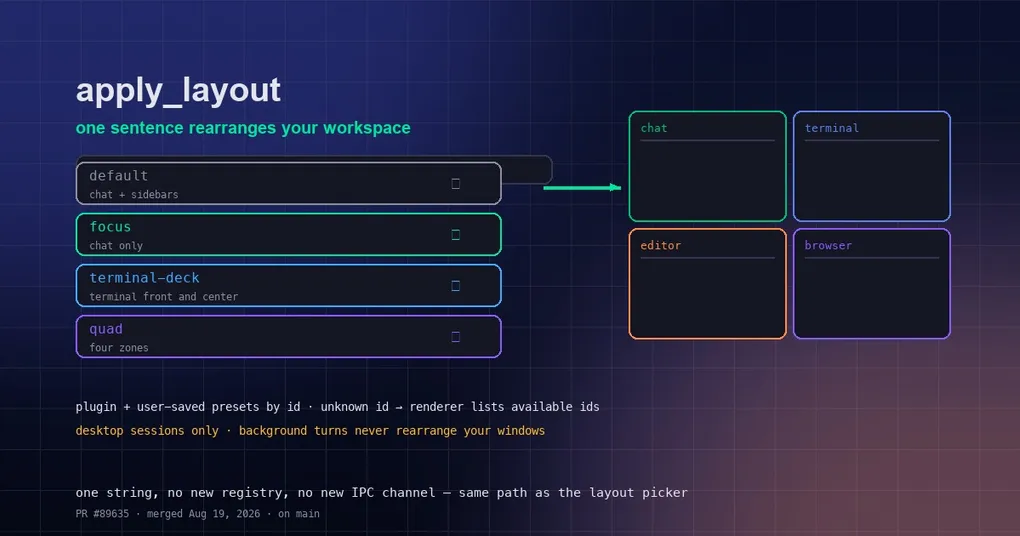
Every morning you do the same dance: open the terminal and drag it left, open the editor and drag it right, shrink the browser into a corner… Ten minutes later the workspace is finally set up and you think “if only I could just say it.” Now you can.
Hermes Desktop has a new apply_layout tool: say “give me a focused view for coding” and the agent calls the tool, and your windows rearrange into a saved layout preset.
How it works
apply_layout lives in the desktop_ui toolset (the same family as focus_pane) and is enabled only for desktop-app sessions. The agent calls it with a single argument — the layout preset id:
apply_layout(preset="focus")The desktop app receives it as a layout.apply event over the existing desktop_ui bridge; the renderer resolves the id against its layouts registry — built-in presets, plugin presets and user-saved presets are all the same list — and applies the tree through the exact code path the layout picker uses.
The four built-in presets
- default — chat plus sidebars, the everyday layout;
- focus — chat only, a distraction-free view;
- terminal-deck — terminal pushed front and center;
- quad — four zones, several panels at once.
Plugin and user-saved presets are addressable by their own ids — no new registry, no new IPC channel, just one string.
How to ask
Treat it as a natural instruction; the agent decides when to call it:
- “Set me up for a code review” →
apply_layout("quad") - “Give me a focused view” →
apply_layout("focus") - “Put the terminal front and center” →
apply_layout("terminal-deck")
If the agent passes a preset id the renderer doesn’t know, there’s no error wall: the renderer replies with the list of available ids so the model can correct itself — no extra action from you.
A safety boundary: background turns never touch your desktop
Only the active window’s session may call apply_layout. A background turn — a cron job, a scheduled task — will never rearrange your windows. No coming back from lunch to find your desktop in quad mode.
apply_layout vs focus_pane
focus_pane brings a single pane forward (“show me the terminal”) without changing the overall arrangement; apply_layout rearranges the whole workspace. Micro-adjustments → focus_pane; switching work modes → apply_layout.
Wrap-up
apply_layout turns “setting up the desktop” from a long sequence of clicks into a sentence. The feature is merged on main but not yet in a release — as of August 20, 2026 the latest version is still v0.20.4 — so Desktop users can grab the next release or track main.
Enjoying desktop features? See our posts on the desktop document preview experience, the desktop Skills Hub, and the v0.20.4 “Glass” release. To try everything, start with the install guide.