Hermes v0.20.4: The Glass Release — Translucent Windows, Honest Updates, Self-Checked Skill Installs
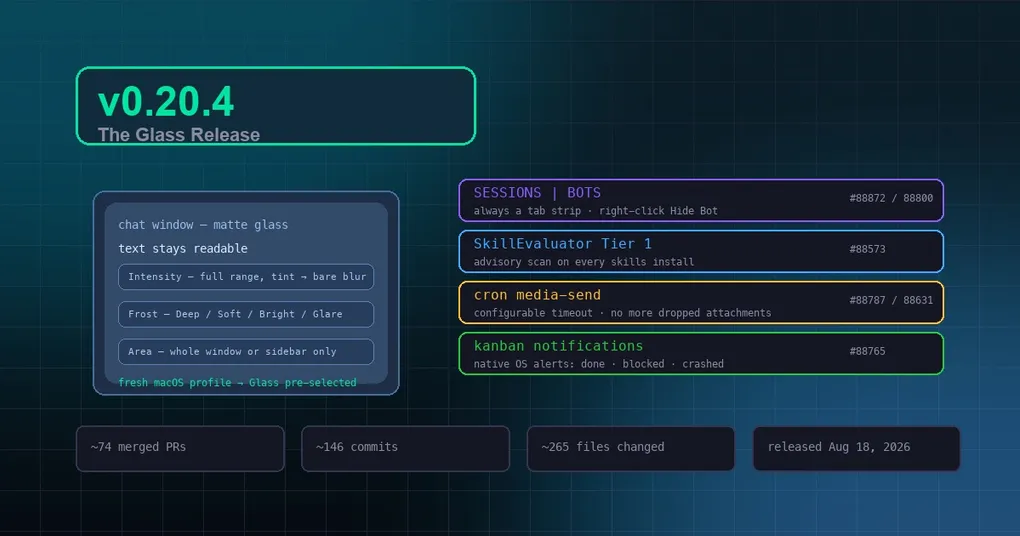
You’re on macOS, you drag the window translucency slider up to let a little wallpaper show through — and suddenly you can’t read a single message. So you drag it back to zero, and the feature may as well not exist. v0.20.4 (tag v2026.8.18, released August 18, 2026) is the answer to exactly this: it adds a Glass mode that blurs the window background while text, cards, and the composer keep full contrast — pretty and usable, no longer a trade-off.
The window merged roughly 74 PRs and 146 commits across ~265 files. Around Glass, it’s a release that stops the desktop from fighting you: the sidebar is permanently tabbed, the bot roster can be tidied (hide/unhide), hermes update stops claiming success it didn’t achieve, skill installs get a security second opinion, cron attachments stop vanishing silently, and Kanban tasks ping you natively. Let’s go through them.
Glass: translucency you can actually read through
The headline feature first. Window translucency used to map directly to native window opacity — the whole window faded together, text included — so on any busy wallpaper the feature was effectively pinned at 0. Glass reinterprets the lever on macOS: the window stays opaque at the native level, and instead the renderer’s background surfaces thin over the system vibrancy material. You get a matte blur while text and cards keep their own opaque tokens.
Three controls shape it once it’s on:
- Intensity — the same slider, full range. At the top it’s a bare, untinted blur; text stays crisp.
- Frost — Deep / Soft / Bright / Glare. macOS exposes no blur-radius knob, so the vibrancy material is the frost control.
- Area — whole window, or sidebar only (the Finder shape: glass rail, opaque content column).
One detail is genuinely thoughtful: adjusting any control peeks — the settings overlay fades out so the live window becomes the preview. Fresh macOS profiles start with Glass pre-selected (intensity still 0, so nothing changes until you move the lever), and Windows/Linux are untouched. For all eight highlights of the window, see our v0.20.4 release notes.
The sidebar behaves — and the bot roster can be tidied
The desktop’s left sidebar occasionally booted with Sessions and Bots stacked vertically, and updates sometimes brought the layout back. Now SESSIONS | BOTS always boots as side-by-side tabs — any stacked layout is forcibly re-homed, and it’s not allowed to survive an update again.
The roster got a tidying knob too: right-click a bot you don’t use → Hide Bot, and it leaves the roster (without touching @mentions or group memberships). A header eye toggle — rendered only while at least one bot is hidden — reveals hidden bots dimmed, with right-click → Unhide Bot. The hidden state syncs across your machines.
Skill installs get a second opinion
Every hermes skills install now runs NVIDIA SkillEvaluator Tier 1 (PII detection, unicode smuggling, script lint) as an advisory scan — findings are shown with file:line before the install confirmation, but the install always continues. That’s deliberate: the upstream PII scanner has known false-positive classes (SSH syntax like [email protected], example emails in docs), so its findings inform your decision rather than gate it. Secrets-class findings (private keys, cloud keys, tokens) render red with an explicit review warning.
The scan is optional — it degrades to a silent no-op when the skillevaluator binary isn’t installed, and you can turn it off:
skills:
  tier1_advisory: false
If you install community skills regularly, this is a free pre-install security check. For more on the skill system, see our project-local skills guide and the skill combos deep dive.
Cron attachments stop vanishing
hermes cron run <job-id> had a sneaky failure mode: the job’s text arrived, but PDF/image attachments could be dropped silently while the run still reported success — the standalone sender recorded upload failures only in warnings, which nothing read. Now attachment failures are visible in the run status on both delivery lanes, and one-off test runs behave exactly like scheduled ones.
The send timeout is configurable too, up from a fixed 30 seconds to a 300-second default — large exports (long audio, big PDFs) no longer blow through it:
cron:
  media_send_timeout_seconds: 300   # or set HERMES_CRON_MEDIA_SEND_TIMEOUT
Combined with the last_fire_error stamping from the previous patch, cron’s silent-failure blind spots are mostly lit up. For the full scheduling and monitoring picture, see our complete cron automation guide.
hermes update tells the truth
Source-install users may know this scene: your checkout sits parked on a feature branch, you run hermes update, it prints ✓ Code updated! — but it updated a stale branch, and none of main’s new code arrived. v0.20.4 kills the lie: when the parked branch is provably safe to leave (clean tree + fully merged), the updater switches back to main automatically; when it isn’t, it warns loudly and marks the code update SKIPPED; and the summary lines carry the real branch and HEAD short-sha:
✓ Update complete! [main @ 30fcf9580]Drift is visible at a glance.
Kanban tasks ping you natively
The desktop now raises a native OS notification when a Kanban task completes, hits a blocker, or fails — the full terminal set (completed / blocked / gave_up / crashed / timed_out / block_loop_detected) with per-kind severity, so a worker stalling on a blocker while you’re in another app no longer dies silently. Gated by Settings ▸ Notifications ▸ Plugin notifications. For the coordination model behind it, see our kanban review lifecycle guide.
Upgrade
hermes updateThen run hermes doctor to verify the install and restart the gateway (hermes gateway). macOS users: once the desktop app refreshes, Glass lives under Appearance ▸ Window Translucency.
The complete change list is in the v0.20.4 release notes; the previous patch’s cron self-healing and MCP stateless-protocol highlights are in our v0.20.3 breakdown.