Too Many Commands to Remember? Hermes Gave Its CLI a Cleanup
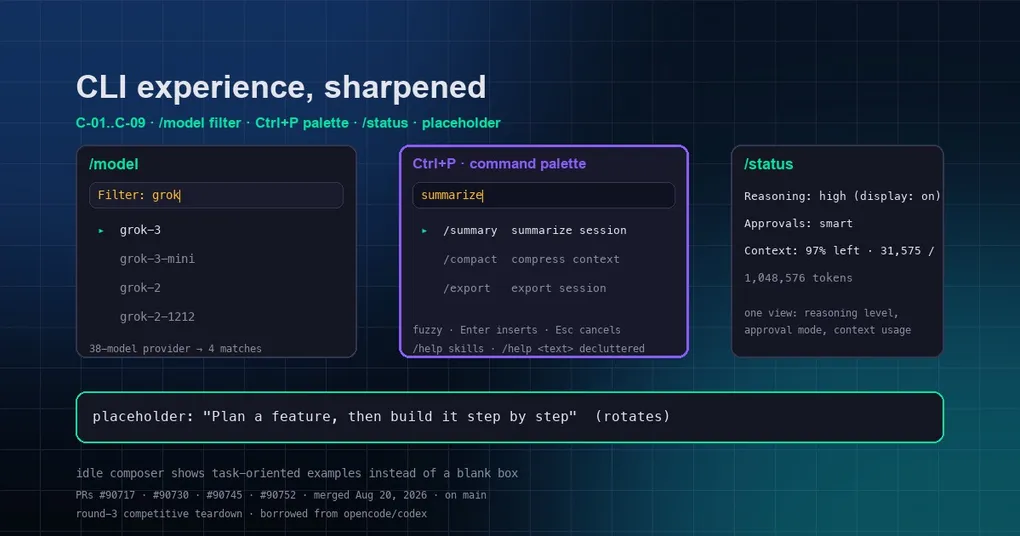
If you use the terminal version of Hermes, you’ve been here: you want to switch models and you’re scrolling through 38 options one screen at a time. You want to remember how a command works, so you type /help — and 100+ commands plus 69 skill commands blast your whole screen away. You wonder how much context this session has left and have to remember which subcommand shows it… When there are this many commands, the user gets lost in them.
The good news: Hermes just merged a batch of CLI interaction improvements on main — the output of a competitive teardown benchmarked against opencode/codex (round-3 teardown), fixing nine small pain points (numbered C-01 through C-09) one after another. This post covers the most useful ones.
C-01: /model now filters as you type
The /model picker used to be a long list you had to scroll — 38 models to hunt through. Now you can just type to filter: type grok and the list instantly narrows to the models with grok in the name; type nothing and you get the full list.
The key design choice: it narrows but never guesses. Filtering only helps you pick from the real list; what you select is always a specific concrete model. A fuzzy string can never be “resolved” into a possibly-wrong model (the “claude → old claude-sonnet” footgun that this two-stage provider→model flow was built to prevent). Enter selects, Esc clears the filter first then closes, Backspace trims — it all feels natural.
/model
Filter: grok▏  (4/38 match)
▸ grok-3
  grok-3-mini
  grok-2
  grok-2-1212
C-04: /help stops flooding the screen
The old /help dumped everything at once — 69 skill commands mixed in with the core reference, pushing the commands you actually wanted off the screen.
Now skill commands collapse to a one-line count:
⚡ Skill Commands: 69 installed — /help skills to list them/help skills shows the full list. Also, /help <text> filters commands by substring, and the giant “Session” category (46 commands) is split in the renderer into Session / Context / Background & Automation sub-groups — much easier to navigate.
C-05: Ctrl+P command palette
The most “editor-like” addition of the batch: press Ctrl+P (or type /palette) to open a full-screen fuzzy search palette over every command plus installed skills.
Matching is command-name-first: exact > prefix > substring > subsequence. Enter inserts the command, Esc cancels. You no longer need to memorize spellings — just remember a few keywords.
Ctrl+P
> summarize▏
▸ /summary   summarize the session
  /compact   compress context
  /export    export session to file
C-02: /status shows three things at once
/status used to show session id, model, tokens, and running state. Now it merges three high-frequency facts into one view (each line appears only when data is available):
- Reasoning: effective effort level + display on/off, e.g.
high (display: on) - Approvals: the active approval mode
manual/smart/off, annotated(YOLO bypass active)when a session bypass is live - Context: percent left + used/max tokens, e.g.
97% left · 31,575 / 1,048,576 tokens
/status
Reasoning: high (display: on)
Approvals: smart
Context: 97% left · 31,575 / 1,048,576 tokens
For deeper dives there are still /usage and /context; /status is the one-glance view.
C-09: the composer is no longer blank
The idle composer used to be an empty box. Now it rotates through task-oriented example prompts — “Summarize what’s in this folder”, “Find and fix a failing test”, “Plan a feature, then build it step by step” — plus a nudge: Type / to browse commands, or Ctrl+P for the palette.
Deliberately kept generic, since Hermes isn’t a coding-only agent. A small change, but it helps onboarding and stops you staring at a void.
Behind the changes
These PRs (#90717 / #90730 / #90745 / #90752) were all merged to main on 2026-08-20 and haven’t shipped in a release yet. Once the next release lands, a hermes update gets you there.
If you mostly live in the terminal, start with Ctrl+P and the /model filter — those two save the most time day to day. Curious about other hidden terminal tricks? See our roundup of tricks even veterans miss, or the full command panorama.