After v0.21.7, `hermes update` follows tagged releases only — know which channel you are on
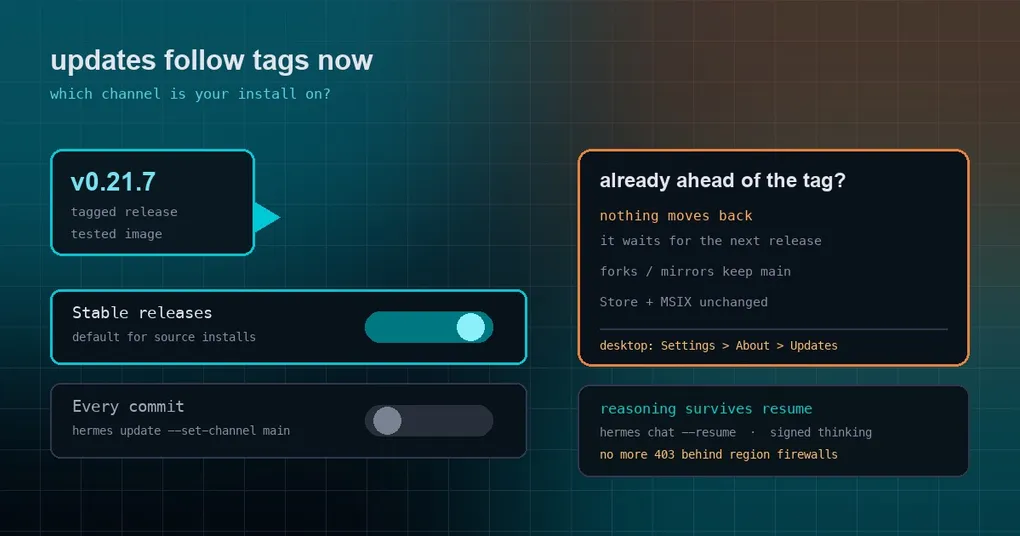
You type hermes update, the terminal scrolls, and the last line tells you the upgrade succeeded. What did you actually install — a commit that landed yesterday, or a release that was cut three days ago? On a machine that runs around the clock, that question matters: you do not want to fall behind a fix, and you do not want to wake up tracking main on a state nobody has stepped on yet.
v0.21.7 is about exactly that. It is not a pile of features; it is a policy change. A source install now updates to the latest published release instead of to every commit on main. This post covers the two practical parts: which channel your install is on, and how to prove what you are running.
What actually changed is where your updates come from
A git install of Hermes used to mean hermes update pulls the working tree to the tip of main. Fixes arrived fast, and you stood on a moving floor: main changes daily, half-merged states can live for hours, and your machine might update during one of them.
As of v0.21.7 the default is: move to the latest vX.Y.Z release only. The rules are worth reading one by one, because they shape your intuition about whether you are behind:
- Older than the latest tag → you move up to that tag.
- Already ahead of the latest tag (say you followed
mainearlier) → nothing moves. Your install stays where it is and waits for the next release. Nothing is ever moved backwards. - Forks and mirrors → they keep following
main, unaffected. - Microsoft Store, MSIX and the bundled desktop app → packaging is unchanged; they move with their own builds.
That second rule is the one people misread as “updates are broken”. It is deliberate: dragging a main-tracking install back to a tag would turn a routine update into a downgrade, and Hermes does not do that.
Channel A: Stable releases (the new default)
Nothing to configure — a source install starts here. You get the newest published tag, which is v0.21.7 right now.
Who it suits: anyone who would rather have someone else step on the floor first. A release is a stable point distilled out of a window, and it will not become something else overnight.
Channel B: Every commit (opt in explicitly)
To keep following every commit on main, one command:
hermes update --set-channel mainOnce set, the old behaviour is back. Switching back is the same kind of command:
hermes update --set-channel stableIf your build predates these flags, run a plain
hermes updatefirst to get a version that understands channels, then switch.
The channel is a persistent state, not a one-shot flag for a single update. Set it once and every later update obeys it — so do not sprinkle it into a script you will forget about.
Where the desktop switch lives
On the desktop app it is Settings ▸ About ▸ Updates, which has an Update channel switch (Stable releases / Every commit). It only means anything for a source install: Store, MSIX and bundled installs are unaffected by your choice.
The update dialog also tells you which channel you are on now, so you no longer have to rely on “I think I set that once”.
Two everyday interruptions fixed in the same release
Two more items in the release body fall into the “you do not care until it happens to you” category:
Reasoning survives resume. With Anthropic or Bedrock Converse reasoning models, signed thinking is replayed correctly after hermes chat --resume and on the next gateway turn, and Bedrock Converse reasoning models are no longer rejected on resumed sessions. The mechanism deserves its own walkthrough — which routes read which fields, and what happens when a route rejects a field — and we wrote that up separately: see the reasoning replay guide.
Updates no longer fail behind some firewalls. Installs on main used to fetch a release record that regional firewalls could answer with a 403, which failed the update outright. The check now uses your GitHub token when one is set (GITHUB_TOKEN, or gh auth login), and reports a GitHub rate limit as a rate limit instead of an opaque failure.
How much landed in this window
The scale numbers come from the official release body, measured at commit 1fd18277267152893a8a24792b79213e7ca3f899:
| Metric | Value |
|---|---|
| Non-merge commits | 740 |
| Changed files | 4,156 (+86,775 / −26,980) |
| Merged PRs | 204 |
| Closed issues | 69 |
As with v0.21.6, the full curated notes ship with v0.22.0, which will document everything from v0.21.0 onward, including highlights, feature areas and complete contributor credits. The v0.21.7 body also lists a batch of things deliberately left uncatalogued here: plugins running built-in app actions, the plugin SDK pet bubble, skills installed mid-session reaching the model without a prompt rebuild, Krea 2 Medium Turbo as the image lane for paid subscribers with a FAL fallback, faster desktop updates, pinned installs that check out only the pin, compaction marks emitted to Relay, and new community plugins. We are covering those one by one — the plugin actions piece is already live: desktop plugin actions and the pet bubble.
Proving which version you have
Three commands, pick the one that matches your install:
# version (a git install also prints the distance past the tag and the short commit)
hermes version

# current channel and update source (source installs)
hermes update --help

# desktop / installer installs
hermes doctor
If you suspect an update reported success but changed nothing, check whether the tag moved in hermes version, then read hermes update --verbose. For the background on channels, see our earlier stable channel guide; for the release pipeline this tag was cut by, see the v0.21.6 release write-up.
Upgrading
# CLI
hermes update

# Desktop: updates itself. Microsoft Store: updates through the Store.

# Docker / Hermes Cloud
docker pull nousresearch/hermes-agent:stable
A quick self-check after upgrading, so the channel and version are what you expect:
hermes version
hermes config get agent.max_turns      # also confirms the update left your config alone
In one line: v0.21.7 turns updating from something you watch on main into something you can leave alone — at the price of knowing which channel you are on. Set it once and let the next tag do the rest.